

In this post I make a (potentially) spicy assertion: if you're worried about the speed that .NET is moving, and more specifically the fact that Microsoft only gives 2 or 3 years of support to new versions of .NET, maybe the answer isn't that .NET should slow down .NET. Maybe it isn't even that Microsoft should shoulder the burden of supporting more versions of .NET. Maybe the answer is that you should just pay for post-EOL support like other ecosystems do.
This post is sponsored by HeroDevs, and is the result of chatting with Hayden Barnes in the fallout on my post about the worst .NET vulnerability ever. That said, all the opinions expressed in this post are entirely my own—I just think HeroDevs' Never Ending Support for .NET could be a great option for many companies.
In this post I describe the official support for .NET provided by Microsoft and what "support" actually means. I discuss the advantages and disadvantages of updating to a new major version and then provide an alternative: pay for EOL support instead. Finally I show how you can easily fix your EOL .NET 6 applications by using HeroDevs' Never Ending Support for .NET 6, demonstrating how it protects you from the recent 9.9 severity CVE.
.NET, support lifecycles, and managing vulnerabilities
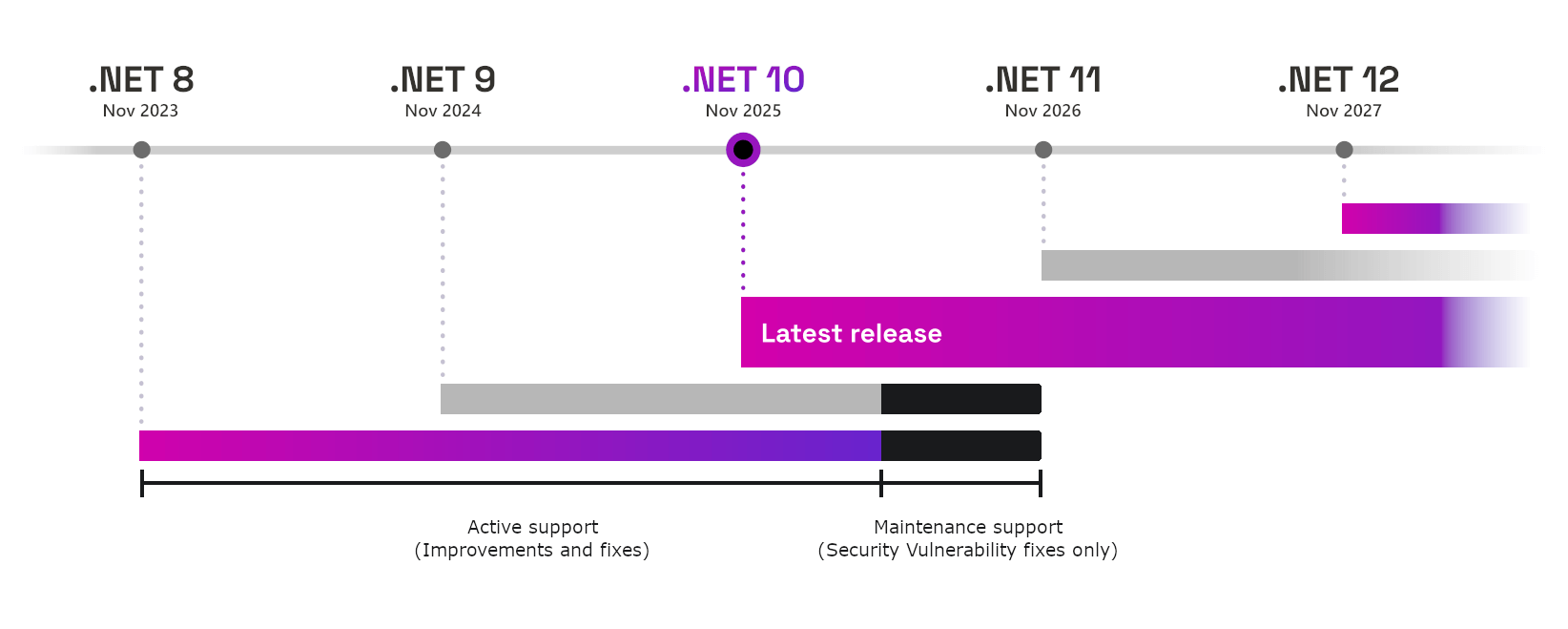
.NET 10 has just been released, and while some people are excited to see the performance improvements and to use the new features, others will no doubt be worrying about the inevitable march of time before the current version of .NET they're using is out of support. A new version of .NET is released every November, and is either a Long Term Support (LTS) release or Standard Term Support (STS) release:
- Odd number releases are Standard Term Support (STS), and receive 2 years of support from Microsoft.
- Even number releases are Long Term Support (LTS), and receive 3 years of support from Microsoft.
The following image shows how this works (adapted from the official .NET support policy page)

There's no difference in the quality bar between LTS and STS releases, the only difference is how long the release is supported by Microsoft until it becomes End of Life (EOL). But what do "supported" and "EOL" even mean? 🤔
What does "supported" mean?
Most people have an intrinsic feel for what "supported" means and it's typically something like "if there's a bug, it'll get fixed". But Microsoft is very specific about exactly what supported means in their policy. There are two "phases" to support for both LTS and STS releases:
- Active support: During the active support period, .NET releases are updated to improve functional capabilities and mitigate security vulnerabilities.
- Maintenance support: During the maintenance support period, .NET releases are updated to mitigate security vulnerabilities, only. The maintenance support period is the final 6 months of support for any release.
So for the majority of the support timeline, you can expect to see fixes for security vulnerabilities, and "updates to improve functional capabilities". What counts as an "improvement to functional capability" is actually pretty broad:
- Resolve reported crashes.
- Resolve severe performance issues.
- Resolve functional bugs in common scenarios.
- Add support for a new operating system version or new hardware platform.
Given how the first three points are all about fixing relatively severe issues, I was somewhat surprised to see "supporting a whole new OS version" on the list, but that somewhat makes sense. For example, if Debian releases a new version, it's likely the .NET team are going to want to make sure the latest released version of .NET works on it!
6 months before a release goes EOL and stops receiving official support entirely, it enters "maintenance", in which only security vulnerabilities will be addressed:
Whatever your issue, you should be able to contact a Microsoft Support Professional to ask for support. This is particularly appealing to larger companies that like to have a single person they can shout at if things aren't working, and typically have an ongoing relationship with Microsoft anyway. Of course, you can also interact with the various teams on GitHub in the dotnet org too.
If you do file an issue on GitHub, and assuming that you provide sufficient information that the issue can be reproduced, then I've found the team to be very receptive to resolving issues:
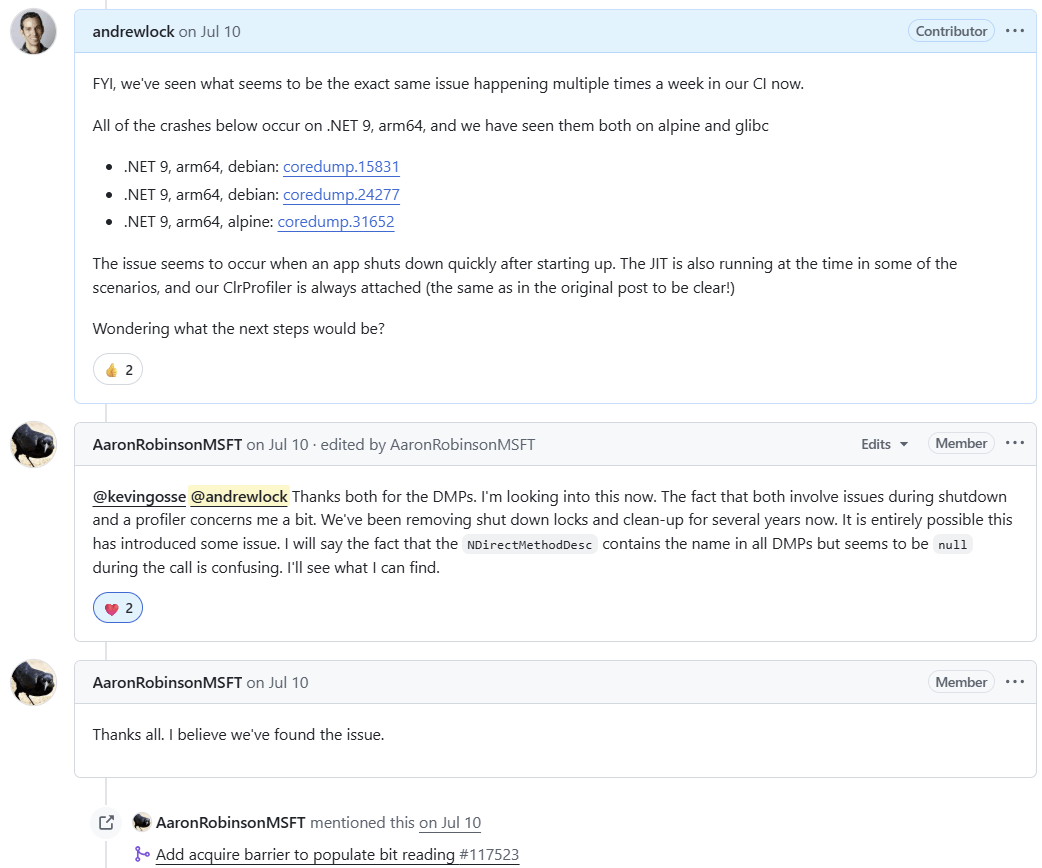
Where you might struggle is where your issue is considered minor. If you find a security issue, or a common crashing bug, then sure, it'll probably be fixed in all supported versions of .NET. But if your issue is rare, or if it's risky (because it could have adverse impacts, for example) then you might have a harder time getting the fix implemented in all versions of .NET, even if they're technically still supported. This is particularly true in the last 6 months of support, when the release enters "maintenance" support. In this stage, you'll likely only get security vulnerability fixes.
Another aspect to consider is that whenever you raise an issue, you'll be asked what version of .NET you're using. Which brings us to the next very important point: only the latest patch version of a .NET major version is supported.
You patch every month, right?
.NET 10 was released on 11th November, but in a month's time I'm sure there will be patches released for the runtime, for ASP.NET Core, for the .NET SDK, and for a variety of other packages that make up the base .NET ecosystem as provided by Microsoft.
Even if you're using a .NET release which is actively supported, you're only supported if you're using the latest patched version. To make this concrete, the latest released versions of .NET 9 at the time of writing are:
- .NET 9 SDK
9.0.307 - .NET Runtime
9.0.11
If you have an application today that's using .NET 9, and you're not running on the latest .NET 9 patch version (9.0.11), then you're using an unsupported version of .NET. And next month there will likely be a 9.0.12 version, which will supplant 9.0.11!
Only the latest patch versions of all the .NET components are supported. As of today, that means the latest patches for .NET 8, .NET 9, and .NET 10 respectively.
Putting that all together, if you want to stick to using only Microsoft supported versions of .NET, that means that every month, you need to, at a minimum:
- Update the .NET SDKs used to build .NET applications.
- Update the .NET runtime used to deploy and run your applications.
If you can't update these versions every month, then you won't be using a Microsoft supported version of .NET.
The good news is that patch updates for .NET are typically very easy to apply. They rarely contain breaking issues or require significant effort. But eventually there won't be any more patch versions, the version of .NET you're using will go out of support, and then what?
Running an unsupported version of .NET is playing with fire
Fundamentally, nothing happens from a technical point of view when a .NET version goes out of official support. Everything keeps working, just as it did before. Nevertheless, depending on your regulatory environment, you may find you're no longer compliant, with all the potential associated financial or legal implications.
Even if you're not in a regulated environment, you still have the potential for a big problem to hit at any point: when you (or someone else) discovers an issue in your out-of-support version of .NET.
This is the exact scenario many people found themselves in recently, when the request-smuggling security vulnerability CVE-2025-55315 was announced. This vulnerability is Very Bad™️ (a 9.9 severity), because it allows attackers to potentially bypass security controls, exfiltrate data, login as other users, perform injection attacks and more, all by relying on request smuggling. Hopefully, you get the picture…Not Good.

I wrote an extensive blog post looking at this vulnerability, explaining how request smuggling works in general, walking through the specific vulnerability in CVE-2025-55315, describing how to test if you're vulnerable and what to do to protect yourself.
Patches were released for the vulnerability for .NET 8, .NET 9, and .NET 10, as these were in support. But basically all versions of .NET are vulnerable; at least .NET Core 3.1. NET 5, .NET 6, and .NET 7.
All of which leaves those organisations running an unsupported version of .NET in a sticky situation. If you keep running an unsupported version of .NET, then your application has a known 9.9 severity vulnerability. The alternative is to perform a major version update of your applications to use a supported version of .NET, but that might also be easier said than done…
If you're using .NET 6, then there's another option, HeroDevs, which we're going to come to shortly! 😅
The difficulties of a major version update
Many developers look forward to new major versions of .NET. A new major version of .NET typically means:
- Performance improvements. Incredibly, each new version of .NET is faster than the previous version.
- New features. A major version typically means new features. Whether that's incremental improvements or entirely new features, most releases touch all parts of the .NET stack.
- Support for new platforms. Some major releases include support for new operating systems and CPU architectures.
But a major upgrade isn't always for the feint of heart. We've come a long way from the huge shifts between .NET Core 1.0, .NET Core 2.0, and .NET Core 3.1, but there are still many potential risks associated with performing major version updates, particularly when viewed from an organisation's point of view. For example:
- Breaking changes. Major version updates inevitably come with a variety of breaking changes. How severely you're affected by these issues will depend on your specific application, but you should always review this list to establish which, if any, would impact you, and plan work to mitigate them as part of an upgrade.
- Behavioural changes. Even if the changes in an update aren't considered breaking, they may still result in a difference in behaviour, which could cause your application to behave in a way you don't expect. Often the only way to identify these issues (if they're not marked as breaking changes) is to test your updated application extensively.
- Tooling upgrades. Building a new version of .NET may require that you update various tooling, whether that's the SDK you use to build your application, the continuous integration (CI) runners you use to build your app, or the machines you deploy your application to. This work often takes a large proportion of the overall migration time, and is commonly overlooked.
- Regulatory compliance. Depending on your environment, you may need to re-certify all the applications that you update to a new major version, to ensure they're compliant with any regulations. That can cost time and money.
- Internal support. If you have a "platform" team which supports other teams, then there's a degree of experience and learning developers need to undertake to learn about what's available.
- Opportunity cost. Time spent migrating to newer versions of .NET is time spent not implementing new features or addressing customer needs.
Updating to a new major version clearly has a number of advantages, but for some organisations and applications, the benefits of performance improvements and new features simply aren't enough to offset the risk and costs associated with performing a migration.
But those same organizations also can't afford to be stuck on unsupported versions that will cause them regulatory problems, or be at risk of handling unpatched CVEs like CVE-2025-55315. So what's a poor .NET-using org to do?
Why not just pay for support?
And now we get to my pitch: delay the major-version update if it's too painful, and just pay for support for old .NET versions.
As I discussed in the previous section, organizations often don't want to do major version updates, due to the difficulties described previously. Organisations make these major updates because they have to, to ensure they can address any security issues that appear, and to ensure they're compliant with their regulatory requirements.
A prime example is an application which is no longer being actively developed. The costs associated with performing a major version update in this case likely outweigh the benefits, especially if this triggers any sort of compliance or audit requirements. But leaving the app unsupported is also not an option.
The fact that organisations don't want to update to new major versions of .NET sometimes manifests as pleas to Microsoft for them to extend the support windows for .NET. Many organisations yearn for the decades-long support of Windows or .NET Framework, and ask "why can't modern .NET be like that".
But here's the thing, even with a decade of support, organizations don't want to upgrade! Windows 10 was no longer supported as of October 2025 (10 years after its release), and yet it still accounts for 40% of active Windows versions! Organisations hate change…
Of course, Windows 10 ended standard support in October 2025, but you can still pay for extended support for Windows 10 and receive security updates. So it seems like the simple answer is "if you don't want to update, just pay for support".
Post-EOL support in other ecosystems
This model of paying for support after a product's official support has ended is also common in other ecosystems. Take Java for example. Multiple vendors produce Open JDK distributions, and provide substantial support durations for them, but you often need to pay for that:
| Vendor | Supported JDKs | Support Duration |
|---|---|---|
| Red Hat) | 8, 11, 17, 21 (varies by RHEL release) | Typically up to 8+ years (with RHEL subscription) |
| Microsoft) | 11, 17, 21 (based on Microsoft support policy) | Typically 6+ years |
| Ubuntu | 8, 11, 17, 21 (varies by Ubuntu release) | 12 years (with extended support) |
Similarly, the Java Spring and Spring Boot frameworks provide free support for releases initially, and then have paid options through VMware Tanzu, as shown on their support page:

However there are also a whole load of third-party companies that will happily provide paid support for Spring Framework and Spring Boot even beyond these timelines (including HeroDevs!)
And it's not like the willingness to pay for support after a product is officially EOL is restricted to the Java ecosystem. You can find EOL support for all sorts of front-end frameworks like Angular, AngularJS, Vue, heck, even Bootstrap.
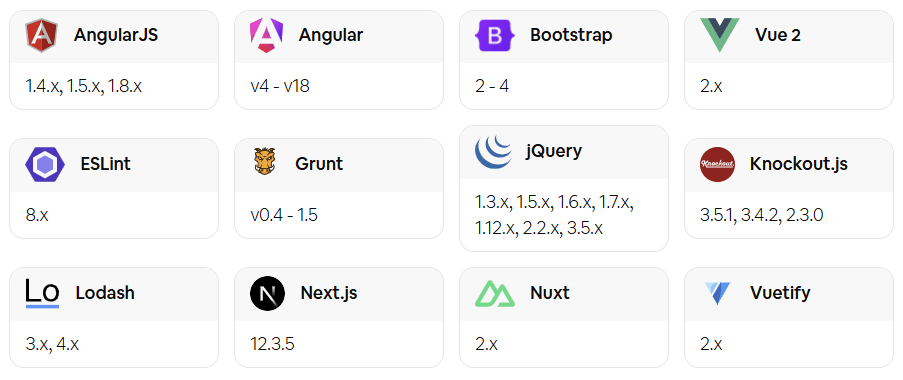
So why not .NET too?
Post-EOL support in .NET
So why does it seem like some companies are so hesitant to pay for post-EOL support for .NET? I would speculate that part of the reason is because Microsoft has typically been willing to provide very long support windows in general. Take .NET Framework for example; .NET Framework 3.5 is still supported—it's not EOL until 2029!
I suspect another major reason is that some .NET organisations simply don't know that paying for post-EOL support is an option! as far as I can tell, Microsoft doesn't explicitly endorse or even mention that this is available for the ecosystem, nor do Microsoft-adjacent bodies like the .NET Foundation. I really don't know why they wouldn't, it seems like a win-win scenario to me. 🤷
So consider this my public service announcement:
If you're still running applications on .NET 6, or if you're eyeing .NET 8's end of support next year with concern, don't worry. Switch to a post-EOL support build of .NET 6 (or .NET 8 next year), and you'll receive security fixes without needing to do go through a costly major version update.
This is the pitch HeroDevs make for their .NET support:
- Security Fixes. A new version of NES for .NET will be released each time HeroDevs find, validate, and fix a security issue.
- Drop-In Compatibility. A direct replacement for your framework—no migrations, no rewrites, just ongoing support.
- SLA Compliance. HeroDevs provides SLAs that ensure compliance by providing incident response and remediation in accordance with industry-standard regulations, including SOC 2, FedRAMP, PCI, and HIPAA.
Of course, like me, you'll probably still have questions:
- "Just how easy is to swap to a post-EOL supported version?"
- "Will I get fixes for security issues found in other versions of .NET?"
- "How much is this going to cost?"
The final point is going to vary depending on your requirements, so you'll need to dig into that yourself. But I wanted to get a feel for the technical side of the first two questions, so I gave HeroDevs' Never Ending Support (NES) for .NET 6 a try!
Trying out HeroDevs' Never Ending Support for .NET
HeroDevs provide a drop-in replacement for out-of-support .NET 6 versions as part of their Never-Ending Support (NES) for .NET. They provide both Linux and Windows binaries, so you can easily patch your existing applications, no matter how you deploy.
I wanted to test out the NES binaries, and I thought the best way to show the benefits would be to test the binaries against the recent CVE-2025-55315 vulnerability. My plan was:
- Create a simple docker image using the latest official .NET 6 version.
- Demonstrate the presence of the CVE-2025-55315 vulnerability.
- Update the docker image to use HeroDevs' NES version of .NET 6.
- Show that the vulnerability no longer exists.
Luckily, as I described in my post about the CVE-2025-55315 vulnerability, we can test for the presence of the vulnerability in .NET using this GitHub repo from Hayden Barnes. The app in this repo tests for the CVE-2025-55315 by sending a malicious payload to an ASP.NET Core app. It then prints the result of the test to the output. For example, if we run the test against an up-to-date .NET 8.0 release, we get the following results:

At the bottom of the output you can see the 2/2 tests passed, showing that the latest .NET 8 release (8.0.22) is not vulnerable to CVE-2025-55315. Now we'll try it against .NET 6.
Demonstrating that .NET 6 is vulnerable to CVE-2025-55315
The dockerfile below is how I tested against .NET 6. It uses the latest .NET 10 SDK to build the app from the reproduction GitHub repo, and then copies the published app into the latest official .NET 6 docker image.
# ---------------Builder image---------------------- #
FROM mcr.microsoft.com/dotnet/sdk:10.0 AS builder
# Clone the reproduction repo
RUN git clone https://github.com/sirredbeard/CVE-2025-55315-repro /app
# Publish the app for .NET 6 to the /app/publish folder
RUN dotnet publish /app/Repro/Repro.csproj -c Release --framework net6.0 -o /app/publish
# ---------------Final image---------------------- #
# Use the latest official .NET 6 image
FROM mcr.microsoft.com/dotnet/aspnet:6.0
# Copy the published app from the builder image
WORKDIR /app
COPY /app/publish .
# Run the app
ENTRYPOINT ["dotnet", "Repro.dll"]
Note that I built the app with .NET 10, but you can always use a more recent version of the .NET SDK to build applications that target older versions of .NET. In many ways this is preferable to using an old .NET SDK, as you benefit from compiler improvements and the ability to use newer versions of C#.
To test the above docker image, copy it into a file called Dockerfile and build and test it using the following:
docker build -t andrewlock/repro-test:official-6.0 .
docker run --rm -it andrewlock/repro-test:official-6.0
This runs the same vulnerability reproduction tests as we ran for .NET 8, but this time the tests fail, and we can see that the latest .NET 6 release, version 6.0.36, is vulnerable to CVE-2025-55315, as shown by the 0/2 tests passed in the logs:
![=== Runtime Version Information === .NET Runtime: 6.0.36 Runtime Directory: /usr/share/dotnet/shared/Microsoft.NETCore.App/6.0.36/ warn: Microsoft.AspNetCore.Server.Kestrel Overriding address(es) 'http://+:80'. Binding to endpoints defined via IConfiguration and/or UseKestrel() instead. info: Microsoft.Hosting.Lifetime[14] Now listening on: http://localhost:5000 info: Microsoft.Hosting.Lifetime Application started. Press Ctrl+C to shut down. Kestrel.Core Version: 6.0.36+64ea4108e7dcf1ca575f8dd2028363b0b1ef6ebc info: Microsoft.Hosting.Lifetime Hosting environment: Production info: Microsoft.Hosting.Lifetime Content root path: /app ASP.NET Core Version: 6.0.36+64ea4108e7dcf1ca575f8dd2028363b0b1ef6ebc =================================== Server started on http://localhost:5000 info: Microsoft.AspNetCore.Hosting.Diagnostics[1] Request starting HTTP/1.1 GET http:/// - - info: Program Bad chunk extension NOT detected. info: Microsoft.AspNetCore.Hosting.Diagnostics[2] Request finished HTTP/1.1 GET http:/// - - - 408 - - 10915.5124ms Test 1 FAILED info: Microsoft.AspNetCore.Hosting.Diagnostics[1] Request starting HTTP/1.1 GET http:/// - - info: Program Bad chunk extension NOT detected. info: Microsoft.AspNetCore.Hosting.Diagnostics[2] Request finished HTTP/1.1 GET http:/// - - - 408 - - 10977.8230ms Test 2 FAILED 0/2 tests passed info: Microsoft.Hosting.Lifetime Application is shutting down...](/content/images/2025/herodevs_repro_6.png)
This shows that if you're running .NET 6 today, you've vulnerable to CVE-2025-55315.
Using the HeroDevs NES for .NET 6 build
To test out HeroDevs' NES for .NET 6 support, Hayden Barnes provided me with a docker image containing their patched NES version of .NET 6.
This isn't necessarily the way you need to integrate HeroDevs into your build pipeline, it was just a convenient approach for me. HeroDevs provide multiple ways to integrate, so reach out to them for more details!
The only change I made was to switch out the "official" .NET 6 image with HeroDevs patched version of .NET 6. Note that you won't be able to use the docker image below as-is, you'll need to contact HeroDevs to get access to patched versions of .NET; I was provided this image directly by HeroDevs just for testing.
# ---------------Builder image---------------------- #
FROM mcr.microsoft.com/dotnet/sdk:10.0 AS builder
RUN git clone https://github.com/sirredbeard/CVE-2025-55315-repro /app
RUN dotnet publish /app/Repro/Repro.csproj -c Release --framework net6.0 -o /app/publish
# ---------------Final image---------------------- #
# 👇 Using HeroDevs NES for .NET 6 version
FROM registry.nes.herodevs.com/oci/dotnet-runtime:6.0.39-bullseye-slim
WORKDIR /app
COPY /app/publish .
ENTRYPOINT ["dotnet", "Repro.dll"]
I then built the docker image and ran it using:
docker build -t andrewlock/repro-test:nes-6.0 .
docker run --rm -it andrewlock/repro-test:nes-6.0
and as you can see from the logs below, the NES version of .NET 6 is not vulnerable to CVE-2025-55315! 🎉
![=== Runtime Version Information === .NET Runtime: 6.0.39 Runtime Directory: /usr/share/dotnet/shared/Microsoft.NETCore.App/6.0.39/ info: Microsoft.Hosting.Lifetime[14] Now listening on: http://localhost:5000 info: Microsoft.Hosting.Lifetime Application started. Press Ctrl+C to shut down. info: Microsoft.Hosting.Lifetime Hosting environment: Production info: Microsoft.Hosting.Lifetime Content root path: /app Kestrel.Core Version: 6.0.39+c7c5c868b73b54f925f3a9d0ca7080b5910be4b9 ASP.NET Core Version: 6.0.39+c7c5c868b73b54f925f3a9d0ca7080b5910be4b9 =================================== Server started on http://localhost:5000 info: Microsoft.AspNetCore.Hosting.Diagnostics[1] Request starting HTTP/1.1 GET http:/// - - info: Program Bad chunk extension detected. info: Microsoft.AspNetCore.Hosting.Diagnostics[2] Request finished HTTP/1.1 GET http:/// - - - 400 - - 82.6425ms Test 1 PASSED info: Microsoft.AspNetCore.Hosting.Diagnostics[1] Request starting HTTP/1.1 GET http:/// - - info: Program Bad chunk extension detected. info: Microsoft.AspNetCore.Hosting.Diagnostics[2] Request finished HTTP/1.1 GET http:/// - - - 400 - - 0.4682ms Test 2 PASSED 2/2 tests passed info: Microsoft.Hosting.Lifetime Application is shutting down...](/content/images/2025/herodevs_repro_nes.png)
The logs above show that the .NET version provided in the NES for .NET build is 6.0.39, higher than the latest official version of 6.0.36. This is thanks to the additional patches HeroDevs apply to the runtime and libraries on top of the 6.0.36 base.
And there you have it. We easily replaced a vulnerable version of .NET 6 with HeroDevs' NES for .NET version and our app was no longer vulnerable. No costly or risky major version updates required, just support for what you're already using!
One aspect I didn't strictly demonstrate was that we didn't even recompile the app—we simply swapped out the runtime image, not the build step. Even if you can't rebuild your app (perhaps you lost the source code, for example), the HeroDevs solution still works, while updating to a new major version clearly wouldn't be an option!
I demonstrated an ASP.NET Core app in this example, but HeroDevs support many different components: the .NET SDK, the runtime, the ASP.NET Core runtime, WPF, and more! Just reach out to the team at HeroDevs and see how they can help you keep your applications protected.
Conclusion
In this post I described the support that Microsoft provides for .NET, including what "supported" means, the requirement for you to patch every month to be supported, and the risks you're exposing yourself to if you don't regularly patch your applications.
I then discussed some of the difficulties of staying up to date when a major version is no longer supported. A major version update can mean potentially time-consuming and costly updates, depending on the number and type of applications you need to support. Obviously there are benefits to updating to newer major versions, and I'm certainly not suggesting you don't update. But if you can't update, then there's another option: pay for support.
In many other ecosystems, paying for support of end-of-life (EOL) products is common place. It's just an accepted maintenance cost, and it frees organisations from the regulatory and maintenance barriers of having to update all your applications when a framework goes EOL. For organisations that have dozens, hundreds, or even thousands of apps, performing a mass migration simply isn't practical, and post-EOL support is a very practical option.
And I think .NET organisations should embrace this. Companies like HeroDevs can provide patched versions of EOL runtimes that you can "drop in" to your existing apps and get instance support and protection, with very little work required on your side—you don't even need to recompile your apps, which my be crucial in some cases (oops, we lost the source code😅).
At the end of this post I tried out HeroDevs support, by showing how easy it is to drop in their Never Ending Support (NES) for .NET 6 binary. After switching to NES for .NET, I demonstrated how an application that was vulnerable to the critical CVE-2025-55315 vulnerability was now protected.
More organisations should be considering this as a path forward; if upgrading to a new major version is too costly, or simply isn't possible, take a look at HeroDevs, and see if they can meet your needs!
