
In this post I describe some of the recent updates to my source generator NuGet package NetEscapades.EnumGenerators which you can use to add fast methods for working with enums. I start by describing why the package exists and what you can use it for, then I walk through some of the recent changes.
Why should you use an enum source generator?
NetEscapades.EnumGenerators was one of the first source generators I created using the incremental generator support introduced in .NET 6. I chose to create this package to work around an annoying characteristic of working with enums: some operations are surprisingly slow.
Note that while this has historically been true, this fact won't necessarily remain true forever. In fact, .NET 8+ provided a bunch of improvements to enum handling in the runtime.
As an example, let's say you have the following enum:
public enum Colour
{
    Red = 0,
    Blue = 1,
}
At some point, you want to print the name of a Color variable, so you create this helper method:
public void PrintColour(Colour colour)
{
    Console.WriteLine("You chose "+ colour.ToString()); // You chose Red
}
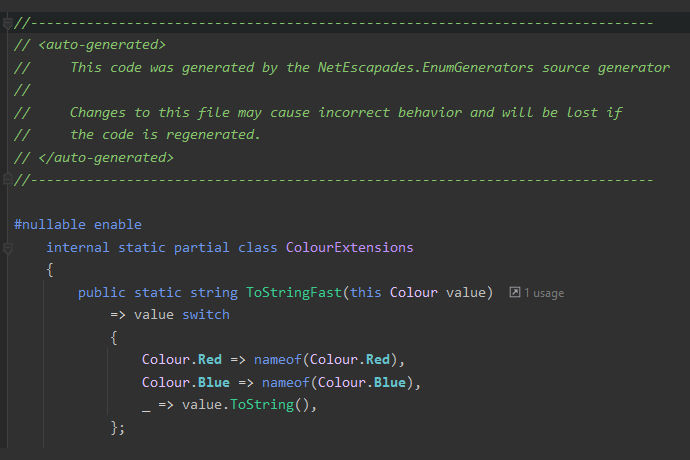
While this looks like it should be fast, it's really not. NetEscapades.EnumGenerators works by automatically generating an implementation that is fast. It generates a ToStringFast() method that looks something like this:
public static class ColourExtensions
{
    public string ToStringFast(this Colour colour)
        => colour switch
        {
            Colour.Red => nameof(Colour.Red),
            Colour.Blue => nameof(Colour.Blue),
            _ => colour.ToString(),
        }
    }
}
This simple switch statement checks for each of the known values of Colour and uses nameof to return the textual representation of the enum. If it's an unknown value, then it falls back to the built-in ToString() implementation to ensure correct handling of unknown values (for example this is valid C#: PrintColour((Colour)123)).
If we compare these two implementations using BenchmarkDotNet for a known colour, you can see how much faster ToStringFast() implementation is:
| Method | FX | Mean | Error | StdDev | Ratio | Gen 0 | Allocated |
|---|---|---|---|---|---|---|---|
| ToString | net48 | 578.276 ns | 3.3109 ns | 3.0970 ns | 1.000 | 0.0458 | 96 B |
| ToStringFast | net48 | 3.091 ns | 0.0567 ns | 0.0443 ns | 0.005 | - | - |
| ToString | net6.0 | 17.985 ns | 0.1230 ns | 0.1151 ns | 1.000 | 0.0115 | 24 B |
| ToStringFast | net6.0 | 0.121 ns | 0.0225 ns | 0.0199 ns | 0.007 | - | - |
These numbers are obviously quite old now, but the overall pattern hasn't changed: .NET is way faster than .NET Framework, and the ToStringFast() implementation is way faster than the built-in ToString(). Obviously your mileage may vary and the results will depend on the specific enum you're using, but in general, using the source generator should give you a free performance boost.
If you want to learn more about what the package provides, check my blog posts or see the project README.
That covers the basics, now let's look at what's new.
Updates in 1.0.0-beta.16
Version 1.0.0-beta16 of NetEscapades.EnumGenerators was released to nuget.org on 4th November and included a number of quality of life features and bug fixes. I'll describe each of the updates in more detail below, but they fall into one of three categories:
- Redesign of how "additional metadata attributes" such as
[Display]and[Description]work. - Additional analyzers to ensure
[EnumExtensions]is used correctly - Bug fixes for edge cases
Let's start by looking at the updated metadata attribute support.
Updated metadata attribute and [EnumMember] support
For a long time, you've been able to use [Display] or [Description] attributes applied to enum members to customize how ToStringFast or Parse works with the library. For example, if you have the following enum:
[EnumExtensions]
public enum MyEnum
{
    First,

    [Display(Name = "2nd")]
    Second,
}
Then three different ToString methods are generated: Two overloads of ToStringFast() and ToStringFastWithMetadata():
public static partial class MyEnumExtensions
{
    // Use a boolean to decide whether to use "metadata" attributes
    public static string ToStringFast(this MyEnum value, bool useMetadataAttributes)
        => useMetadataAttributes ? value.ToStringFastWithMetadata() : value.ToStringFast();

    // Use the raw enum member names
    public static string ToStringFast(this MyEnum value)
        => value switch
        {
            MyEnum.First => nameof(MyEnum.First),
            MyEnum.Second => nameof(MyEnum.Second),
            _ => value.ToString(),
        };

    // Use metadata attributes if provided, and fallback to raw enum member names
    private static string ToStringFastWithMetadata(this MyEnum value)
        => value switch
        {
            MyEnum.First => nameof(MyEnum.First),
            MyEnum.Second => "2nd", // 👈 from the metadata names
            _ => value.ToString(),
        };
    // ... more generated members
}
The ability to use these additional metadata values can be very useful, and I've used them frequently. For a long time I supported [Display] and [Description] attributes, but there was a request to support [EnumMember] as well.
The problem was when you had multiple metadata attributes on enum members—which one should the attribute use? Previously the generator arbitrarily chose [Display] preferentially, and fell back to [Description]. But there was no good reason for that ordering, it was entirely due to one being implemented before the other😬 And adding [EnumMember] as another fallback just felt too nasty.😅
So instead, in #163, I added explicit support for [EnumMember] but also updated the code so that you could only use a single metadata attribute source for a given enum. That means only a single type of metadata attribute is considered for a given enum.
You can select the source to use by setting the MetadataSource property on the [EnumExtensions] attribute. In the example below, the generated source explicitly opts in to using [Display] attributes:
[EnumExtensions(MetadataSource = MetadataSource.DisplayAttribute)]
public enum EnumWithDisplayNameInNamespace
{
    First = 0,
    [Display(Name = "2nd")]
    Second = 1,
    Third = 2,
}
Any other metadata attributes ([Description], [EnumMember]) applied to members in the above enum would be ignored.
Alternatively, you can use MetadataSource.None to choose none of the metadata attributes. In this case, the overloads that take a useMetadataAttributes parameter will not be emitted.
This was a breaking change on its own, but there was an even bigger change: the default metadata source has been changed to
[EnumMember]as a better semantic choice for these attributes.
You can change the default metadata source to use for a whole project by setting the EnumGenerator_EnumMetadataSource property in your project:
<PropertyGroup>
  <EnumGenerator_EnumMetadataSource>DisplayAttribute</EnumGenerator_EnumMetadataSource>
</PropertyGroup>
Just to reiterate, this is a breaking change, that will impact you if you're currently using metadata attributes. I may add an analyzer to try to warn about this potential issue in a subsequent release, which brings us to the next category: analyzers
New analyzers to warn of incorrect usage
There are several scenarios in which the code generated by the NetEscapades.EnumGenerators package won't compile. These are often edge cases that are tricky to handle in the generator, but which can be very confusing if you hit them in your application.
To work around the issue, I added several Roslyn analyzers to explain and warnabout cases that will cause problems.
Flagging generated extension class name clashes
Currently, you can decorate enums with [EnumExtension] attributes in such a way that the same extension class name is used in both cases, which causes name clashes. For example, the following generates SomeNamespace.MyEnumExtensions twice, one for each enum:
namespace SomeNamespace;

[EnumExtensions]
public enum MyEnum
{
    One,
    Two
}

public class Nested
{
    [EnumExtensions]
    public enum MyEnum
    {
        One,
        Two
    }
}
Ideally we would disambiguate by generating SomeNamespace.Nested.MyEnumExtensions as a nested class for the second case, but unfortunately extension method classes can't be nested classes.
Another option would be to include the class name in the generated namespace, but then that runs into another issue that can generate clashes. Ultimately, there's always a way to get clashes, especially as you can explicitly set the name of the class to generate!
Given that these types of clashes are going to be very rare, #158 added an analyzer, with diagnostic ID NEEG001, which flags the fact there's a clash on the [EnumExtensions] attribute directly as an error diagnostic.
This isn't strictly necessary, because generating duplicate extension classes results in a lot of compiler errors, but having an analyzer will hopefully make it more obvious exactly what's happened. 😅
Handling enums nested in generic types
Another case where we simply can't generate valid code is if you have an enum nested inside a generic type:
using NetEscapades.EnumGenerators;

public class Nested<T> // Type is generic
{
    [EnumExtensions]
    public enum MyEnum // Enum is nested inside
    {
        First,
        Second,
    }
}
Unfortunately there's no easy way to generate a valid extension class in this case. We can't put the generated extension class inside Nested<T>, because extension methods can't be inside nested types. There's some things we could do with making the extension class itself generic, but that's all a bit confusing and opens the flood gates to some complexity.
Instead, in #159 I opted to just not support this scenario. If you write code like the above, no extension method is generated, and instead the NEEG002 diagnostic is applied to the [EnumExtensions] attribute to warn you that this isn't valid.
Duplicate case labels in an enum
The final analyzer added in this release handles the case where you have "duplicate" enum members, that is, enum members with the same "value" as others. For example in the code below, both Failed and Error have the same value:
[EnumExtensions]
public enum Status
{
    Unknown = 0,
    Pending = 1,
    Failed = 2,
    Error = 2,
}
This is perfectly valid, but due to the way the enum generator works with switch expressions, it means you won't always get the value you expect if you call ToStringFast() (or other methods). This isn't an issue with the generator per se, as you see similar behaviour using the built-in ToString() method:
var status = Status.Error;
Console.WriteLine(status.ToString()); // prints Failed
This is just an artifact of how enums work behind the scenes in .NET, but it can be confusing, so #162 adds an analyzer that flags these problematic cases with a diagnostic NEEG003:
[EnumExtensions]
public enum Status
{
    Unknown = 0,
    Pending = 1,
    Failed = 2,
    Error = 2,  // NEEG003: Enum has duplicate values and will give inconsistent values for ToStringFast()
}
This diagnostic is just Info, so it won't break your build, as it's still valid to use [EnumExtensions] with these cases, it's just important to be aware that the generated extensions might not work as you expect!
That covers all the new analyzers, so finally we'll look at some of the fixes.
Bug fixes
The first fix, introduced in #165 and then fixed properly in #172 was to better handle the cases where users have set their project's LangVersion to Preview.
In a previous release of NetEscapades.EnumGenerators I added support for C#14 Extension Members. This lets you call static extension members as though they're defined on the type itself. For example, lets say you have this enum:
[EnumExtensions]
public enum MyColours
{
    Red,
    Green,
    Blue,
}
The source generator generates a MyColoursExtensions.Parse() method, but with extension members, you can call it as though it's defined on the MyColours enum itself:
var colour = MyColours.Parse("Red");
I intended to only enable this when you're using C#14, but I made a mistake. I enabled it when you're using C#14 or when you've set the LangVersion=Preview. Long story short, Preview can mean practically anything depending on what you're targeting and what version of the SDK you're building with, so this was not a good idea 😅
As a fix, I removed the generation of extension members unless you're explicitly targeting C#14 or higher (ignoring the Preview case). To allow opt-in to extension members when you're using Preview, I added a EnumGenerator_ForceExtensionMembers setting that you can set to true to explicitly opt-in when you wouldn't normally. Unfortunately I accidentally initially defaulted this to true, so #172 fixes this to be false by default instead 🙈
The main other fix was for handling the case where enum member names are reserved words, e.g.
[EnumExtensions]
public enum AttributeFieldType
{
    number,
    @string, // reserved, so escaped with @
    date
}
Unfortunately, I wasn't handling this correctly, so the generator was generating invalid code:
public static string ToStringFast(this AttributeFieldType value)
    => value switch
    {
        global::AttributeFieldType.number => "number",
        global::AttributeFieldType.string => "string", // ❌ Does not compile
        global::AttributeFieldType.date => "date",
        _ => value.AsUnderlyingType().ToString(),
    };
The fix involved updating the generator with this handy function, to make sure we correctly escape the identifiers as necessary:
private static string EscapeIdentifier(string identifier)
{
    return SyntaxFacts.GetKeywordKind(identifier) != SyntaxKind.None
        ? "@" + identifier
        : identifier;
}
So that the generated code is escaped correctly:
public static string ToStringFast(this AttributeFieldType value)
    => value switch
    {
        global::AttributeFieldType.number => "number",
        global::AttributeFieldType.@string => "string", // ✅ Correctly escaped
        global::AttributeFieldType.date => "date",
        _ => value.AsUnderlyingType().ToString(),
    };
The final change was to remove the NETESCAPADES_ENUMGENERATORS_EMBED_ATTRIBUTES option in #160 which removes the ability to embed the marker attributes in the target dll. This is rarely the right thing to do, and the package is already doing the work to ship the attribute in a dedicated dll. This also reduces some of the duplication, removes a config combination to need to test, and opens up the ability to ship "helper" types in the "attributes" dll in the future.
Summary
In this post I walked through some of the recent updates to NetEscapades.EnumGenerators shipped in version 1.0.0-beta16. These quality of life updates add support for [EnumMember], updates how metadata attributes are used, and adds additional analyzers to catch potential pitfalls. Finally it fixes a few edge-case bugs. If you haven't already, I recommend updating and giving it a try! If you run into any problems, please do log an issue on GitHub.🙂
