

In my previous post, I described how SameSite cookies work and how they work as a security measure. I also mentioned the fact that the specification was updated in 2019, and that the behaviour of browsers from before 2019 is generally not compatible with modern browsers. That means there's no "simple" way for your SameSite cookies to work correctly in both legacy and modern browsers.
In this post I explore one way to get ASP.NET Core Identity SameSite cookies working with both legacy and modern browsers. The approach in this post is inspired by a suggestion from the Chrome dev team, and is an alternative to the "User-Agent sniffing" approach suggested in the ASP.NET Core documentation.
I'll start by describing what the problem is, and how the 2019 spec change caused it. I'll then outline the basic design of the proposed solution. Finally I'll demonstrate how we can shoehorn this in to a simple ASP.NET Core app that uses ASP.NET Core Identity with Cookie Authentication.
The approach I demonstrate in this post is really only a proof-of-concept; I haven't tested it in production, and there are known edge cases and issues with it, but maybe someone will find it useful or interesting!
2016 SameSite cookies vs 2019 SameSite cookies
SameSite cookies are an IETF draft standard that are designed to provide some protection against cross-site request forgery (CSRF) attacks. I described how they work and how they protect you in my previous post, so I suggest reading that one first if SameSite cookies are new to you.
The original SameSite cookie draft in 2016 defined 2 possible values for SameSite cookies:
Strict. Cookies are only sent when the navigation event originated from the same-site, e.g. you clicked a link within your own site.Lax. Cookies are sent in all theStrictsituations, plus when there's a top-level cross-site navigation event e.g. you clicked a link in an email that took you to the site.
If you don't specify a SameSite value in your cookie, the browser would not apply any protections, and would always send the cookie for any cross-site requests as normal (allowing for CORS restrictions).
In 2019, the SameSite draft standard was revised in a way that was not backwards compatible. There were two important changes for our discussion:
- The spec introduced the
Nonevalue. This new value means "always send the cookies", including cross-site. - The spec changed the default behaviour, when no
SameSitevalue was provided. Instead of always sending the cookies (i.e. treating it the same asNone), the browser would treat these cookies asLax.
Another important thing to consider is the behaviour when the browser receives an unknown SameSite value:
- In the
2016spec, it treats the cookies as though they areStrict. - In the
2019spec, it treats the cookies as through they areLax.
The problem with all these changes may not be immediately apparent, but the problem arises when you need a cookie to be sent cross-site. I'll call that the "None" style. The question is, what value should you set on your cookie, so that both browsers implementing the 2016 spec and browsers implementing the 2019 spec will send a cookie cross-site?
SameSite cookie | 2016 browser | 2019 browser | Suitable ? |
|---|---|---|---|
Strict | Strict | Strict | ❌ |
Lax | Lax | Lax | ❌ |
None | Strict | None ✅ | ❌ |
<not set> | None ✅ | Lax | ❌ |
<UNKNOWN VALUE> | Strict | Lax | ❌ |
The table above shows that there's no single SameSite value you can apply to a cookie and have all browsers send the cookie cross-site:
- If you apply the
Nonevalue, 2019 browsers respect it, but 2016 browsers treat the value asStrict, because they don't understand the value. - If you don't set any value, 2016 browsers treat it as
None, but2019browsers treat it asLax.
So now what? What are you supposed to do?
Solving the None problem with user-agent sniffing
This wasn't just an academic issue, there were real problems with some OpenID Connect flows being impacted by this change for example. Thankfully, 4 years on, and with evergreen browsers, the problem is largely consigned to history: you can send None for these cookies, and the majority of browsers will be using the 2019 version.
But what if you do need to support a browser that uses the 2016 version of the standard? For ASP.NET Core apps, Microsoft's documentation suggest an approach that uses User-Agent sniffing:
- Configure a
CookiePolicyOptionsthat setsMinimumSameSitePolicy=SameSiteMode.Unspecified. - Add a callback to
CookiePolicyOptions.OnAppendCookie. The callback checks to see if theUser-Agentheader of the request suggests the request is from a browser that doesn't supportSameSite=None(i.e. a pre-2019 browser). - If the user-agent doesn't support
SameSite=None, remove theSameSitevalue (by setting it toSameSiteMode.Unspecifiedin code).
This approach works, but it requires that you have a reliable way of sniffing user-agents to work out which browser a request is from. If that's unreliable, and your sniffing library suggests that a site doesn't need SameSite=None when it does (or vice-versa), then you may well have a broken site. Microsoft provide a "sample" user-agent sniffer in their docs, but it's covered with warnings:
⚠ Warning
The following code is for demonstration only:
- It should not be considered complete.
- It is not maintained or supported.
So is there an alternative?
Solving the None problem by sending multiple cookies
I came across an alternative solution to the problem from Google when researching SameSite cookies for my previous post. I think it's both elegant and crude at the same time:
- Whenever you set a cookie with
SameSite=None, set a "legacy" cookie with the same value, without settingSameSite. - In your app, when attempting to read a cookie, check for the "main" cookie first. If that's not found, check for the "legacy" version, and use that if it's found.
Let's make this concrete: say you want to set a cookie with the value MyCookie=SomeValue. You need it to be sent cross-site, so you need to set SameSite=None. So the whole thing looks something like:
Set-Cookie: MyCookie=SomeValue; Secure; HttpOnly; SameSite=None
Note that
Secureis required when you're settingSameSite=None
This cookie works on 2019 browsers, but to handle earlier browsers, you also set the following cookie:
Set-Cookie: MyCookie-$#legacy#$=SomeValue; Secure; HttpOnly;
We've appended the "-$#legacy#$" string to the cookie name (using a few symbols to risk chances of collision). This is set alongside the original, so both cookies are sent in the response:
Set-Cookie: MyCookie=SomeValue; Secure; HttpOnly; SameSite=None
Set-Cookie: MyCookie-$#legacy#$=SomeValue; Secure; HttpOnly;
When the browser makes a cross-site request, it will only send one of these values:
- If the browser is 2019-spec compliant, it will send
MyCookiebecause it's marked asSameSite=None, but not the legacy cookie because it will be treated asLax. - If the browser is 2016-spec compliant, it will send
MyCookie-$#legacy#$because it doesn't have aSameSitevalue specified, and it won't sendMyCookiebecause it treats theSameSite=Nonevalue asStrict.
In the app, we just need to check for both MyCookie and MyCookie-$#legacy#$. If we find either of them, we can use the provided value.
Note that for cross-site requests we will only ever see one of the values. For same-site requests we will likely see both values (depending on the specifics).
The good thing about this solution is: no user-agent sniffing! That means it should be reliable.
The downside is that you're sending the same cookie value twice which will increase your response sizes (and request sizes for same-site requests).
So that's the theory, now let's try to implement it in ASP.NET Core!
Solving the None problem for ASP.NET Core Identity
To test the solution, I created a simple ASP.NET Core Razor Pages app, using ASP.NET Core Identity. In this scenario, I'm imagining that I need to send the authentication cookie in a cross-site request. That's the scenario I described in a previous post.
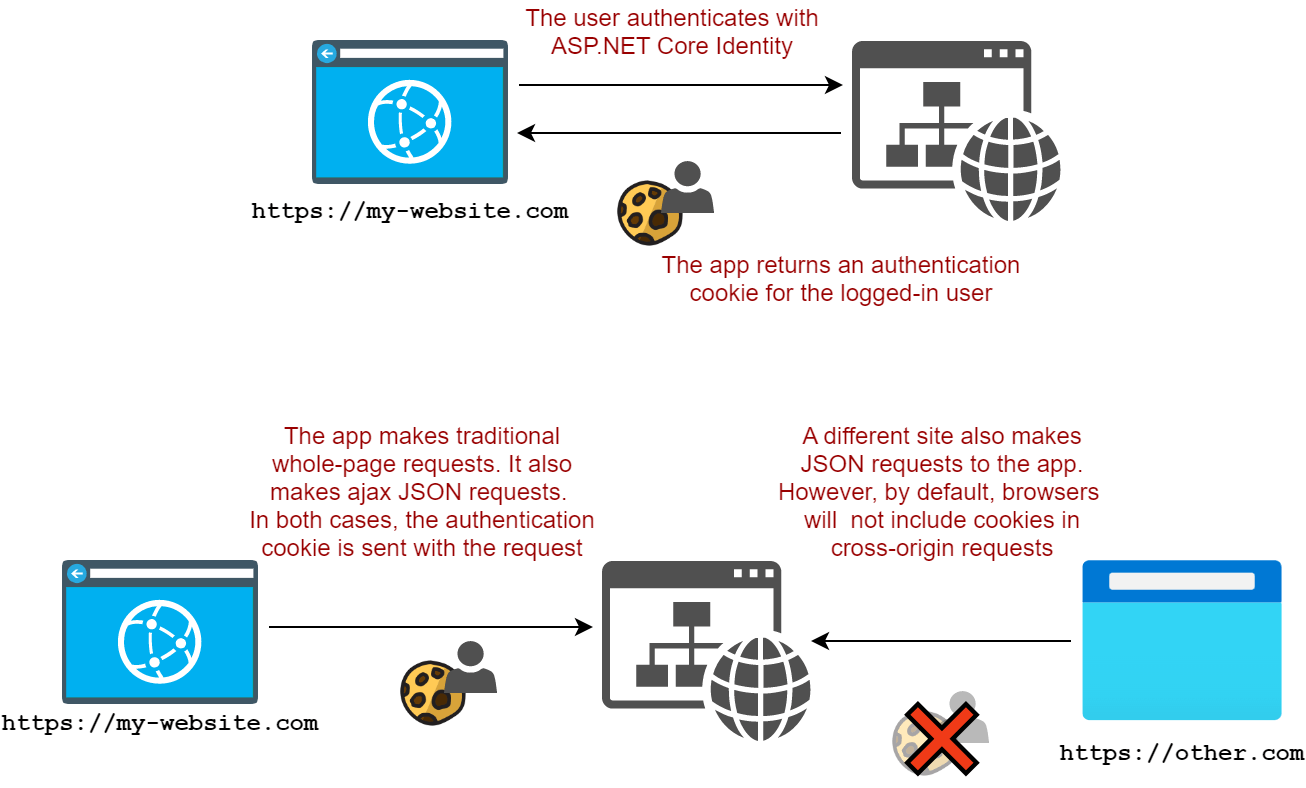
To make that work, we need the cookie to be treated as SameSite=None. My goal in this test is to have that work in modern browsers but also in pre-2019 browsers.
I started by scaffolding the Razor Pages app with ASP.NET Core Identity using
dotnet new webapp -au Individual
If you run the app and login, you'll find that the authentication cookie is marked as SameSite=Lax (for good reason):

We can switch that to be SameSite=None using the snippet I added in my previous post:
builder.Services.AddDefaultIdentity<IdentityUser>(options => options.SignIn.RequireConfirmedAccount = true)
    .AddEntityFrameworkStores<ApplicationDbContext>();

// 👇 Add this
builder.Services.Configure<CookieAuthenticationOptions>(
    IdentityConstants.ApplicationScheme,
    x => x.Cookie.SameSite = SameSiteMode.None);
Adding this snippet (after the other ASP.NET Core Identity configuration) ensures that ASP.NET Core Identity sets SameSite=None on the cookie. If we log out and back in again, we can see

So far so good. But now we need to make sure an additional "legacy" cookie is set in the response, as well as ensure that ASP.NET Core Identity reads them.
Understanding our options
Theoretically, there are several places we could try to hook into the ASP.NET Core infrastructure to intercept the writing and reading of cookies. Each of these has pros-and cons:
- The
CookiePolicyoptions have callbacks you can use to intercept whenever a cookie is written to or deleted from the response.- We could easily add a callback to add the legacy cookie whenever a
SameSite=Nonecookie is added. - This is only a solution to the "write" part. There's no way to intercept retrieving a cookie here, so this can only ever be a partial solution.
- We could easily add a callback to add the legacy cookie whenever a
- The
IRequestCookiesFeatureserver feature provides a "lower-level" API for reading cookies from the request.- We could wrap the "raw"
IRequestCookiesFeaturewith a version that intercepts queries for a cookie to also check the "legacy" version. - A bit fiddly to implement
- Only a solution for the "read" part. Could be coupled with the
CookiePolicyapproach to form a complete solution.
- We could wrap the "raw"
- The
CookieAuthenticationOptionsuses anICookieManagerto handle writing large cookies that exceed the maximum allowed value by browsers.- Handles both the reading and writing of cookies, so can form a complete solution for the authentication cookie.
- Only used for cookie authentication, so not a "general" solution.
In this post, I show a solution that uses ICookieManager, as it achieves my original goal, and frankly, it's the easiest! A more complete solution would probably use all of the above types, but there are a few difficulties there too, as I'll touch on later.
Creating a custom ICookieManager
The CookieAuthenticationOptions expose an ICookieManager property, which is set to null initially. The ICookieManager interface is relatively simple, containing just three methods for managing cookies:
public interface ICookieManager
{
    string? GetRequestCookie(HttpContext context, string key);
    void AppendResponseCookie(HttpContext context, string key, string? value, CookieOptions options);
    void DeleteCookie(HttpContext context, string key, CookieOptions options);
}
If you don't configure a customer ICookieManager on CookieAuthenticationOptions, then ASP.NET Core uses a ChunkingCookieManager. This handles splitting a cookie with a long value (more than 4050 characters) into multiple cookies in the response, as well as piecing them back together again in the request.
For my solution, I created a simple wrapper around the ChunkingCookieManager, something like this:
internal sealed class CookieManagerWrapper : ICookieManager
{
    const string LegacySuffix = "-$#legacy#$";
    private readonly ICookieManager _cookies = new ChunkingCookieManager();

    public string? GetRequestCookie(HttpContext context, string key)
        =>_cookies.GetRequestCookie(context, key);

    public void AppendResponseCookie(HttpContext context, string key, string? value, CookieOptions options)
        => _cookies.AppendResponseCookie(context, key, value, options);

    public void DeleteCookie(HttpContext context, string key, CookieOptions options)
        => _cookies.DeleteCookie(context, key, options);
}
Right now, this is literally just a wrapper, it doesn't add any functionality, but we'll update that shortly.
To use our custom CookieManagerWrapper we call Configure<> on the cookie options:
builder.Services.Configure<CookieAuthenticationOptions>(
    IdentityConstants.ApplicationScheme,
    x => x.CookieManager = new CookieManagerWrapper());
Add this after configuring your other ASP.NET Core Identity services. With this in place, we can update the CookieManagerWrapper to add the functionality we need.
Writing the Legacy cookie to the response
As a reminder, when we set a SameSite=None cookie to the response, we want to set a cookie with the same value, without a SameSite setting. To achieve this, we can update CookieManagerWrapper.AppendResponseCookie():
public void AppendResponseCookie(HttpContext context, string key, string? value, CookieOptions options)
{
    // Set the normal cookie
    _cookies.AppendResponseCookie(context, key, value, options);

    // If the cookie we're setting is SameSite=None, set the legacy cookie
    if (options.SameSite == SameSiteMode.None)
    {
        // Create a copy of the options (HttpOnly, Secure etc)
        // but remove the SameSite setting by setting to Unspecified
        var clonedOptions = new CookieOptions(options)
        {
            SameSite = SameSiteMode.Unspecified
        };

        // Append the LegacySuffix to the cookie name, and set the cookie
        _cookies.AppendResponseCookie(context, $"{key}{LegacySuffix}", value, clonedOptions);
    }
}
The code for deleting the cookie looks almost identical - when we delete the "original" cookie, we want to make sure we delete the legacy cookie too:
public void DeleteCookie(HttpContext context, string key, CookieOptions options)
{
    // Delete the normal cookie
    _cookies.DeleteCookie(context, key, options);

    // If the cookie we're setting is SameSite=None, delete the legacy cookie
    if (options.SameSite == SameSiteMode.None)
    {
        // Create a copy of the options (HttpOnly, Secure etc)
        // but remove the SameSite setting by setting to Unspecified
        var clonedOptions = new CookieOptions(options)
        {
            SameSite = SameSiteMode.Unspecified
        };

        // Append the LegacySuffix to the cookie name, and delete the cookie
        _cookies.DeleteCookie(context, $"{key}{LegacySuffix}", clonedOptions);
    }
}
That handles the response side, now we need to make sure we retrieve the cookie.
Reading the legacy cookie from the request
Finally, we can update CookieManagerWrapper.GetRequestCookie() to try reading the legacy cookie if the normal cookie fails:
public string? GetRequestCookie(HttpContext context, string key)
{
    // Try to read the normal cookie
    if (_cookies.GetRequestCookie(context, key) is { } value)
    {
        // We found it, all good
        return value;
    }

    // Try to get the legacy cookie instead
    return _cookies.GetRequestCookie(context, $"{key}{LegacySuffix}");
}
And with that, we're finished, let's try it out!
Taking it for a spin
If we open our app, login to the site, we'll now see two authentication cookies:
.AspNetCore.Identity.Applicationwhich is set withSameSite=None.AspNetCore.Identity.Application-$#legacy#$which is set without aSameSitevalue

What's more, we can now delete the original auth cookie, but we're still authenticated via the legacy cookie. That means when we're using a legacy browser and our app receives a cross-site request which doesn't include the SameSite=None cookie, we'll be able to read the legacy cookie and stay authenticated, success!
What's the catch?
There are basically two downsides to this implementation:
- Sending a big cookie twice is wasteful most of the time
- This implementation only works for authentication cookies created by the
CookieAuthenticationHandler. If you're "manually" setting cookies then you may want to look at the other approach I mentioned.
So, should you do this? Probably not 🤷♂️ Hopefully noone needs to do this these days, and if you don't explicitly need it, then don't. But if you do…I'd be interested to hear how you have solved the problem!
The full code
You can find the full code for the sample on GitHub (link below), but for completeness, I've included the full solution here too:
using System.Security.Claims;
using Microsoft.AspNetCore.Identity;
using Microsoft.EntityFrameworkCore;
using cross_origin_aspnetcore_identity.Data;
using Microsoft.AspNetCore.Authentication.Cookies;

var builder = WebApplication.CreateBuilder(args);

// Add Identity services to the container.
var connectionString = builder.Configuration.GetConnectionString("DefaultConnection");
builder.Services.AddDbContext<ApplicationDbContext>(options =>
    options.UseSqlite(connectionString));
builder.Services.AddDatabaseDeveloperPageExceptionFilter();

builder.Services.AddDefaultIdentity<IdentityUser>(options => options.SignIn.RequireConfirmedAccount = true)
    .AddEntityFrameworkStores<ApplicationDbContext>();

// 👇 This sets the cookie to use SameSite=None
builder.Services.Configure<CookieAuthenticationOptions>(IdentityConstants.ApplicationScheme,
    x => x.Cookie.SameSite = SameSiteMode.None);

// 👇 This configures our custom Cookie Manager
builder.Services.Configure<CookieAuthenticationOptions>(IdentityConstants.ApplicationScheme,
    x => x.CookieManager = new CookieManagerWrapper());

builder.Services.AddRazorPages();

// Configure CORS
builder.Services.AddCors(options =>
{
    options.AddPolicy(name: "AllowAndrewLock", policy
        => policy.WithOrigins("https://andrewlock.net")
            .AllowCredentials()
            .WithMethods("GET"));
});

var app = builder.Build();

app.UseStaticFiles();
app.UseRouting();

app.UseCors();

app.UseAuthentication();
app.UseAuthorization();

app.MapRazorPages();

app.MapGet("/api", (ClaimsPrincipal user) => user.Identity?.Name ?? "<unknown>")
    .RequireCors("AllowAndrewLock");

app.Run();

// 👇 The cookie manager implementation
internal sealed class CookieManagerWrapper : ICookieManager
{
    const string LegacySuffix = "-$#legacy#$";
    private readonly ICookieManager _cookies = new ChunkingCookieManager();

    public string? GetRequestCookie(HttpContext context, string key)
    {
        if (_cookies.GetRequestCookie(context, key) is { } value)
        {
            return value;
        }

        return _cookies.GetRequestCookie(context, $"{key}{LegacySuffix}");
    }

    public void AppendResponseCookie(HttpContext context, string key, string? value, CookieOptions options)
    {
        _cookies.AppendResponseCookie(context, key, value, options);

        if (options.SameSite == SameSiteMode.None)
        {
            var clonedOptions = new CookieOptions(options)
            {
                SameSite = SameSiteMode.Unspecified
            };
            _cookies.AppendResponseCookie(context, $"{key}{LegacySuffix}", value, clonedOptions);
        }
    }

    public void DeleteCookie(HttpContext context, string key, CookieOptions options)
    {
        _cookies.DeleteCookie(context, key, options);
        if (options.SameSite == SameSiteMode.None)
        {
            var clonedOptions = new CookieOptions(options)
            {
                SameSite = SameSiteMode.Unspecified
            };
            _cookies.DeleteCookie(context, $"{key}{LegacySuffix}", clonedOptions);
        }
    }
}
Summary
In my previous post, I described how SameSite cookies work and how they work as a security measure. I also mentioned the fact that the specification was updated in 2019, and that the behaviour of browsers from before 2019 is generally not compatible with modern browsers. This is due to differences in the way SameSite=None and "unspecified" behave.
In this post I explored one way to get ASP.NET Core Identity SameSite cookies working with both legacy and modern browsers simultaneously. I showed that you could implement an ICookieManager that checks whenever a cookie is set. If the cookie has SameSite=None, the cookie manager automatically sets a duplicate cookie, without a SameSite flag. Modern browsers will send the SameSite=None for cross-site requests, whereas legacy browsers won't, and vice versa for the unspecified SameSite cookie.
When the app receives a cross-site request and the app tries to read a cookie, the ICookieManager checks for the presence of the original cookie. If that fails (because the request was from a legacy browser, for example), the ICookieManager automatically checks for the "legacy" cookie. In this way, the app can support browsers that support both the 2016 and 2019 versions of the specification.
