
In this post I provide an introduction to Device Bound Session Credentials (DBSC). I describe the problem they're trying to solve, how the protocol works, and what you need to do to to support them.
What problems are Device Bound Session Credentials (DBSC) trying to solve?
Web applications need a way to authenticate. One of the most common (and reasonable) approaches is to rely on long-lived cookies for user authentication. With modern enhancements like same-site cookies, many of the historical vulnerabilities associated with cookie authentication are now less of an issue.
However, a fundamental issue with authentication session cookies remains: these are bearer tokens. That is, there's no way to prove you "own" the cookie; if anyone else has the cookie, there's nothing to stop them using it.
When you hear about "bearer" tokens, you might typically think about JWT tokens which are commonly sent in headers. But all "bearer" means is "anyone in possession of the token can use it", which applies to cookies too.
This leads to a risk of "cookie theft" and to "session hijacking", where if an attacker finds a way to read your authentication cookie, they're free to use it for malicious behaviour, on any computer. They don't have to find a way to send requests from the victim's computer; as long as they can extract the cookie, they can use it from their own machines without issue.
Device Bound Session Credentials (DBSC) aim to provide a defence against this weakness, by exchanging long-live credentials for short-lived credentials, and using a refresh token that requires a server to verify it is being used on the same machine it was issued to. This makes session hijacking harder, as you can no longer simply extract credentials and use them elsewhere; the short-lived cookies will shortly expire, and the refresh token would not be valid.
This verification works by having the browser sign requests using a private key that is stored in a Trusted Platform Module (TPM). The key is never exposed outside of the TPM, so you can be sure that if a request is signed with the same key, it's coming from the same machine.
DBSC is also meant to provide progressive enhancement, and doesn't require changing how web applications do their authentication. A server can request that browsers use DBSC where possible, and if the browser supports it, it will seamlessly opt in. A browser that doesn't support DBSC won't recognise the opt-in header, and so will continue as it did before; there's no breaking changes.
How does DBSC work?
In this section, I describe the overall flow for a server and browser that implement DBSC. This is a very general overview, and there are no doubt lots of subtleties in any actual implementation (e.g. see Scott Helme's post about edge cases and bugs he ran into). The goal is to follow the various additional requests happening, so that you can better understand what's happening if you choose to implement DBSC in your applications.
Implementing DBSC
Implementing DBSC in a server should be relatively simple (when compared to some other security measures). In brief, an application needs to:
- Add a
Secure-Session-Registrationheader to the response when a user logs in. This advertises to the browser that the server supports DBSC. - Implement a "session registration" endpoint that registers the browser session and switches to short-lived cookies.
- Implement a "refresh" endpoint that validates the browser still has access to the key, and refreshes the short-lived session cookie.
An important aspect of DBSC is that you don't need to change how you do authentication and validation in general. You need to add the endpoints above, and handle the implications, but overall your authentication code should just keep working as it currently does.
Also, this flow is optional. If a browser doesn't recognise the Secure-Session-Registration header, then it doesn't support DBSC, and so nothing happens. Your application continues to work just as it did before you implemented DBSC.
Now that you know you only have to implement a couple of endpoints, let's look at the end-to-end flow of DBSC.
The DBSC flow
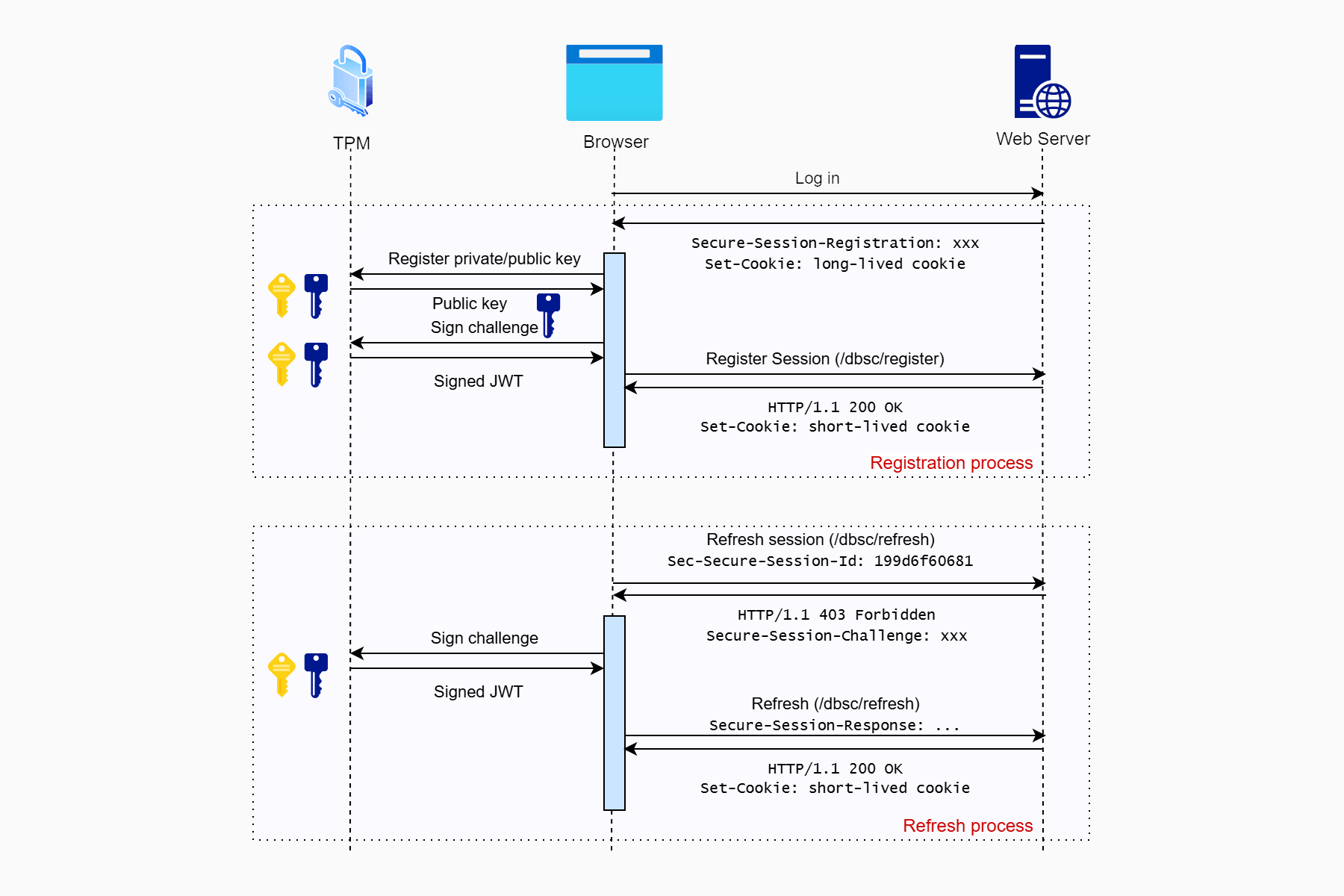
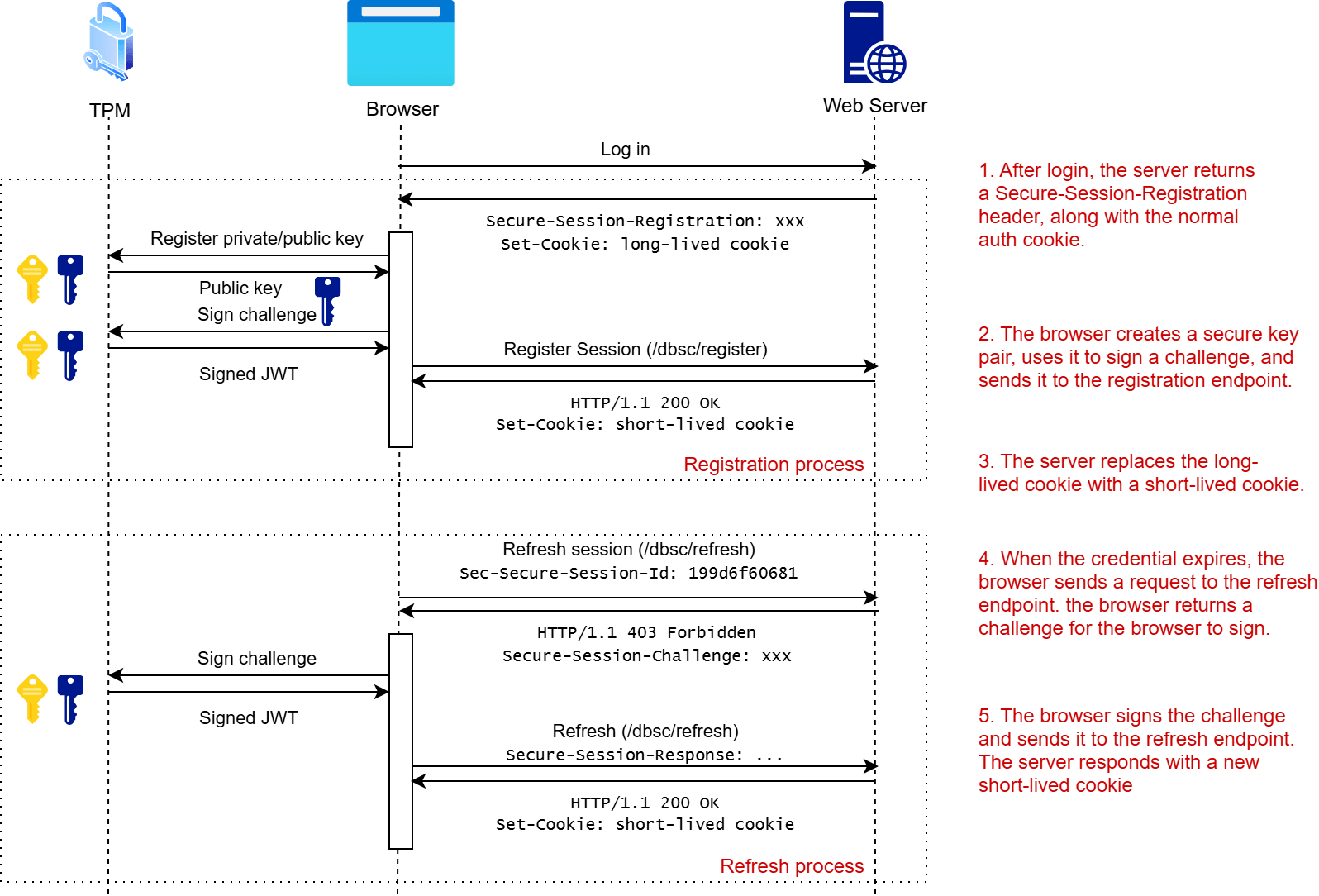
The overall flow of requests, after a user logs in to a server that supports DBSC is shown in the following diagram:
Note that there are alternative integration patterns available, so you may see other variations of the above.
1. The login response includes a Secure-Session-Registration header
The first step is for the server to advertise to the browser that it supports DBSC. When a user logs in, as well as the usual authentication cookie, the server adds an additional header to the response, Secure-Session-Registration:
HTTP/1.1 200 OK
Secure-Session-Registration: (ES256 RS256); path="/dbsc/registration";challenge="4a96e2cab06e76e2366b5e802bfcbabfe81e52c81abfcc71afc97010157ae9bd"
Set-Cookie: MyAuthCookie=CfDJ8Apn9==; path=/; samesite=lax; httponly
The structure of the that Secure-Session-Registration cookie is as follows:
(ES256 RS256): These are the supported algorithms that can be used for signing by the browser. In this case, the supported algorithms areECDSA P-256andRSASSA-PKCS1-v1_5.path="/.well-known/dbsc/registration": This is the "registration" path that the browser should use to register new DBSC credentials.challenge="<somevalue>": A random value that the browser will sign and send as part of the registration call
There are some additional fields that could be included in the Secure-Session-Registration header, but which are not required by all implementations, such as authorization or provider_key, but I'll ignore those here for now. You can read more about them in the specification here.
When the browser receives the response, and it sees the Secure-Session-Registration header, this is the trigger that it should register a key with the DBSC endpoint your application exposes.
2. The browser sends a request to the registration endpoint
This is the crucial step in the flow. On receiving the Secure-Session-Registration header, the browser does the following:
- Generate a new public-private key pair in the TPM/secure enclave
- Sign the provided
challengewith the private key. POSTa request to the specifiedpath, containing the signed challenge and the public key, as a JWT.
So the browser sends something like this:
POST /dbsc/registration HTTP/1.1
Cookie: MyAuthCookie=CfDJ8Apn9==
Secure-Session-Response: eyJhbGciOiJFUzI1NiIsImp3ayI6eyJjcnYiOiJQLTI1NiIsImt0eSI6IkVDIiwieCI6ImxITjNhci13bFZTU0FkeThPSlhxeGhId0JpdXVyMnJUbG1ieGNnaW05X28iLCJ5IjoiemZfeTc5cDhycGI3enRuUUdaMjV4UFhfTHFfcjdvMUNoOWp2bmU3MHRKNCJ9LCJ0eXAiOiJkYnNjK2p3dCJ9.eyJqdGkiOiI0YTk2ZTJjYWIwNmU3NmUyMzY2YjVlODAyYmZjYmFiZmU4MWU1MmM4MWFiZmNjNzFhZmM5NzAxMDE1N2FlOWJkIn0.MO28tc5E-OwA7IlKTAMe1yCGkRA_b8ljLVpP0gnc-jky7g1dcw2CrYREB0KWoE_ae5ixCjJZc4IEcVwfnP_qKA
Content-Length: 0
As you can see, this is posting to the Path provided in the original header, and it includes the original authentication cookie. The Secure-Session-Response contains a base64 encoded JWT. If you plug that into a decoder, you'll see that it contains:
- A header, indicating the algorithm used for signing, along with the public key
- The payload, which just contains
jti, followed by the challenge sent in the header - The signature, which is generated from the header and payload, and the private key
The decoded header above looks like this:
{
  "alg": "ES256",
  "jwk": {
    "crv": "P-256",
    "kty": "EC",
    "x": "lHN3ar-wlVSSAdy8OJXqxhHwBiuur2rTlmbxcgim9_o",
    "y": "zf_y79p8rpb7ztnQGZ25xPX_Lq_r7o1Ch9jvne70tJ4"
  },
  "typ": "dbsc+jwt"
}
while the body looks like this:
{
  "jti": "4a96e2cab06e76e2366b5e802bfcbabfe81e52c81abfcc71afc97010157ae9bd"
}
It's then up to the server to handle this request.
3. The server validates the request, and returns short-lived credentials
When the server receives this request it must first validate the JWT in the Secure-Session-Response header, and confirm that
- The JWT signature is correct and valid.
- There is a valid authentication cookie for the user.
- The challenge in the JWT matches the one included in the original
Secure-Session-Registrationheader.
If all those are true, then the server should do the following:
- Generate a new DBSC session ID, and associate it with the current user.
- Replace the existing authentication cookie with a short-lived cookie.
- Return instructions in the response for how to refresh the short-lived cookie, and where the cookie should be used.
If all goes well, the response will look something like this:
HTTP/1.1 200 OK
Content-Type: application/json
Set-Cookie: MyDbscCookie=abc123; Path=/; Secure; HttpOnly; SameSite=Lax; Max-Age=300

{
  "session_identifier": "199d6f60681",
  "refresh_url": "/dbsc/refresh",
  "scope": {
    "origin": "https://example.com",
    "include_site": false
  },
  "credentials": [
    {
      "type": "cookie",
      "name": "MyDbscCookie",
      "attributes": "Path=/; Secure; HttpOnly; SameSite=Lax"
    }
  ]
}
Let's dig through each part of this response:
- The long-lived
MyAuthCookiecookie is no longer present - A new
MyDbscCookiecookie is now set, with a short expiration time (5 minutes). This now serves as the authentication cookie for the user. - The body contains a
session_identifier, which is used to associate this DBSC session with the current user. The browser will include this whenever it needs to refresh the short-lived auth cookie. - The body contains the
refresh_url, which is the path the browser must hit to obtain a new short-lived auth cookie. - The
scopesays where the short-lived cookie is valid, and where it should not be used - Finally, the
credentialssection provides details about the exact cookie that this config applies to.
Note that the only valid value for
"type"iscookie, so this is likely just future-proofing at work.
After receiving the response, the browser will then use these credentials for all subsequent requests. The server must use the short-lived cookie in place of the "normal" authentication cookie, and everything works as "normal" aside from that.
Of course, very soon, that cookie is going to expire, so it's important for the browser to be able to refresh these credentials.
4. The browser refreshes the credentials in the background
When the browser needs to send a request to your application, and the short-lived cookie has expired, the browser needs to get a fresh instance of the cookie. In general, browsers will likely try to refresh before the cookie expires but if they don't, then they will defer a user request until after the refresh request.
The browser first sends a request to the refresh endpoint, including the DBSC session ID:
POST /dbsc/refresh HTTP/1.1
Sec-Secure-Session-Id: 199d6f60681
The server then generates a new challenge for the browser to sign in the Secure-Session-Challenge header and returns a 403 response:
HTTP/1.1 403 Forbidden
Secure-Session-Challenge: "4524d32ab2b9";id="199d6f60681"
Next, the browser creates another signed JWT, containing the the challenge value with the same private key as it used to register the session originally. It then sends another request to the same refresh endpoint, but this time with the JWT included in the Secure-Session-Response header:
POST /dbsc/refresh HTTP/1.1
Sec-Secure-Session-Id: 199d6f60681
Secure-Session-Response: eyJhbGciOiJFUzI1NiIsImp3ayI6eyJjcnYiOiJ...
The server then has to make sure everything matches up:
- The JWT signature is correct and valid.
- The session ID is a known current session
- The challenge contained in the JWT matches the challenge sent to the browser
If all those checks pass, the server creates a new short-lived cookie, and responds with a 200 OK:
HTTP/1.1 200 OK
Set-Cookie: MyDbscCookie=def456; Path=/; Secure; HttpOnly; SameSite=Lax; Max-Age=300
When the browser receives the request, it replaces the expired short-lived cookie with the new one, and continues with the deferred request.
And that's the complete DBSC covered. As the cookie expires, the browser keeps calling the refresh endpoint to create new short-lived cookies.
Can you use DBSC? Is it worth it?
So, as an application creator, should you support DBSC? In general, I think the answer is "probably", because it doesn't really have an obvious downside, and it protects your users from session hijacking.
Right now, only Chromium implements DBSC, so while that has a big reach, it's far from ubiquitous. The good news is that you should be able to implement DBSC, and then it will only kick in if the user's browser supports it. If the browser doesn't support DBSC, then it will ignore the Secure-Session-Registration header entirely, and the browser simply uses the normal long-lived/session cookie to authenticate with the browser as normal.
But if the browser does support DBSC, you get all the benefits that brings. Namely, protection against session-hijacking, by converting to short-lived credentials instead. And it shouldn't require sweeping changes to your app. So why not?
There are some potential difficulties with the implementation, as described in this post from Scott Helme, which can be very problematic in some cases. For that reason, I'd suggest waiting for the framework to implement it. On a more minor note, I found that my ad blocker completely blocked the DBSC flow 😅
So in conclusion: yes, implement it for extra security, but maybe wait for a canonical implementation in your language/framework of choice first!
Resources
I wrote this post based on reading a bunch of others, I recommend the following to get a better understanding of the feature:
- Chrome for Developers—Device Bound Session Credentials (DBSC)
- W3C specification—Device Bound Session Credentials
- Does your browser support DBSC?
- Scott Helme—Device Bound Session Credentials: Making Stolen Cookies Useless
- Scott Helme—Everything I Learned Shipping Device Bound Session Credentials
- ASP.NET Core—Device Bound Session Credentials (DBSC) for cookie authentication (prototype) PR