

In this post I take a brief look at the Microsoft.Extensions.Options.Contextual package that I came across the other day. I try to understand the purpose of the package, look at how to install and configure it, and finally consider whether it's something people should consider using themselves.
What is Microsoft.Extensions.Options.Contextual?
I was browsing around in the dotnet repositories for something the other day, when I spotted this library: Microsoft.Extensions.Options.Contextual. I was somewhat intrigued considering I hadn't heard this library mentioned before, or had seen it used. What's more, a little probing seemed to suggest it's not used by any other first party .NET libraries either. So what is it for, and how does it work?
According to the library itself, the library provides:
APIs for dynamically configuring options based on a given context
That's pretty vague 😅 What are "options" and what is "context" here? It's likely easiest to understand with an example, even if it's a simple one. The example below is based on the documentation in the package, using the classic "weather forecast" scenario.
Configuring options based on another type
First of all, let's imagine we have some configuration options:
internal class WeatherForecastOptions
{
    public string TemperatureScale { get; set; } = "Celsius"; // Celsius or Fahrenheit
    public int ForecastDays { get; set; }
}
This is pretty standard stuff—which unit to use for temperature display, and how many days to include in the forecast.
The interesting thing is how these options are configured. If you're doing global configuration for your app then you might have something like this (using Configure() and/or AddOptions()):
var builder = WebApplication.CreateBuilder(args);

builder.Services
    .AddOptions<WeatherForecastOptions>() // Register the options
    .Configure(x => x.ForecastDays = 7) // Configure in Code
    .BindConfiguration(builder.Configuration["Weather"]); // Bind to configuration
That's all well and good, but you're fundamentally "globally" configuring the WeatherForecastOptions instances (whether you're using singleton, transient, or scoped instances).
I'm not going to get into the general
IOptions<>abstraction debate here. Many people rail against it, and I sympathize. That said, if you don't like those abstractions, I don't know that you'll like the ones we're introducing shortly 😉.
What if, instead, you want to configure an options object arbitrarily based on some context object? For example, imagine you want to change the TemperatureScale based on the country associated with the current user. This "context" might be encapsulated in some Appcontext object:
internal class AppContext
{
    public Guid UserId { get; set; }
    public string? Country { get; set; }
}
Note that this is a different use case to named options where you have a distinct named set of "global" options. For contextual options we explicitly configure the app based on the provided context.
For example, at the call site, contextual options would look something like this:
// Get an IContextualOptions<TOptions, TContext> from DI
IContextualOptions<WeatherForecastOptions, AppContext> _contextualOptions;

AppContext context; // Get an instance of the context object from somewhere

// Get an instance of WeatherForecastOptions using the AppContext instance
WeatherForecastOptions options = await _contextualOptions.GetAsync(context, cancellationToken: default);
The IContextualOptions<> instance is available in DI when you set up contextual options, and the AppContext is whatever you want to use to control how your options object is created. You then pass one to the other, and voila, you have a configured contextual options object, with properties set based on AppContext.
Of course, there's a lot more to it behind the scenes, so we'll look at how to get started with this in the next section.
Adding the Microsoft.Extensions.Options.Contextual package
To get started with contextual option, you need to add the Microsoft.Extensions.Options.Contextual package to your project. Interestingly, it appears that this package has never made it out of preview:
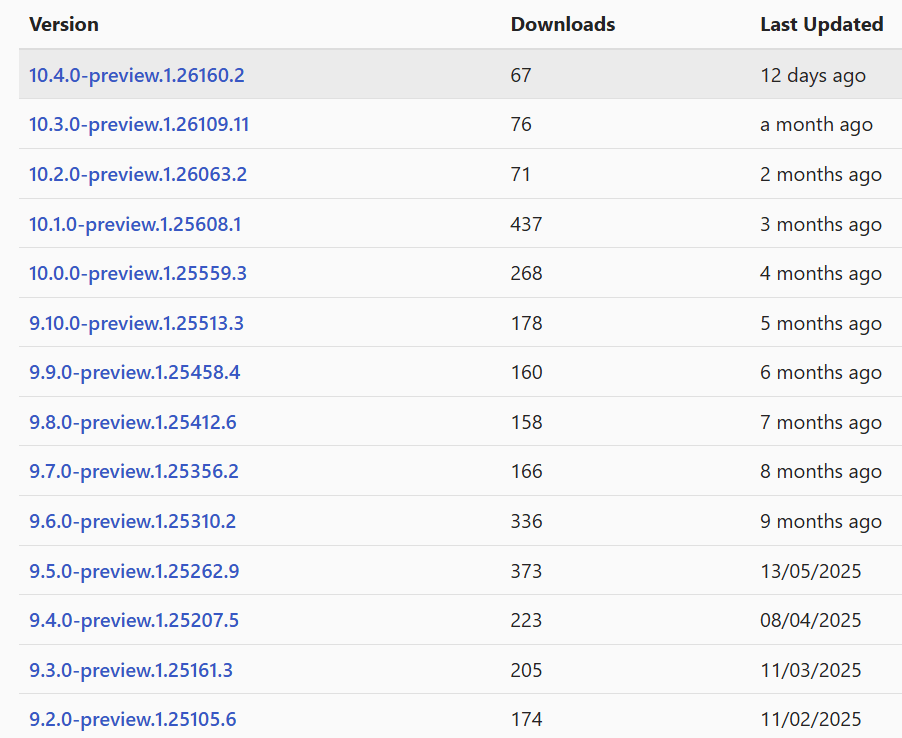
This means you must use the --prerelease flag when adding the package to your project with the .NET CLI:
dotnet add package Microsoft.Extensions.Options.Contextual --prerelease
This adds the latest version to your project file:
<Project Sdk="Microsoft.NET.Sdk.Web">

  <PropertyGroup>
    <TargetFramework>net10.0</TargetFramework>
    <Nullable>enable</Nullable>
    <ImplicitUsings>enable</ImplicitUsings>
  </PropertyGroup>

  <ItemGroup>
    <!-- Add this 👇 -->
    <PackageReference Include="Microsoft.Extensions.Options.Contextual" Version="10.4.0-preview.1.26160.2" />
  </ItemGroup>
</Project>
The latest version of the package supports .NET Framework and .NET 8+.
Once you have the package installed, you can start configuring your options and context.
Configuring the contextual options
Once we have the package installed, we need to configure all the moving parts:
- Add
[OptionsContext]to your context object, to drive a source generator - Define an
IOptionsContextReceiverobject for extracting value from the context - Define how to take the extracted context values and apply them to your options object
It likely isn't clear why you need all these components at this points, but just go with it for now. It'll become clearer how they all fit together later.
Adding the ContextualOptionsGenerator
The first step is to mark your context object partial and add the [OptionsContext] attribute:
[OptionsContext] // 👈 Add attribute, and make the type partial
internal partial class AppContext
{
    public Guid UserId { get; set; }
    public string? Country { get; set; }
}
I've used a mutable class for
AppContextin the example above, but you could also make it astruct, and (ideally) make itreadonlytoo.
The [OptionsContext] object drives a source generator, the ContextualOptionsGenerator, which generates a separate partial class, which looks a little like this:
// <auto-generated/>
using Microsoft.Extensions.Options.Contextual;

partial class MyAppContext : IOptionsContext
{
    void IOptionsContext.PopulateReceiver<T>(T receiver)
    {
        receiver.Receive(nameof(Country), Country);
        receiver.Receive(nameof(UserId), UserId);
    }
}
This makes your context type implement IOptionsContext:
public interface IOptionsContext
{
    void PopulateReceiver<T>(T receiver)
        where T : IOptionsContextReceiver;
}
which interacts with:
public interface IOptionsContextReceiver
{
    void Receive<T>(string key, T value);
}
O…K… so what has that got us? 😅 Effectively the source generator provides a way to extract properties from a type by their name, and pass them to a "receiver" type. So now we'll implement that receiver.
Implementing an IOptionsContextReceiver
Implementing an IOptionsContextReceiver for your target is pretty simple; just create a type that implements the interface, and which can receive any type of T value. as you saw above, this receiver will be invoked with each of the properties of the "context" object, so the idea is to simply extract the keys that you care about in your context.
In the following example, we only care about the "Country" key, so that's the value we extract. I've done a little further manipulation of the value in this example, converting the "Country" into an assumed default temperature unit:
// Implement IOptionsContextReceiver to receive the context values
internal class CountryTemperatureReceiver : IOptionsContextReceiver
{
    // This property exposes the "extracted" values to others
    public string? DefaultUnit { get; private set; }

    // The receive implementation could receive a T of any type
    public void Receive<T>(string key, T value)
    {
        // When you receive the key you're looking for...
        if (key == "Country")
        {
            // ... extract the value and store it
            DefaultUnit = value is "USA" ? "Fahrenheit" : "Celsius";
        }
    }
}
Ok, we're almost there, we have:
- Our "context" object
- A source generated
IOptionsContextwhich populates a "receiver" based on the context object - Our "receiver" object
- Our "target" options that we want to configure
Now it's time to put it all together
Configuring the WeatherForecastOptions
We've almost got all the basic pieces, all that remains is to set up the configuration of our options object, WeatherForecastOptions. We can do this partially using "normal" options configuration, by providing lambdas or binding to configuration, and partially using our new "contextual" configuration options which serves as a contextual "loader":
// Create a standard .NET app builder (in this case a web app)
var builder = WebApplication.CreateBuilder(args);

builder.Services
    .Configure<WeatherForecastOptions>(x => x.ForecastDays = 7) // Configure in Code
    .Configure((IOptionsContext ctx, WeatherForecastOptions opts) => // Configure contextual options
    {
        // 1. Create an instance of the receiver
        var receiver = new CountryTemperatureReceiver();

        // 2. Populate the receiver based on the context
        ctx.PopulateReceiver(receiver);

        // 3. Update the options based on the receiver's values
        if (receiver.DefaultUnit is not null)
        {
            opts.TemperatureScale = receiver.DefaultUnit;
        }
    });
With the code above we've now configured an WeatherForecastOptions object, based on some unknown IOptionsContext, via the CountryTemperatureReceiver. This code is invoked as needs be, using the provided IOptionsContext instance, by the IContextualOptions implementation.
Retrieving a contextual WeatherForecastOptions object
Finally, we have all the pieces in place. All that remains is to use the IContextualOptions object, as we saw earlier:
// Get an IContextualOptions<TOptions, TContext> from DI
IContextualOptions<WeatherForecastOptions, AppContext> _contextualOptions;

AppContext context; // Get an instance of the context object from somewhere

// Get an instance of WeatherForecastOptions using the AppContext instance
WeatherForecastOptions options = await _contextualOptions.GetAsync(context, cancellationToken: default);
When invoked, the IContextualOptions<> object loads a "globally" configured IOptions<WeatherForecastOptions> instance, and then calls our "loader" function. This uses the IOptionsContext to pass values to our IOptionsReceiver object, and then we use those values to configure the WeatherForecastOptions. Finally, the configured object is returned, configured both via the standard IOptions system and by contextual options.
So, what's this for again?
So, if you're anything like me, you might reading this and thinking…Why? Why go to all that length?
On first blush it looks a little bit like "loose coupling". Sure, you could set the default WeatherForecastOptions based on the properties of the AppContext directly, but by using the receiver, you're now "loosely coupled".
Except, you're not, really, are you?
If you had code like this, then it would be very clear that you're directly coupled:
WeatherForecastOptions opts = new();
AppContext ctx = new();

// Configure the options directly based on the AppContext
opts.TemperatureScale = ctx.Country is "USA" ? "Fahrenheit" : "Celsius";
But to my eyes, introducing the receiver doesn't really reduce that coupling. It just means that you're now coupled indirectly via the magic string "Country". If you rename the Country property, then suddenly this breaks.
All of which makes me wonder, why bother? Is all this infrastructure really necessary to provide another way to configure an IOptions object? What was the thinking here?
Feature flags, theoretically
Luckily, after playing around for a while, I found an API proposal for introducing these contextual options. But the funny thing was, the API proposal was closed as "not planned" with the API "needs work" 😅 So… what happened here?!

The proposed API and API usage given in the issue are pretty much exactly what is shipped and currently available, and is pretty much the only example around, i.e. the classic WeatherForecast example.
What is revealing is one question raised in the API review meeting:
- How many IOptionsContextReceiver implementations are there in practice?
- There's an internal one for Azure, but we don't know of an open-source version of a > service that provides contextual options.
- LaunchDarkly is a commercial service that could provide contextual options.
The fact that they mention LaunchDarkly here is telling. It shows that they were clearly thinking about this as a "feature flags" solution.
Except, there's already a feature flags solution from Microsoft, that I wrote about extensively 7 years ago 😅 That's also based on the .NET configuration system. Now, I haven't really looked at that solution in a loong time, but seeing as Microsoft.FeatureManagement has about 140 million downloads, I think it's safe to say some people think it does the job. So introducing a sideways approach to do something very similar feels a little strange to me.
Right now, I can only see one package that uses the Microsoft.Extensions.Options.Contextual and that is a package for doing feature flagging/experimentation: https://github.com/excos-platform/config-client
In Microsoft's defence, Microsoft.Extensions.Options.Contextual is very much marked as experimental, such that you really have to put some effort in if you actually want to use it.
Definitely experimental
To start with, there's no stable version of the Microsoft.Extensions.Options.Contextual package. All versions of the package are marked preview, so you'll need to bear that in mind when you install it.
Additionally, all the APIs are also decorated with the [Experimental] attribute, which generate the EXTEXP0018 compile-time error. This is similar to the [Obsolete] attribute, but it's applied to new APIs that might change, as opposed to old ones that are deprecated. If you want to use any of the APIs you have to explicitly opt in by using #pragma or other methods to disable the warnings:
#pragma warning disable EXTEXP0018
A particularly irritating aspect is the fact that even the source generated code has this error, and seeing as you can't add #pragma to these APIs, you effectively must disable the warning globally (which kind of defeats the purpose of the attribute a bit in my opinion). The easiest way to disable it is to add it to the NoWarn variable in your .csproj file:
<PropertyGroup>
  <!-- Suppresses "For evaluation purposes only and is subject to change or removal in future updates" -->
  <NoWarn>$(NoWarn);EXTEXP0018</NoWarn>
</PropertyGroup>
So given all that, is there any value to these APIs, and should you use them?
In short, I don't think so. If you're completely bought into the IOptions life, and you specifically have a need for something like that, then, maybe, I guess. But with none of the package versions ever reaching 1000 downloads, it doesn't seem like many people consider it worth it.
And if what you really want is feature flagging and/or experimentation, then maybe consider taking a look at OpenFeature instead (something that I might do a post on soon)!
Summary
In this post I took an introductory look at the Microsoft.Extensions.Options.Contextual package. This package builds on the IOptions abstractions common to .NET. I show the basics of how to use the package, focusing on the partial decoupling it provides between a "context" object and your options object. Ultimately, I'm not convinced that this "decoupling" is worth this extra complexity, so if you have any experience with the package yourself, I'd be interested in your experiences in the comments!
