

In this post I discuss the addition of a new API for source generators included in version 4.14 of the Roslyn compiler (included as part of the .NET 10 SDK). This provides a simple solution to an otherwise annoying problem associated with the "marker attributes" that often drive source generator behaviours. In this post I describe the problem and recap the existing solution which is available in previous SDKs. Next I describe the new API and show how you can use it. Finally, I discuss the trade-offs between the new API and the existing solution, and when you should choose each option.
This post was written using the features available in .NET 10 preview 5. Many things may change between now and the final release of .NET 10.
Background: Marker attributes and source generators
Incremental source generators have been around for several years now, and the runtime includes many built-in generators, so I expect most people are familiar with using source generators, even if they're not familiar with building them. As such, you're likely familiar with the trigger for many source generators being the addition of an attribute of some kind.
For example, the LoggerMessage source generator that is part of the Microsoft.Extensions.Logging library in .NET 6 uses a [LoggerMessage] attribute to define the code that will be generated:
using Microsoft.Extensions.Logging;

public partial class TestController
{
    // 👇 Adding the attribute here generates code for LogHelloWorld
    [LoggerMessage(0, LogLevel.Information, "Writing hello world response to {Person}")]
    partial void LogHelloWorld(Person person);
}
Similarly in my NetEscapades.EnumGenerators library, you add the [EnumExtensions] attribute to an enum to generate a class of handy extension methods:
[EnumExtensions] // 👈 Add this to generate `ColorExtensions`
public enum Color
{
    Red = 0,
    Blue = 1,
}
In both of these cases, the attribute itself is only a marker, used at compile-time, to tell the source generator what to generate. But where does that attribute come from?
A pattern that is very commonly used in examples (both from Microsoft and from the community) is to use a source generator API called RegisterPostInitializationOutput(). This hook is seemingly tailor made for adding marker attributes to the user's compilation, which you can then use later in the generator. In fact, this scenario is explicitly called out in the source generator cook book as "the way" to work with marker attributes:
[Generator]
public class HelloWorldGenerator : IIncrementalGenerator
{
    public void Initialize(IncrementalGeneratorInitializationContext context)
    {
        context
            .RegisterPostInitializationOutput(i =>
            {
                // Add the source code to the user's compilation
                i.AddSource("MyExampleAttribute.g.cs", @"
                namespace HelloWorld
                {
                    internal class MyExampleAttribute: global::System.Attribute {}
                }");
            });

        // ... generator implementaation
    }
}
And most of the time, this works great. Right up until it doesn't…
The [MyExample] attribute is added as an internal attribute, so it's theoretically not exposed outside of the project that the source generator is added to. However, there's a common scenario where this does become a problem:
- The source generator adds an attribute using
RegisterPostInitializationOutputas above. - The source generator is added to multiple projects in a solution.
- One project using the generator references a different project that uses the generator.
- You're using
[InternalsVisibleTo]in the referenced project.
In this scenario you'll get a CS0436 warning, and a build warning along the lines of:
warning CS0436: The type 'MyExampleAttribute' in 'HelloWorldGenerator\MyExampleAttribute.g.cs' conflicts with the imported type 'MyExampleAttribute' in 'MyProject, Version=1.0.0.0, Culture=neutral, PublicKeyToken=null'.
The problem is that we've defined the same type with the same namespace in two different projects, and the compiler can't distinguish between them. Now technically this is only a warning, but ignoring them is a pain, and it's all a bit messy generally.
Ultimately, adding code using RegisterPostInitializationOutput() is just not as neat as it seems, and there are better options.
Solving the duplicate attribute problem with a shared dll
I first wrote about the "marker attribute" problem for source generators back in 2022, when I was wrestling with the problem myself. In that post (and the subsequent post) I described the problem and several potential solutions. Ultimately I settled on an approach for handling marker attributes (which has separately become the general suggested approach) which is to include the attributes in a separate shared dll in the NuGet package.
For example, the LoggerMessage generator is part of the Microsoft.Extensions.Logging.Abstractions library. It is packaged in the same NuGet package that people will install anyway, and the marker attributes are contained in the referenced dll, so they will always be there.
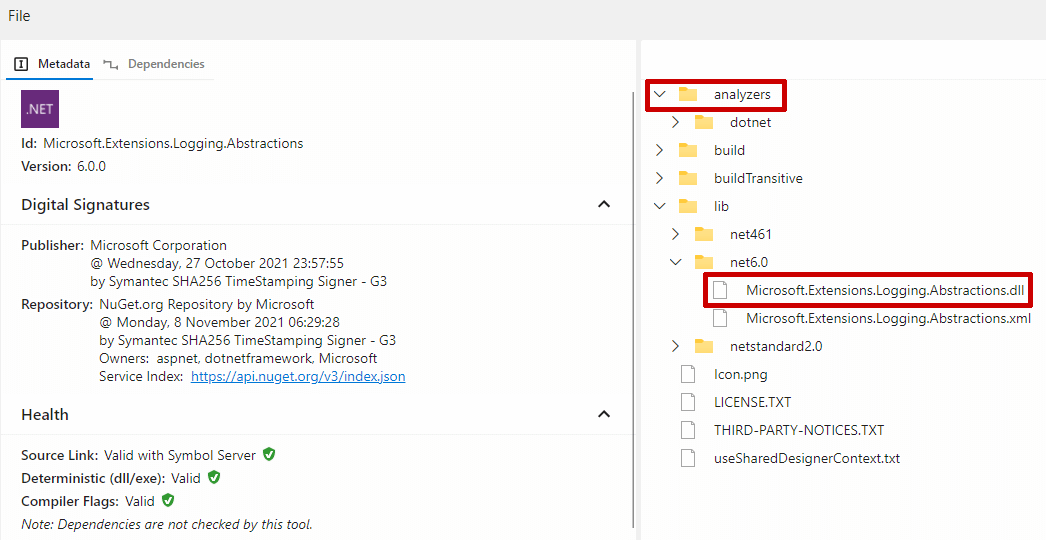
Simlarly, my NetEscapades.EnumGenerators package includes the NetEscapades.EnumGenerators.Attributes.dll packaged separately from the generator dll NetEscapades.EnumGenerators.dll, and is actually referenced by the target project.

The advantage of this approach is that when you reference the package in multiple projects, they're all referencing the same type; in this case the [EnumExtensions] attribute in NetEscapades.EnumGenerators.Attributes.dll. We're not generating identical code in each target project, so there's no type conflict. Problem solved 🎉
The big downside with this approach is that it's just more complicated to build. You need a separate project for the attributes dll, and you need to do some MSBuild faffing to make sure you pack the attributes dll into the lib folder of the NuGet package while the analyzer is packed into the analyzers folder.
I'm not going to detail the whole process here; see my previous post for the approach. Alternatively, see the source code for NetEscapades.EnumGenerators and copy-paste what you need! It's ultimately not too hard, just a bit of a faff😅
Even though the separate attributes dll works well, it's a shame that RegisterPostInitializationOutput() never quite fulfilled it's design as an easy way to add code to a target project which the generator could then use. Thankfully, in .NET 10, this is finally possible!
How does Roslyn avoid these issues? With the [Embedded] attribute
An interesting part of this story is that the compiler has had the ability to add synthesized types into the compilation for a long time. You can see this, for example, in some of the generated code of collection expressions (which I showed in a previous post), which may generate types and embed them in the target dll to optimize the initialization of various collections.
The compiler might also generate attributes, which it embeds in the target compilation. This isn't always necessary (the attributes are often included in the .NET base class libraries), but is particularly useful when using a newer SDK with an older target runtime; in those older runtimes, the attributes may not be available, so they're synthesised at build time.
The interesting thing is that Roslyn essentially has the same problem that we have with our embedded generator attributes; it may need to generate the attributes in multiple projects, but it must not cause type collision issues. As a result, whenever it needs to emit a potentially problematic attribute, the compiler always emits an additional attribute: [Embedded]. Applying [Embedded] to a type ensures that it's not visible outside the current project (more accurately, the current compilation). In other words, it solves the [InternalsVisibleTo] problem.
The snag is that up until now, you weren't able to add the [Embedded] type yourself, and you weren't able to use the automatically-synthesized version. That changed in dotnet/roslyn#76523, which enabled adding the attribute yourself:
namespace Microsoft.CodeAnalysis
{
    internal sealed partial class EmbeddedAttribute : global::System.Attribute
    {
    }
}
The definition of this attribute is very strict, because it must match the definition that the compiler generates. Specifically:
- It must be
internal - It must be a
class - It must be
sealed - It must be non-
static - It must have an
internalorpublicparameterless constructor - It must inherit from
System.Attribute. - It must be allowed on any type declaration (
class,struct,interface,enum, ordelegate)
The above example is about the simplest version that does that.
Solving warning CS0436 in source generators with [Embedded] and AddEmbeddedAttributeDefinition()
With the new capability to manually add EmbeddedAttribute to our compilation, we can revisit the marker attribute issues we were having in our source generator. The big problem we were facing was the "leaking" of internal generated attributes across projects when you use [InternalsVisibleTo]; [Embedded] provides a solution to that.
To solve the issue, we need to:
- Add the
EmbeddedAttributedefinition to our project. - Apply the
[Embedded]attribute to our generated marker attribute types.
Technically, you can do the first point however you like, but dotnet/roslyn#76583 introduced a convenient API, AddEmbeddedAttributeDefinition(), which will generate the definition for you.
Putting those two changes together, we can update the HelloWorldGenerator example from earlier to solve the CSO436 problem with the addition of just 2 lines of code:
[Generator]
public class HelloWorldGenerator : IIncrementalGenerator
{
    public void Initialize(IncrementalGeneratorInitializationContext context)
    {
        context
            .RegisterPostInitializationOutput(i =>
            {
                i.AddEmbeddedAttributeDefinition() // 👈 Add the definition
                i.AddSource("MyExampleAttribute.g.cs", @"
                namespace HelloWorld
                {
                    // 👇 Use the attribute
                    [global::Microsoft.CodeAnalysis.EmbeddedAttribute]
                    internal class MyExampleAttribute: global::System.Attribute {}
                }");
            });

        // ... generator implementaation
    }
}
With those two lines; no more CSO436 errors due to type confusion! 🎉
Note that in the example above I used the fully qualified type name for the
[Embedded]attribute. This often isn't necessary, but can sometimes bite you if your don't, so I always do it in my generated source code.
The addition of [Embedded] and AddEmbeddedAttributeDefinition() in .NET 10 nicely solve an annoying quirk of incremental source generators, so it's really nice to see the support added. However, it's not all sunshine and roses, and you shouldn't always use it.
Should you use AddEmbeddedAttributeDefinition() or a shared dll?
The AddEmbeddedAttributeDefinition() and [Embedded] attribute approach seems like a great solution, and it will likely be the go-to approach for anyone building a new source generator with the .NET 10 SDK. There are some caveats though.
Are all your customers using the .NET 10 SDK?
The AddEmbeddedAttributeDefinition() API is available in Roslyn 4.14, which corresponds to version 4.14.0 of Microsoft.CodeAnalysis.CSharp. This is the package you will need to reference in your source generator for the API to be available.
This isn't just a dependency on your side though. This version of Microsoft.CodeAnalysis.CSharp requires anyone installing your package to be using at least version 9.0.300 or .NET 10 preview 4 of the .NET SDK (both released in May 25). If they're using Visual Studio, they need to be using at least version 17.14 (i.e. the latest version at the time of writing).
If you're ok with putting those requirements on consumers of your package, then using AddEmbeddedAttributeDefinition() should be your go-to approach for your marker attributes. If I was creating a new source generator, I would definitely start with this as the minimum requirement, take the easy option, and just document the requirements.
However, if you have an existing generator, then you have a tricky question to answer; are you willing to make the breaking change to update Microsoft.CodeAnalysis.CSharp? How many of your customers are using old versions of the .NET SDK? Are you willing to force them to have to upgrade to continue to use your package? The answer to those questions will likely be different for each source generator author.
Are you already using the shared dll approach?
If you're already using the "shared" dll approach, then you may not have much to gain by switching to AddEmbeddedAttributeDefinition(). You've already done the hard work to setup the shared dll, and this approach has other potential benefits (which we'll come to shortly), so it may not be worth switching your approach. Essentially you'd be choosing to make a breaking change not to solve an active problem, but to make your life a bit easier. Is it worth it?🤷♂️
That said, switching to AddEmbeddedAttributeDefinition() may simplify some things for you with regards to testing, as well as generally making your generator easier to understand.
Do you need any additional capabilities from having a shared dll?
One good thing about including a shared dll in your source generator NuGet package is that it doesn't have to just include attributes. This shared dll can include anything that the target project needs to reference. In some cases this may be the main purpose of the package, with the source generator being just a helpful addition.
This is obviously the case for the Microsoft.Extensions.Logging.Abstractions package discussed previously. The main purpose of the package is to provide the shared abstractions; the addition of the
[LoggerMessage]attribute and the source generator was added much later as an optimisation.
Another example of this might be if the code that your source generator generates has a public API that needs to expose public types. For example, imagine that my NetEscapades.EnumGenerators library generated code similar to the following (it doesn't😅):
public static class ColorExtensions
{
    public static string ToStringFast(this Color value, TransformType transform)
    {
        if (transform == TransformType.LowerInvariant)
        {
            return value switch
            {
                Color.Red => "red",
                Color.Blue => "blue",
            }
        }

        return value switch
        {
            Color.Red => "Red",
            Color.Blue => "Blue",
        }
    }
}
That TransformType enum is part of the public API of the ColorExtensions class. The ToStringFast() method above might be called from a different project to the one that generates it, so we need the TransformType enum to also be available in that project.
We could generate the TransformType at the same time in the assembly containing ColorExtensions, but then if we use the source generator in another project we'd generate the same type there too. We could try workarounds by using different namespaces, but it's all a bit messy.
An important thing to note is that we can't generate the TransformType and apply [Embedded] to it. If we did that, we wouldn't be able to reference ToStringFast outside the project that it's defined. Which means we wouldn't be able to call ToStringFast from a different project, because we can't create a TransformType to pass in!
The easiest solution is to include the TransformType in the shared dll. And if you're doing that, then maybe it's just as easy to include the attributes in there too? That gives you all the same benefits, without the stringent .NET 10 SDK requirements.
That said, if you're willing to accept the SDK requirement, you can certainly take both approaches. You can generate your marker attributes and add [Embedded] to them, and only include additional helper types in your shared dll.
Summary
In this post I discussed the "marker attribute" problem for source generators. I described the problem of CS0436 errors that you can get if you generate the marker attributes with your source generator (as is often shown in tutorials, because it's simple). I then showed the pre-.NET 10 approach to solving the problem by using a shared dll. Next I discussed how the Roslyn compiler solves a similar problem using the [Embedded] attribute. I then explained that this capability is now available to source generator authors too, along with the AddEmbeddedAttributeDefinition() API to make generating the API simple. Finally I discussed the pros and cons of using the AddEmbeddedAttributeDefinition() approach over a shared dll.
