
In this post I take a look at the new Web Worker template available in the .NET 11 SDK, how to add it to an existing app, what the code is doing behind the scenes, and how to use it to run CPU intensive work without blocking the UI.
This post was written using the features available in .NET 11 preview 3. Many things may change between now and the final release of .NET 11.
Why do you need Web Workers?
One of the neat things about .NET running in the browser using Blazor is that you can easily handle all sorts of complex domains such as image processing, document parsing, or data manipulation. This is simple enough when you are running using Blazor Server, and you can run these CPU intensive tasks on the server. Unfortunately, if you are using Blazor WASM, it's not always so simple.
The core problem is that the JavaScript engine (e.g. V8) is fundamentally single-threaded. That means if you're doing CPU-intensive work, then nothing else can happen—most importantly, the UI will become unresponsive, and the browser may even suggest closing the page. A related issue is that you can't use multi-threading (because there's only a single-threaded event loop).
That's where Web Workers come in. Web workers are a way to get multi-threading back, by running JavaScript (or WebAssembly) on a background thread. They can then communicate back to the main UI thread by posting messages to it.
If you're used to creating .NET Windows Forms applications, this communication is somewhat analogous to the single-threaded-apartment model that requires you only modify UI elements on the STA Thread.
Web Workers give you "true" multi-threading, but it is a somewhat limited version. It is a much more "cooperative" form of multi-tasking than you might be used to in .NET (where using async/await or Task.Run() can schedule work implicitly to run on the thread pool). In contrast, you need to explicitly schedule work to run on a Web Worker.
It has been possible to use Web Workers with Blazor (or pure WASM) .NET applications since .NET 8, as described in these articles, but they're somewhat complex in terms of the number of moving parts to get it working. There's also an open source project, BlazorWorker, that aims to encapsulate this with a simple API.
In .NET 11, a Web Worker project template has been added that similarly provides the bulk of the required code for Web Worker, to make it easier to run CPU intensive work on a background thread. For the rest of this post we'll look at how to use that project template, and what it contains.
Adding the Web Worker project
In this section, I show how to add the Web Worker template to a solution, how to reference it from your Blazor app, and how to use it to run code on a Web Worker.
Creating the initial Blazor app
We'll start by creating a basic Blazor WASM app. This is just the default template app that includes counter and weather forecast pages.
The following is a simple script that creates this app called BlazorWebApp, places it in the /src/BlazorWebApp sub-folder, creates a .sln file, and adds the project to it:
dotnet new sln
mkdir src
dotnet new blazorwasm -o ./src/BlazorWebApp
dotnet sln add  ./src/BlazorWebApp
If you run the app using dotnet run, you'll get the familiar Blazor app:
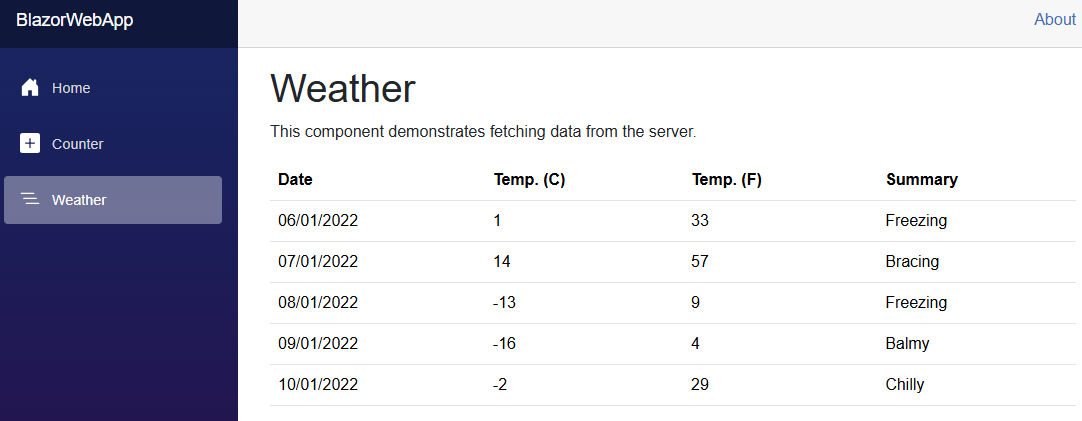
We're going to change how the forecasts are loaded. Currently, they're loading using an HTTP request for static JSON data. In our new approach, we'll invoke a method on a Web Worker which generates the data instead.
Generating the Web Worker template
The first thing to do is to generate the Web Worker project. Note that this template is intended to be used as a standalone project, which you then reference in your main app, rather than by adding the template directly to your Blazor project.
This differs from both the existing documentation on how to use Web Workers and the BlazorWorker project.
The following creates the BlazorWebWorker project as a sibling project, and adds it to the solution:
dotnet new webworker -o ./src/BlazorWebWorker
dotnet sln add  ./src/BlazorWebWorker
This template consists of just a few files, as you can see below:
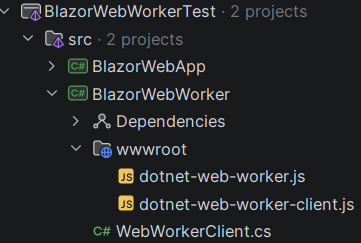
We'll look in detail at the content of these files later. For now, we'll just look at how to use this project in your Blazor app.
Updating the Blazor app to reference the Web Worker project
The Web Worker template creates a separate project, so you need to reference it from your main app:
dotnet add ./src/BlazorWebApp reference ./src/BlazorWebWorker
We're also going to use the [JSExport] attribute, which means we need to explicitly enable unsafe code by adding <AllowUnsafeBlocks> to the project file:
<Project Sdk="Microsoft.NET.Sdk.BlazorWebAssembly">

  <PropertyGroup>
    <TargetFramework>net11.0</TargetFramework>
    <Nullable>enable</Nullable>
    <ImplicitUsings>enable</ImplicitUsings>
    <OverrideHtmlAssetPlaceholders>true</OverrideHtmlAssetPlaceholders>
    <!-- 👇 Add this -->
    <AllowUnsafeBlocks>true</AllowUnsafeBlocks>
  </PropertyGroup>

  <ItemGroup>
    <PackageReference Include="Microsoft.AspNetCore.Components.WebAssembly" Version="11.0.0-preview.3.26207.106" />
    <PackageReference Include="Microsoft.AspNetCore.Components.WebAssembly.DevServer" Version="11.0.0-preview.3.26207.106" PrivateAssets="all" />
  </ItemGroup>

  <ItemGroup>
    <ProjectReference Include="..\BlazorWebWorker\BlazorWebWorker.csproj" />
  </ItemGroup>

</Project>
Ok, that's all the legwork, now let's add the code to actually use the Web Worker.
Defining the functions to run in the Web Worker
The functions that you want to run in the Web Worker need to be exported using [JSExport], and can only return primitive types (like int or bool) or strings. The following example shows a couple of important points:
- The type containing the methods is a
static partial. - It's decorated with
[SupportedOSPlatform("browser")], because this[JSExport]code is only supported to run in the browser. - The method is decorated with
[JSExport], which generates the code for interacting with JavaScript APIs from .NET code. You can read more about it in a previous post about running code in .NET without Blazor. - We can't return
WeatherForecastobjects directly, they have to be serialized to astringfirst.
Here's the code that simulates us doing some "real" work on the worker thread, and returning a serialized collection of objects
[SupportedOSPlatform("browser")]
public static partial class WorkerMethods
{
    [JSExport]
    public static string GetForecasts(int count)
    {
        // simulate doing "real" work that would block
        // the UI if run on the main thread.
        Thread.Sleep(5_000);

        // Generate the data to return
        Weather.WeatherForecast[] forecasts =
        [
            new()
            {
                Date = new DateOnly(2022, 01, 06),
                TemperatureC = 1,
                Summary = "Freezing",
            },
            new()
            {
                Date = new DateOnly(2022, 01, 07),
                TemperatureC = 14,
                Summary = "Bracing",
            },
            new()
            {
                Date = new DateOnly(2022, 01, 08),
                TemperatureC = -13,
                Summary = "Freezing",
            },
            new()
            {
                Date = new DateOnly(2022, 01, 09),
                TemperatureC = -16,
                Summary = "Balmy",
            },
            new()
            {
                Date = new DateOnly(2022, 01, 10),
                TemperatureC = -2,
                Summary = "Chilly",
            }
        ];

        // Can't return it directly, must serialize to a string first
        return JsonSerializer.Serialize(forecasts.Take(count));
    }
}
Ok, we have a method to run on our web worker, all that remains is to hook it up!
Creating a web worker and running code on it
Currently the Weather page component app uses an HttpClient to load the collection of WeatherForecast objects:
@code {
    private WeatherForecast[]? forecasts;

    protected override async Task OnInitializedAsync()
    {
        forecasts = await Http.GetFromJsonAsync<WeatherForecast[]>("sample-data/weather.json");
    }
}
We can now rewrite this to use our web worker instead:
@using BlazorWebWorker
@inject IJSRuntime JsRuntime
@code {
    private WeatherForecast[]? forecasts;

    protected override async Task OnInitializedAsync()
    {
        // Create the webWorker
        await using var worker = await WebWorkerClient.CreateAsync(JsRuntime);

        // Get the full name of the method to invoke
        // i.e. "BlazorWebApp.WorkerMethods.GetForecasts"
        const string workerMethod = $"{nameof(BlazorWebApp)}.{nameof(WorkerMethods)}.{nameof(WorkerMethods.GetForecasts)}";
        const int initialCount = 5;

        // invoke the code on the web worker
        forecasts = await worker.InvokeAsync<WeatherForecast[]>(workerMethod, args: [initialCount]);
    }
}
Note that the InvokeAsync<T> method will automatically deserialize the string that we return from GetForecasts() into the WeatherForecast[] we need.
Caching the web worker
If you run the above code, it will work, and the UI won't freeze. But it will also take a little while to startup. That's because the web worker has to initialize the .NET runtime, as it's isolated from the rest of your app. If you have dev tools open you'll see a bunch of .NET assemblies being requested when you start the Web Worker:
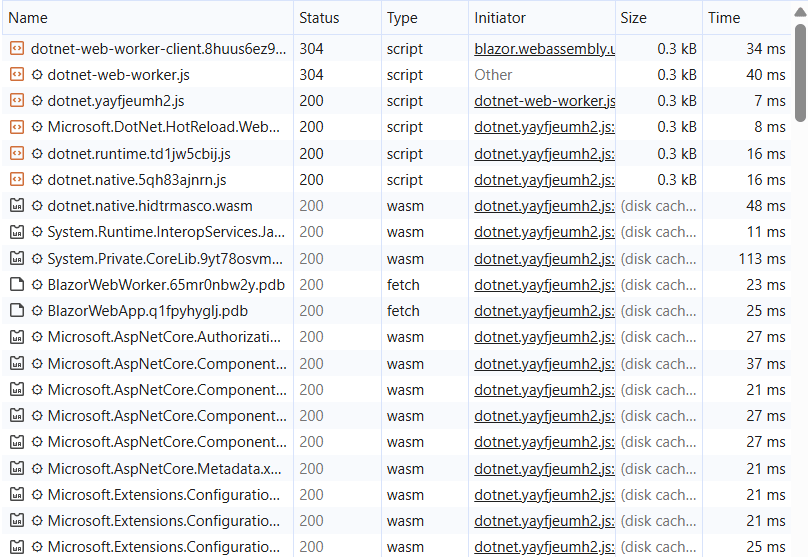
Needing to start up the runtime makes the CreateAsync() call relatively slow, so if you had to do that every time you wanted to run some web worker code, you'd be taking quite the hit. Luckily, we can instead cache the Web Worker reference somewhere and reuse it (in the example below I just cache it in a static field, but there are many other options):
private static WebWorkerClient? _client;
public static async Task<WebWorkerClient> GetOrCreateClient(IJSRuntime jsRuntime)
{
    // if we already have a client, use it
    if (_client is { } client)
    {
        return client;
    }

    // Otherwise, initialize, which could be slow
    _client = await WebWorkerClient.CreateAsync(jsRuntime);
    return _client;
}
and then in our Weather page, we can call this method instead:
protected override async Task OnInitializedAsync()
{
-    await using var worker = await WebWorkerClient.CreateAsync(JsRuntime);
+    var worker = await WorkerMethods.GetOrCreateClient(JsRuntime);
}
And that's about all there is to it! The code runs on the web worker, and on subsequent calls you don't pay the overhead of starting the worker, because it's already running!
Now that we know how to use the template, let's take a look at the code that's actually part of the template.
Looking at the Web Worker code
There's only a few files that are part of the template, so we'll look at each of them in turn to understand how it works.
WebWorkerClient manages things on the .NET side
We'll start with the WebWorkerClient, as it's not too complex. I've annotated the code below with a rough explanation of how it works:
public sealed class WebWorkerClient(IJSObjectReference worker) : IAsyncDisposable
{
    public static async Task<WebWorkerClient> CreateAsync(IJSRuntime jsRuntime)
    {
        // import the dotnet-web-worker-client.js code and take a reference
        await using var module = await jsRuntime.InvokeAsync<IJSObjectReference>(
            "import", "./_content/BlazorWebWorker/dotnet-web-worker-client.js");

        // call the `create()` method to create an instance of
        // the JavaScript `DotnetWebWorkerClient` object
        var workerRef = await module.InvokeAsync<IJSObjectReference>("create");

        return new WebWorkerClient(workerRef);
    }

    public async Task<TResult> InvokeAsync<TResult>(string method, object[] args, CancellationToken cancellationToken = default)
    {
        // Call the `invoke` method on the WebWorker code,
        // specifying the method to execute
        return await worker.InvokeAsync<TResult>("invoke", cancellationToken, [method, args]);
    }

    public async ValueTask DisposeAsync()
    {
        try
        {
            // Call the `terminate` method on the `DotnetWebWorkerClient` object
            await worker.InvokeVoidAsync("terminate");
        }
        catch (JSDisconnectedException)
        {
            // Circuit disconnected, worker is already gone
        }

        await worker.DisposeAsync();
    }
}
So this is relatively simple - it imports the dotnet-web-worker-client.js module, calls create, and then allows calling invoke to run code on the Web Worker.
Note that that "path" to the JavaScript file has the name of the project,
BlazorWebWorker, embedded in it. This is the path where the content files will end up when your main Blazor app references this project. If you rename the project, or otherwise move these files, you'll need to fix this path.
Now let's take a look at the content of the dotnet-web-worker-client.js file itself.
dotnet-web-worker-client.js code sets up the Web Worker
The dotnet-web-worker-client.js JavaScript file acts as a factory for creating a Web Worker, configuring it to start the .NET runtime, and for running functions on the worker by posting messages to it. I've added comments to the file below to explain what's going on, but it's generally pretty self explanatory.
class DotnetWebWorkerClient {
    #worker;
    #pendingRequests = {};
    #requestId = 0;

    constructor(worker) {
        this.#worker = worker;
    }

    // Invoked from .NET code to configure a web worker
    static create() {
        return new Promise((resolve, reject) => {
            // Run the dotnet-web-worker.js file using the Web Workers API
            const worker = new Worker('_content/BlazorWebWorker/dotnet-web-worker.js', { type: "module" });

            // If the worker errors, bubble that up to the caller
            worker.addEventListener('error', (e) => {
                reject(new Error(e.message || 'Worker encountered an error'));
            });

            // Listen for the 'ready' message from the web worker.
            worker.addEventListener('message', function onMessage(e) {
                if (e.data.type === "ready") {
                    // Once received, detach the 'ready' listener
                    worker.removeEventListener('message', onMessage);
                    if (e.data.error) {
                        // An error occured during initialization, bubble it up
                        reject(new Error(e.data.error));
                    } else {
                        // Succesfully initialized, create a wrapper, and setup communication
                        const client = new DotnetWebWorkerClient(worker);
                        client.#setupMessageHandler();
                        // Return the wrapper to the caller
                        resolve(client);
                    }
                }
            });

            // Initialize the worker with the path to the .NET runtime
            const dotnetJsUrl = DotnetWebWorkerClient.#resolveDotnetJsUrl();
            worker.postMessage({ type: 'init', dotnetJsUrl });
        });
    }

    static #resolveDotnetJsUrl() {
        // Resolve using the browser's import map (handles fingerprinted URLs in published apps).
        // Workers don't inherit the page's import map, so we resolve on the main thread and pass the URL.
        const dotnetJsUrl = new URL('_framework/dotnet.js', document.baseURI).href;
        return import.meta.resolve?.(dotnetJsUrl) ?? dotnetJsUrl;
    }

    // Invoked by the .NET code to run a function in the worker
    invoke(method, args) {
        return new Promise((resolve, reject) => {
            // Store the request for later handling and post it to the Web Worker
            const id = ++this.#requestId;
            this.#pendingRequests[id] = { resolve: r => resolve(this.#parseIfJson(r)), reject };
            this.#worker.postMessage({ method, args, requestId: id });
        });
    }

    // Convenience method for deserializing a string response returned
    // from a Web Worker method invocation into JSON
    #parseIfJson(value) {
        if (typeof value === 'string') {
            try {
                return JSON.parse(value);
            } catch {
                // not JSON, return as-is
            }
        }
        return value;
    }

    terminate() {
        this.#rejectAllPending("Worker terminated");
        this.#worker?.terminate();
        this.#worker = null;
    }

    // Setup handling of messages coming from the Web Worker
    // in response to method invocations
    #setupMessageHandler() {
        this.#worker.addEventListener('message', (e) => {
            if (e.data.type === "result") {
                // Find the request in the stored collection
                const request = this.#pendingRequests[e.data.requestId];
                if (request) {
                    delete this.#pendingRequests[e.data.requestId];
                    // Return the method response or raise an error as appropriate
                    if (e.data.error) {
                        request.reject(new Error(e.data.error));
                    } else {
                        request.resolve(e.data.result);
                    }
                }
            }
        });

        this.#worker.addEventListener('error', (e) => {
            this.#rejectAllPending(e.message || 'Worker error');
        });
    }

    // Cleanup pending requests when termination the worker
    #rejectAllPending(errorMessage) {
        for (const id in this.#pendingRequests) {
            this.#pendingRequests[id].reject(new Error(errorMessage));
            delete this.#pendingRequests[id];
        }
    }
}

export function create() {
    return DotnetWebWorkerClient.create();
}
So this module exposes a single create() method that creates a Web Worker that runs the dotnet-web-worker.js code, and configures message handling, so that messages can be sent to the Web Worker and responses returned. Due to the pub-sub nature of this message passing, there's a small amount of book-keeping required to associate responses with a given request, but otherwise there's not much more happening.
One interesting point of this code for me was the use of
#prefixed members indicating private elements. These work just likeprivatemembers in C#, but I didn't realise they existed, despite being "available across browsers since July 2021"! I guess that shows how long it's been since I was writing JavaScript! 😅
The JavaScript above is the "glue" code between your application and the Web Worker, but the Web Worker itself is running dotnet-web-worker.js. In the next section we'll take a look at that code too.
dotnet-web-worker.js runs as a Web Worker
We've already seen that the dotnet-web-worker-client.js code runs in the context of your app and starts a Web Worker that runs dotnet-web-worker.js. The Web Worker code is essentially isolated from your app, so it needs to initialize a whole new instance of .NET before it can run your code. The following is the entirety of the Web Worker code, annotated to explain what's going on.
let workerExports = null;
let startupError = null;

async function initialize(dotnetJsUrl) {
    try {
        // Try to import the _framework/dotnet.js file so
        // that we can we run .NET code in WASM
        const { dotnet } = await import(dotnetJsUrl);

        // Initialize the .NET runtime. For more on this, see
        // https://andrewlock.net/running-dotnet-in-the-browser-without-blazor/
        const { getAssemblyExports, getConfig } = await dotnet.create();
        const assemblyName = getConfig().mainAssemblyName;

        // Get the methods we're allowed to run
        // i.e. anything that has `[JSExport]`
        workerExports = await getAssemblyExports(assemblyName);

        // Post a message back to the main app to indicate
        // we are ready to handle "invoke" messages
        self.postMessage({ type: "ready" });
    } catch (err) {
        // Something went wrong, report the error back to the main app
        const errorMessage = err?.message ?? String(err);
        startupError = errorMessage;
        console.error("[Worker] Failed to initialize .NET:", err);
        self.postMessage({ type: "ready", error: errorMessage });
    }
}

// Listen for messages from the main app
self.addEventListener('message', async (e) => {
    if (e.data.type === 'init') {
        // Initialization method received from the main app
        // so start the .NET runtime
        await initialize(e.data.dotnetJsUrl);
        return;
    }

    // Deconstruct the data, to work out which [JSExport] method to run
    const { method, args, requestId } = e.data;

    try {
        if (!workerExports) {
            // The .NET runtime wasn't initialized yet, shouldn't happen in practice
            throw new Error(startupError || "Worker .NET runtime not loaded");
        }

        // Find the [JSExport] method to invoke
        const fn = method.split('.').reduce((obj, part) => obj?.[part], workerExports);
        if (typeof fn !== 'function') {
            throw new Error(`Method not found: ${method}`);
        }

        // Invoke the method
        const result = await fn(...args);

        // Post a message back to the main app with the result of the function!
        self.postMessage({ type: "result", requestId, result }, collectTransferables(result));
    } catch (err) {
        // Post a message back to the main app with the error that occured
        self.postMessage({ type: "result", requestId, error: err?.message ?? String(err) });
    }
});

// Transferable objects are a way to avoid copying data
// when posting messages to a Web Worker. For more details, see
// https://developer.mozilla.org/en-US/docs/Web/API/MessagePort/postMessage#transfer
function collectTransferables(value) {
    if (ArrayBuffer.isView(value)) return [value.buffer];
    if (value instanceof ArrayBuffer) return [value];
    return [];
}
The code in this function starts a new instance of the .NET runtime when initialized (without using Blazor—see here for more details). This is a big part of the overhead associated with using a Web Worker, and is why you should try to "reuse" the Web Worker instance if possible. Every time you start a new Worker, the runtime has to startup, download all its dependencies, and initialize, which is a relatively large amount of work.
Once the .NET runtime has started, the Web Worker just sits waiting for messages to be sent, asking for methods to execute. It then simply runs them and posts the messages back. Simple!
And that's all there is to the Web Worker mechanism. There's no doubt more we could go into, such as thinking about transferable objects or avoiding needing a separate project, but this post is plenty long enough!
Summary
In this post, I described the new webworker template that shipped in .NET 11 preview 2, which allows running .NET code in a Web Worker when you're running code in the browser using Blazor (or even without Blazor).
I started by explaining that the main reason to do this is to run computationally expensive code without blocking the UI thread. I then showed how to use the new webworker template to create a standalone project that you can add to your Blazor app, so that specific methods can run on a Web Worker. Finally I walked through the code contained in the template, to understand exactly what's happening behind the scenes.
