
Unions are one of those features that have been requested for years, and in .NET 11 (or rather, C# 15) they're finally here. In this post I describe what that support looks like, how you can use them, how they're implemented, and how you can implement your own custom types.
This post was written using the features available in .NET 11 preview 4. Many things may change between now and the final release of .NET 11.
What are union types?
Unions are one of those basic data structures which are used all the time in the functional programming world; they're available in F#, TypeScript, Rust…pretty much any functional-first language. There are many different types of union, but at their core they allow having a type that can represent two different things.
Some of the simplest union types are the Option<T> and Result<TSuccess, TError> types. There's no "standard" version of these, but it's super common to see custom implementations. Result<> is one of the easiest to explain as it can be in one of two states:
- Success—in this case the
Result<>object contains aTSuccessvalue representing the "success" result for an operation that succeeded. - Error—in this case the
Result<>object contains aTErrorvalue representing the "error" for an operation that failed.
You return a Result<> object from your method, and then the caller has to explicitly handle both cases instead of assuming success.
This pattern is often called the result pattern and it has both pros and cons in C#. I wrote a series about using this pattern, as well as considering whether it's worth it here.
Union types don't have to be the super generic form like this though. They can be used to represent any arbitrary combined set of types.
Union types in C# 15 with the union keyword
In the previous section I used the classic Result<> type as an example of a union, but unions are far more versatile than that. They're ideal whenever you want to deal with data that could be one of several potentially unrelated types.
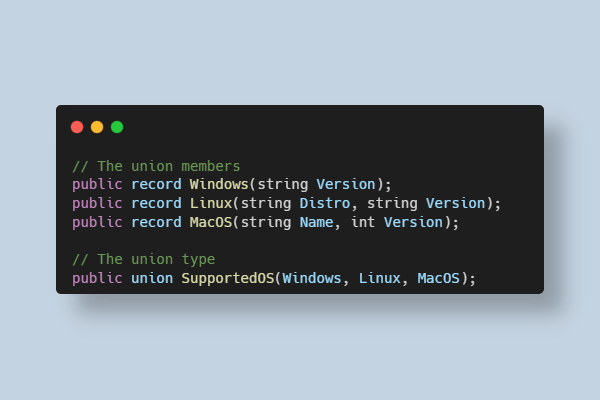
For example, imagine we have three different record types, containing different properties, representing Operating Systems:
public record Windows(string Version);
public record Linux(string Distro, string Version);
public record MacOS(string Name, int Version);
Note that these types don't have any values in common. Prior to C# 15, the main options for handling something which could be a Windows or Linux or MaxOS object would be:
- Try to create a base class from which all the types derive. That might work, but what if you don't control these types because they come from a library?
- Store the type in an
objectinstance. This works, but you lose all the safety of working with types in this case. - Use some "tag" value for keeping track of which type your object contains, e.g. using an
enumto track this.
In C# 15, we get direct support for this scenario with the union keyword, as shown below:
//     👇 Use `union` as the type
public union SupportedOS(Windows, Linux, MacOS);
//             👆 List the types that are part of the union
You can create an instance of the SupportedOS type in a couple of ways:
// You can call new and pass in an instance
SupportedOS os = new SupportedOS(new MacOS("Tahoe", 25));

// Or you can use implict conversion (which calls new() behind the scenes)
SupportedOS os = new MacOS("Tahoe", 25);
The generated union type implements the IUnion interface:
public interface IUnion
{
    object? Value { get; }
}
so you can always get the "inner" case value back out as an object? if you need to:
// You can access the stored "inner" object using `.Value`
Console.WriteLine(os.Value); // MacOS { Name = Tahoe, Version = 25 }
However, the canonical way to work with unions is to use a switch expression:
string GetDescription(SupportedOS os) => os switch
{
    Windows windows => $"Windows {windows.Version}",
    Linux linux => $"{linux.Distro} {linux.Version}",
    MacOS macOS => $"MacOS {macOS.Name} ({macOS.Version})",
}; // note: no discard _ required
The switch expression automatically extracts the inner case type, and a very neat thing is that you don't need to include the _ => "discard" case either: the compiler enforces that you check for each of the allowed values, but you only need to check these values. And if you forget one, you'll get a warning:
warning CS8509: The switch expression does not handle all possible values of its input type
(it is not exhaustive). For example, the pattern 'MacOS' is not covered.
Note that if one of your case types is nullable, e.g.
MacOS?then you'll need to handlenullin yourswitchexpressions too.
To come full circle, we could perhaps implement the Result<> type as the following (just an example, there's lots of different implementations we could choose!)
public union Result<T>(T, Exception);
or to show another classic, the Option<T> type:
public record class None;
public union Option<T>(None, T);
That's the basics of the union types in C# 15, so next we'll look at how you can use them today, before we look behind the scenes at how they're implemented.
Using union types in .NET 11
To use union types you need to do two things:
- Install .NET 11 preview 2+ SDK. The initial
unionsupport was added in preview 2, but you'll have a smoother experience if you install preview 4+. - Enable preview language support in your .csproj files, by adding
<LangVersion>preview</LangVersion>
<Project Sdk="Microsoft.NET.Sdk">

  <PropertyGroup>
    <OutputType>Exe</OutputType>

    <!-- 👇 Add this -->
    <LangVersion>preview</LangVersion>

    <TargetFrameworks>net11.0;net8.0;net48</TargetFrameworks>
    <ImplicitUsings>enable</ImplicitUsings>
    <Nullable>enable</Nullable>
  </PropertyGroup>

</Project>
Note that although you need to use the .NET 11 SDK, you can target earlier versions of the runtime, such as I'm doing in the above .csproj file. The union support is implemented as a compiler feature, so it's available on earlier runtimes (even if it's not technically supported on them).
However, if you're targeting earlier runtimes (or you're using .NET 11 preview 2 or preview 3), then you'll also need to add some helper types to your project:
#if !NET11_0_OR_GREATER
namespace System.Runtime.CompilerServices;

[AttributeUsage(Class | Struct, AllowMultiple = false, Inherited = false)]
public sealed class UnionAttribute : Attribute;

public interface IUnion
{
    object? Value { get; }
}
These were added to .NET 11 in preview 4, so they'll be available automatically if you're using a newer SDK, but you'll need to include them if you're targeting earlier runtimes, regardless.
As you might have guessed, when the compiler creates the union types, it uses this attribute and implements this interface. In the next section we'll take a look at what the generated code looks like, to understand how the union types are implemented.
In terms of IDE support, if you're using either Visual Studio Preview, or VS Code's C# DevKit Insiders, then you should have initial support. Support for JetBrains Rider is still pending.
How are union types implemented
You can see the full spec for union types here, but the standard generated code is really pretty simple:
using System.Runtime.CompilerServices;

[Union]
public struct SupportedOS : IUnion
{
    public object? Value { get; }

    // Constructors for each case type
    public SupportedOS(Windows value) => this.Value = (object) value;
    public SupportedOS(Linux value) => this.Value = (object) value;
    public SupportedOS(MacOS value) => this.Value = (object) value;
}
As you can see, the generated SupportedOS type:
- Is a
struct, decorated with the[Union]attribute. - Has a single, readonly,
object? Valueproperty, implementing theIUnioninterface. - Has a constructor for each of the case types it supports.
I was somewhat surprised to find there was no implicit conversion from the case types to the SupportedOS type, given that we can write code like this:
SupportedOS os = new MacOS("Tahoe", 25);
However it looks like the compiler simply rewrites this to use the [Union] constructor:
// SupportedOS os = new MacOS("Tahoe", 25);

// The compiler emits code that looks like this:
SupportedOS os = new SupportedOS(new MacOS("Tahoe", 25));
This implicit conversion is all driven by the [Union] attribute. You can see this in action if we rewrite our example to not use the union keyword, and instead use the implementation code shown previously but we "forget" to include the [Union] attribute:
using System.Runtime.CompilerServices;

SupportedOS os = new MacOS("Tahoe", 25); // Cannot implicitly convert type 'MacOS' to 'SupportedOS'

var description = os switch
{
    Windows windows => $"Windows {windows.Version}",        // An expression of type 'SupportedOS' cannot be handled by a pattern of type 'Windows'
    Linux linux => $"{linux.Distro} {linux.Version}",       // An expression of type 'SupportedOS' cannot be handled by a pattern of type 'Linux'
    MacOS macOS => $"MacOS {macOS.Name} ({macOS.Version})", // An expression of type 'SupportedOS' cannot be handled by a pattern of type 'MacOS'
};

public record Windows(string Version);
public record Linux(string Distro, string Version);
public record MacOS(string Name, int Version);

// 👇 This attribute is required to be a valid Union type,
//     just removed here for demo purposes
// [Union]
public struct SupportedOS : IUnion
{
    public object? Value { get; }

    public SupportedOS(Windows value) => this.Value = (object) value;
    public SupportedOS(Linux value) => this.Value = (object) value;
    public SupportedOS(MacOS value) => this.Value = (object) value;
}
The code above fails to compile with the following, demonstrating how the [Union] attribute drives the implicit conversions and switch expressions:
error CS0029: Cannot implicitly convert type 'MacOS' to 'SupportedOS'
error CS8121: An expression of type 'SupportedOS' cannot be handled by a pattern of type 'Windows'.
error CS8121: An expression of type 'SupportedOS' cannot be handled by a pattern of type 'Linux'.
error CS8121: An expression of type 'SupportedOS' cannot be handled by a pattern of type 'MacOS'.
If you re-instate the [Union] attribute, everything compiles and runs just fine, which shows how you can create your own custom union types.
Avoiding boxing with custom Union implementations
Given we're just getting support for union types, why might you want to create custom Union types? One reason is that you might already be using custom union types, such as provided by OneOf, or Sasa (two packages I've used in the past). In these cases, the libraries could benefit from built-in language support (e.g. switch expression support) by simply implementing the IUnion interface and adding the [Union] attribute.
Another case is when the "store the case type in an object instance" just isn't good enough for you. The generated union type is always a struct with a single object field. That means that if you're creating a union of multiple struct types, those types are going to be boxed onto the heap.
For example, imagine you need this union, which can represent either an int or a bool:
public union IntOrBool(int, bool);
The problem is that the int or bool passed into the constructor of IntOrBool is immediately boxed to an object and stored in the Value property:
[Union]
public struct IntOrBool : IUnion
{
    public object? Value { get; }

    // The struct arguments are always boxed, allocating on the heap
    public IntOrBool(int value) => this.Value = (object) value;
    public IntOrBool(bool value) => this.Value = (object) value;
}
This allocates on the heap, which is generally undesirable, as union types are intended to be largely transparent performance-wise. Any switch expressions using this implementation will similarly use the Value property. For example, with the basic built-in union implementation, the following expression:
IntOrBool intOrBool;
var description = intOrBool switch
{
    int i => "integer",
    bool b => "bool",
};
would lower to code similar to this:
IntOrBool unmatchedValue = new IntOrBool(23);
object obj = unmatchedValue.Value; // 👈 Access the boxed value
string str;
if (obj is int _)
{
    str = "integer";
}
else if (obj is bool _)
{
    str = "bool";
}
else
{
    ThrowSwitchExpressionException((object) unmatchedValue); // can't happen, but handled anyway
}
In many cases, the boxing allocation won't really matter, but in other places, such as in hot paths, the boxing is undesirable. To account for this, the union feature allows for a "non-boxing" implementation, using a TryGetValue pattern. This requires that you implement:
bool HasValue { get; }which returnstrueif the stored value is non-nullbool TryGetValue(out T value)for each case type,T
For example, the following is a potential implementation of the IntOrBool type above that avoids boxing
[Union]
public struct IntOrBool : IUnion
{
    private readonly bool _isBool;
    private readonly int _value;

    public IntOrBool(int value)
    {
        _isBool = false;
        _value = value;
    }

    public IntOrBool(bool value)
    {
        _isBool = true;
        _value = value ? 1 : 0;
    }

    public bool HasValue => true; // the values are never null
    public bool TryGetValue(out int value) // get the int value without boxing
    {
        value = _value;
        return !_isBool;
    }
    public bool TryGetValue(out bool value) // get the bool value without boxing
    {
        value = _isBool && _value is 1;
        return _isBool;
    }

    // 👇 Have to implement this to satisfy IUnion,
    // and it still boxes, but it won't be used by default.
    public object Value => _isBool ? _value is 1 : _value;
}
When you implement the TryGetValue() methods, the compiler automatically uses them in switch expressions instead of the Value property, so the switch expression above becomes the following:
IntOrBool unmatchedValue = new IntOrBool(23);
string str;
// 👇 Calls TryGetValue instead of using the boxing Value property
if (unmatchedValue.TryGetValue(out int _))
{
    str = "integer";
}
else if (unmatchedValue.TryGetValue(out bool _))
{
    str = "bool";
}
else
{
    ThrowSwitchExpressionException((object) unmatchedValue); // can't happen, but handled anyway
}
Depending on your code paths and use-cases, it may or may not be worth creating custom non-boxing implementations like this, it depends on what you're using the union types for in your code base.
What other features are yet to come?
The union implementation is usable as currently shipped, but there's even more to the language proposal than I've covered. Here are some of the related features that are yet to come:
- Union member providers. These provide a way to define the members that are part of the union type on a different type to the union itself.
- Closed enums. These are
enums in which you don't need to include a "catch-all" expression (_ =>) in theswitchexpression for theenum. - Closed hierarchies. This allows adding the
closedmodifier on aclassto prevent derived classes from being declared outside the defining assembly, which then similarly allows exhaustiveswitchexpressions without a catch-all expression.
These features may or may not make it into .NET 11, but I'll be sure to cover them if they do!
Summary
In this post I described the support for union types introduced in .NET 11 preview 2. I described the steps you need to implement them, as well as how to deconstruct union types using switch expressions. I showed the union declaration syntax, how they're implemented behind the scenes, as well as how to implement a non-boxing version of a union type. Finally I discussed some of the plans and roadmap for union types and for exhaustiveness improvements in C# that are yet to be released.
