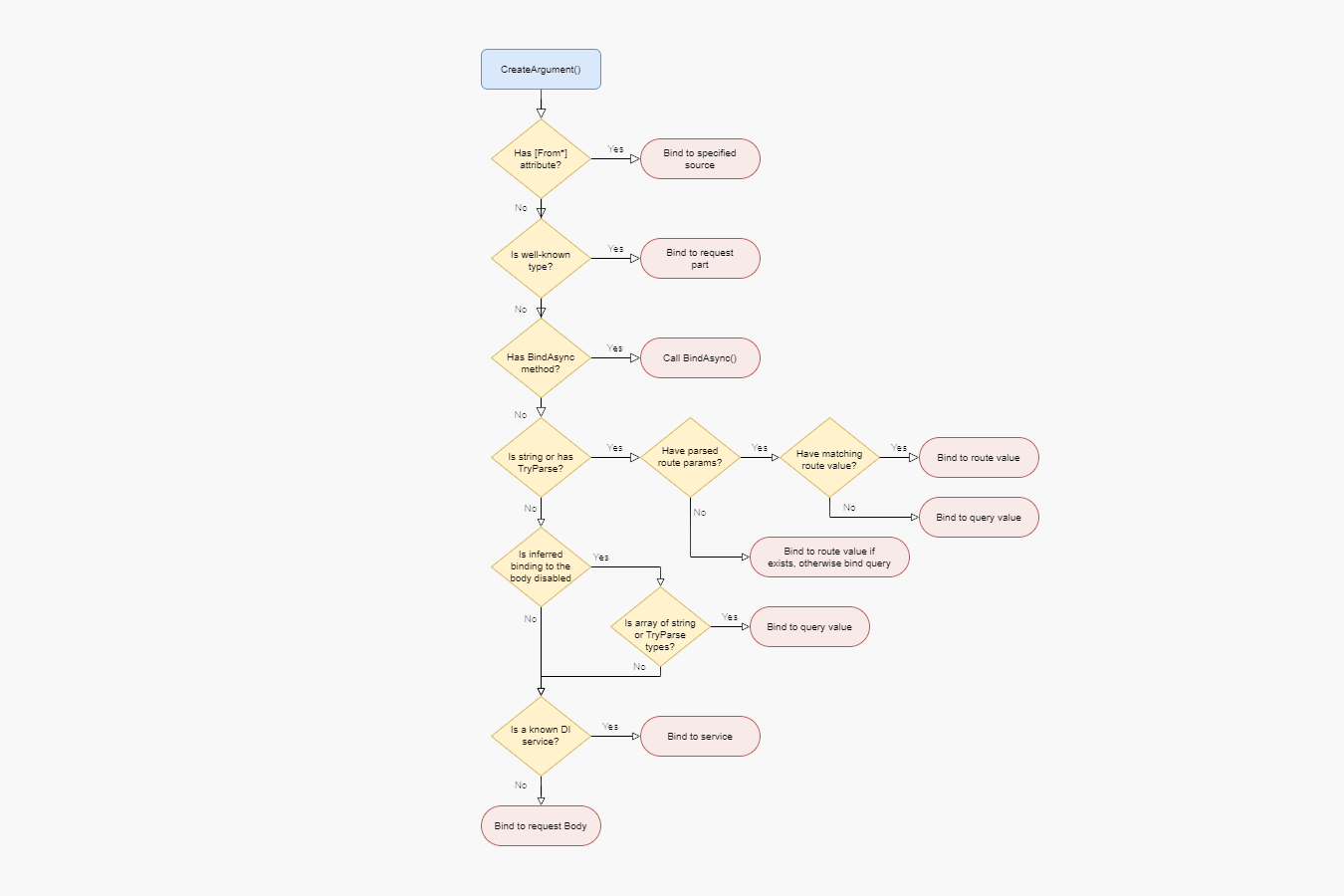

In the previous post in this series, we looked in detail at the RequestDelegateFactory.InferMetadata() method, and how it infers metadata about a minimal API endpoint handler. In that post I skipped over an important step, the RequestDelegateFactory.CreateArgument() method. In this post we explore the code in CreateArgument(), and see how it fundamentally defines the model-binding behaviour of minimal APIs.
- A quick recap of
RequestDelegateFactory - The responsibilities of
CreateArgument - Guarding against invalid values in
CreateArgument() - Understanding the model binding precedence in minimal APIs
A quick recap of RequestDelegateFactory
In this series we've looked at some of the important classes and methods involved in building the metadata about an endpoint, and ultimately building the RequestDelegate that ASP.NET Core executes:
RouteEndpointDataSource—stores the "raw" details about each endpoint (the handlerdelegate, theRoutePatternetc), and initiates the building of the endpoints into aRequestDelegateand collating of the endpoint's metadata.RequestDelegateFactory.InferMetadata()—responsible for reading the metadata about the endpoint handler's arguments and return value, and for building anExpressionfor each argument that can be later used to build theRequestDelegateRequestDelegateFactory.Create()—responsible for creating theRequestDelegatethat ASP.NET Core invokes by building and compiling anExpressionfrom the endpoint handler.
So far we've been focusing on the InferMetadata() function, and in this post we're looking at a method it calls: CreateArgument(). As a reminder, this is what InferMetadata() looks like:
public static RequestDelegateMetadataResult InferMetadata(
    MethodInfo methodInfo, RequestDelegateFactoryOptions? options = null)
{
    var factoryContext = CreateFactoryContext(options);
    factoryContext.ArgumentExpressions =
        CreateArgumentsAndInferMetadata(methodInfo, factoryContext);

    return new RequestDelegateMetadataResult
    {
        EndpointMetadata = AsReadOnlyList(factoryContext.EndpointBuilder.Metadata),
    };
}
CreateArgumentsAndInferMetadata() in turn calls CreateArguments(), passing in details about the endpoint handler's parameters as ParameterInfo[]:
private static Expression[] CreateArgumentsAndInferMetadata(
    MethodInfo methodInfo, RequestDelegateFactoryContext factoryContext)
{
    var args = CreateArguments(methodInfo.GetParameters(), factoryContext);
    // ...
    return args;
}
And CreateArguments() ultimately calls CreateArgument() on each ParameterInfo:
private static Expression[] CreateArguments(
    ParameterInfo[]? parameters, RequestDelegateFactoryContext factoryContext)
{
    // ...
    var args = new Expression[parameters.Length];

    for (var i = 0; i < parameters.Length; i++)
    {
        args[i] = CreateArgument(parameters[i], factoryContext); // 👈
    }
    // ...
    return args;
}
In this post we're going to look in detail at the structure of the CreateArgument() method.
The responsibilities of CreateArgument
From the name and the signature, you'd think that the responsibilities of CreateArgument were simple, and in some ways they are: it creates an Expression that can create a handler parameter given access to an HttpContext httpContext variable.
For example, lets imagine you have a handler that looks something like this:
app.MapGet("/{id}", (string id, HttpRequest request, ISomeService service) => {});
To execute the handler, ASP.NET Core ultimately needs to generate an expression that looks a bit like this:
Task Invoke(HttpContext httpContext)
{
    // Parse and model-bind the `id` parameter from the RouteValues
    bool wasParamCheckFailure = false;

    string id_local = httpContext.RouteValues["id"];
    if (id_local == null)
    {
        wasParamCheckFailure = true;
        Log.RequiredParameterNotProvided(httpContext, "string", "id", "route");
    }

    if(wasParamCheckFailure)
    {
        // binding failed, return a 400
        httpContext.Response.StatusCode = 400;
        return Task.CompletedTask;
    }

    // handler is the original lambda handler method.
    // The HttpRequest parameter has been automatically created from the HttpContext argument
    // and the ISomeService parameter is retreived from the DI container
    string text = handler.Invoke(
        id_local,
        httpContext.Request,
        httpContext.RequestServices.GetRequiredService<ISomeService>());

    // The return value is written to the response as expected
    httpContext.Response.ContentType ??= "text/plain; charset=utf-8";
    return httpContext.Response.WriteAsync(text);
}
You'll notice there's a lot of code here! A lot of this (though not all) is generated by CreateArgument() as an Expression tree. From this code alone, you can see that CreateArgument() is indirectly responsible for various other features:
- It defines the order of model-binding. The fact that the
idparameter is bound to a route parameter and not to the querystring is defined inCreateArgument(). - It defines the behaviour when model-binding fails. The different behaviour between optional and required parameters, and a failure to parse them are all handled here.
In this post, we focus on the first of these responsibilities, exploring how the code in CreateArgument() defines the model binding behaviour of minimal APIs.
I'm not going to look at the generated
Expressiontrees in this post; we'll look at those in the next post. In this post we're going to look at howCreateArgumentchooses whichExpressiontree to generate.
Guarding against invalid values in CreateArgument()
As you might expect, the first thing CreateArgument() does is guard against invalid arguments. It specifically checks for 2 things:
- The parameter has a name (
ParameterInfo.Name is not null). Parameters will normally have a name in your handlers, but parameter names are technically optional in IL. - The parameter doesn't use
in,out, orrefmodifiers. These aren't supported in minimal APIs.
In both of these cases, CreateArgument() throws an exception, immediately stopping the application. The snippet below shows how CreateArgument() makes the checks:
private static Expression CreateArgument(
    ParameterInfo parameter, RequestDelegateFactoryContext factoryContext)
{
    if (parameter.Name is null)
    {
        throw new InvalidOperationException(
            $"Encountered a parameter of type '{parameter.ParameterType}' without a name. Parameters must have a name.");
    }

    if (parameter.ParameterType.IsByRef)
    {
        var attribute = "ref";

        if (parameter.Attributes.HasFlag(ParameterAttributes.In))
        {
            attribute = "in";
        }
        else if (parameter.Attributes.HasFlag(ParameterAttributes.Out))
        {
            attribute = "out";
        }

        throw new NotSupportedException(
            $"The by reference parameter '{attribute} {TypeNameHelper.GetTypeDisplayName(parameter.ParameterType, fullName: false)} {parameter.Name}' is not supported.");
    }

    // ..
}
Once these simple checks are out the way, we're left with the main bulk of the CreateArgument() method, which is basically a giant if...else if statement! This giant if statement defines the core model-binding precedence behaviour of minimal APIs.
Understanding the model binding precedence in minimal APIs
Rather than reproduce all 150(!) lines of the if statement, we'll start by looking at the broad categories that CreateArgument() uses, in order of precedence:
- Does the parameter have a
[From*]attribute? If so, bind to the appropriate source. So if the parameter has a[FromHeader]attribute, bind to the header value. - Is the parameter a "well-known" type like
HttpContextorHttpRequest? If so, use the appropriate type from the request. - Does the parameter have a
BindAsync()method? If so, call the method to bind the parameter. - Is the method a
string, or does it have aTryParsemethod (for example built-in types likeintandGuid, as well as custom types). If so:- Were route parameters successfully parsed from the
RoutePattern?- If yes, is there a route parameter that matches the parameter name? If so, bind from the route values.
- If there is not a route parameter that matches, bind from the querystring.
- If route parameters were not successfully parsed from
RoutePatterntry to bind to the requestRouteValues, and if the parameter is not found, fallback to the querystring instead.
- Were route parameters successfully parsed from the
- If binding to the body is disabled and the parameter is an
Arrayof types that implementTryParse(orstring/StringValues) then bind to the querystring. - Is the parameter a service type known to DI? If yes, bind to the DI service.
- Otherwise, bind to the request body by deserializing as JSON.
Ok… maybe that's still quite hard to follow. As an alternative, you can think of the if as implementing the following flow chart:

Each of the steps above includes further decisions and logic, so in the following sections I'll walk through each of the above and discuss them in a little more detail.
One aspect I'm not going to touch on is the required vs optional behaviour, for example throwing an exception if a non-optional parameter is not present in the querystring. This is largely handled in the
Expression-generation stage, rather than the "choose a binding source" stage that we're focusing on in this post.
1. Binding [From*] parameters
The highest precedence for binding is where you have applied a [From*] attribute to the parameter for example [FromRoute] or [FromQuery]:
app.MapGet("/{id}", ([FromRoute] int id, [FromQuery]string search) => "Hello world");
CreateArgument checks for each of the supported [From] attributes in turn; the first attribute to be found defines the binding source for the parameter. In most cases CreateArgument "blindly" uses the specified source, though it checks for a couple of invalid conditions and throws immediately if it encounters them:
- If you have a
[FromRoute]attribute, the route parameters have been parsed from theRoutePattern, but the name of the parameter (or the name provided in the attribute) doesn't exist in the route collection, you'll get anInvalidOperationException(); - If you apply the
[FromForm]attribute to a parameter that is notIFormFileorIFormFileCollectionyou'll get aNotSupportedException. - If you specify a
Namein the[FromForm]attribute applied to anIFormFileCollectionyou'll get aNotSupportedException(specifying a name is only supported forIFormFile). - If you try to use "nested"
[AsParameters]attributes (applying[AsParameters]to a property) you'll get aNotSupportedException.
These exceptions are thrown immediately when CreateArgument is called, so the endpoint is never built, and your app won't start up correctly.
CreateArgument() looks for each of the [From*] attributes in the order shown in the snippet below. This isn't valid C#, it's just pseudo-code (so don't shout at me), but I think it makes it easier to see both the order of attributes, and some of the "sub" decisions made.
switch =>
{
    // If the parameter has a [FromRoute] attribute, bind to route parameter if it exists
    // if the parameter doesn't exist, throw an InvalidOperationException
    [FromRoute] when "param" exists => HttpContext.Request.RouteValues["param"],
    [FromRoute] => throw new InvalidOperationException(),

    // If the parameter has a [FromQuery] attribute, bind to query parameter
    [FromQuery] => HttpContext.Request.Query["param"],

    // If the parameter has a [FromHeader] attribute, bind to header parameter
    [FromHeader] => HttpContext.Request.Headers["param"],

    // If the parameter has a [FromBody] attribute, bind to the request stream or request body
    // depending on the parameter type
    [FromBody] => switch parmeterType
    {
        Stream stream => HttpContext.Request.Body,
        PipeReader reader => HttpContext.Request.BodyReader,
        // If a generic type, add metadata indicating the API accepts 'application/json' with type T
        T _ => JsonSerializer.Deserialize<T>(HttpContext.Request.Body),
    },

    // If the parameter has a [FromForm] attribute, bind to the request body as a form
    // This also adds metadata indicating the API accepts the 'multipart/form-data' content-type
    [FromForm] => switch parameterType
    {
        IFormFileCollection collection => HttpRequest.Form.Files,
        IFormFile file => HttpRequest.Form.Files["param"],
        _ => throw new NotSupportedException(),
    },

    // If the parameter has a [FromServices] attribute, bind to a service in DI
    [FromServices] => HttpContext.RequestServices.GetRequiredService(parameterType),

    // If the parameter has an [AsParameters] attribute, recursively bind the properties of the parameter
    [AsParameters] => goto start!
}
Note that when binding to the request body, CreateArgument also adds appropriate [Accepts] metadata indicating the expected shape of the request body, inferred from the parameter's type.
2. Binding well-known types
If the parameter doesn't have a [From*] attribute, CreateArgument checks to see if it is a Type that can bind directly to part of HttpContext. It specifically checks for the following types, in the following order:
HttpContext(binds tohttpContext)HttpRequest(binds tohttpContext.Request)HttpResponse(binds tohttpContext.Response)ClaimsPrincipal(binds tohttpContext.User)CancellationToken(binds tohttpContext.RequestAborted)IFormFileCollection(binds tohttpContext.Request.Form.Files, and adds inferred[Accepts]metadata)IFormFile(binds tohttpContext.Request.Form.Files["param"], and adds inferred[Accepts]metadata)Stream(binds tohttpContext.Request.Body)PipeReader(binds tohttpContext.Request.BodyReader)
Most of these are very simple bindings as they are literally types available on the HttpContext. Only IFormFile and IFormFileCollection require more complex binding expressions.
3. Binding using BindAsync methods
After checking whether the Type is a well-known type, CreateArgument() checks whether the method has a BindAsync method. If so, this method is completely responsible for binding the argument to the request.
You can implement one of two BindAsync methods:
public static ValueTask<T?> BindAsync(HttpContext context, ParameterInfo parameter);
public static ValueTask<T?> BindAsync(HttpContext context);
These aren't part of an interface per-se; instead ASP.NET Core uses reflection to check whether the parameter type implements the method, and caches the result.
4. Binding string and TryParse parameters
If you don't specify a [From*] attribute, then most built-in types (like int and string) will bind to route parameters or the query string. This also applies to any types that implement the new IParseable interface (introduced in C#11, using static abstract members), or which have one of the appropriate TryParse methods:
public static bool TryParse(string value, T out result);
public static bool TryParse(string value, IFormatProvider provider, T out result);
Similar to BindAsync, the presence of the static TryParse method is found using reflection and cached so each type is only checked once.
If a route parameter exists with the expected name, the parameter is bound to the route value. If not, it binds to the query value.
There's an interesting third possibility, where the route parameters from the RoutePattern are not available. I'm not sure in what scenarios that can happen, but if it does, the parameter will try to bind to both the route and the query. At runtime, if a route value with the expected name exists it will be used, otherwise the parameter is bound to the querystring.
5. Binding arrays to the querystring
The next binding is an interesting one. It only applies if
- The parameter is a
string[],StringValues,StringValues?, orT[]whereThas aTryParse()method DisableInferredFromBodyistrue(which is the case forGETandDELETErequests for example, as described in my previous post)
If both of these conditions are true, then the parameter is bound to the querystring.
Remember that a URL querystring can contain multiple instances of the same key, for example
?q=1&q=2&q=3. For a handler such as(int[] q) => {}, theqparameter would be an array with three values:new [] {1, 2, 3}.
What makes this binding interesting is that binding an array parameter type such as int[] is valid for both GET and POST requests, but how it's bound is completely different. That's different to all other binding approaches, where parameter bindings are either identical for all HTTP verbs (e.g. [From*] attributes or BindAsync) or are only valid at all for some verbs (e.g. binding complex types to the request body, as we'll see shortly).
But int[] is different. It binds to a different part of the request depending on the HTTP verb: it binds to the querystring for GET (and similar) requests, while for POST (and similar) requests it binds to the request body, just like any other complex type.
6. Binding services
You can inject any service that's registered in the DI container as a parameter in your minimal API handler, and an instance of the service is automatically retrieved and injected for you.
ASP.NET Core determines whether a given request is a service that can be injected using the (interestingly named) IServiceProviderIsService interface. This interface was introduced in .NET 6 (as I discussed in a previous post) specifically for this purpose. You call serviceProviderIsService.IsService(type), and if the DI container is able to provide an instance of type then it returns true.
If you're using a third-party DI container instead of the built-in one, then the container must implement
IServiceProviderIsService. It's supported in modern containers like Autofac and Lamar, but if your container doesn't implement the interface, you won't get automatic binding to services, and you must use[FromService]instead.
7. Last chance: binding to the Body
If none of the other binding options are matched, the final option is to bind to the request body. Note that this option happens regardless of whether you're in a GET or DELETE request in which DisableInferredFromBody is true. This "incorrect" behaviour is corrected for later in the CreateArguments() method after all the handler parameters are bound, as I described in my previous post:
// Did we try to infer binding to the body when we shouldn't?
if (factoryContext.HasInferredBody && factoryContext.DisableInferredFromBody)
{
    var errorMessage = BuildErrorMessageForInferredBodyParameter(factoryContext);
    throw new InvalidOperationException(errorMessage);
}

// Did we try and bind to both JSON body and Form body?
if (factoryContext.JsonRequestBodyParameter is not null &&
    factoryContext.FirstFormRequestBodyParameter is not null)
{
    var errorMessage = BuildErrorMessageForFormAndJsonBodyParameters(factoryContext);
    throw new InvalidOperationException(errorMessage);
}

// Did we try to bind to the body multiple times?
if (factoryContext.HasMultipleBodyParameters)
{
    var errorMessage = BuildErrorMessageForMultipleBodyParameters(factoryContext);
    throw new InvalidOperationException(errorMessage);
}
So if we incorrectly try and bind to the body, we don't error immediately, but after all the parameters have been analysed, we'll throw an InvalidOperationException, blocking the application from running further.
As well as generating the Expression tree for binding to the request body, the final binding stage adds [Accepts] metadata to the endpoint's collection, indicating that the request expects a JSON request matching the Type of the bound parameter.
And with that we've come to the end of this long post on model binding in minimal APIs! In the next post in the series we'll dig in closer to each of these bindings, looking at the Expression trees the RequestDelegateFactory generates!
Summary
In this post, I described how the RequestDelegateFactory.CreateArgument() method defines the model-binding logic for minimal APIs. CreateArgument() is responsible for creating an Expression that defines how to create the argument to minimal API handler, so a fundamental decision is which source to use: headers, the querystring, a DI service etc.
I showed that the minimal API model-binding logic works through seven different categories when determining which source to use: [From*] attributes, well-known types, BindAsync() methods, TryParse() methods, array binding to the querystring (for GET requests), DI services, and finally the request body. The first source that a parameter matches is used. This determines the Expression that is generated. In the next post we'll look at what the generated Expression trees actually look like!
