

In this post I look at the Fetch Metadata HTTP headers that have been part of browsers for several years now. I describe what each of the four headers means, when they're sent, and how you might consider using them. In the next post I look at how .NET 11 is going to use these headers to provide simplifier Cross-Site Request Forgery (CSRF) protection.
What are the Fetch Metadata HTTP headers?
The Fetch Metadata Request Headers specification was first published in 2019, and has been through many revisions, with the latest version published in 2025. It defines a set of HTTP request headers that browsers can send with HTTP requests so that the server has better context about the request being made.
The theory is that it is hard for servers to "know" whether a given HTTP request is "legitimate" in the flow of a normal application, or whether it has been triggered maliciously via a link in an <img> tag, for example. These headers provide that extra context.
There are already many additional protections designed at trying to limit the requests a browser will actually make (see my series on Cross Origin security headers, for example). The Fetch Metadata approach is slightly different in that it is primarily about giving the server more context with which to decide how to handle the request, as opposed to the other way around.
There are four metadata headers defined in the spec:
Sec-Fetch-DestSec-Fetch-SiteSec-Fetch-ModeSec-Fetch-User
With these headers, it's possible for the server to know whether a request was the result of a user clicking a link and navigating to a new page, whether the request was made directly with a fetch() JavaScript call, or whether the request was initiated by a page on the same or a different origin.
These headers can't be set or modified via JavaScript APIs, so the server knows that the values it receives can be trusted, and are an accurate representation of the real scenario.
We'll walk through what each of these headers means, the possible values it can take, and how these can be used by a server to understand the provenance and intention of the request.
The Sec-Fetch-Dest header
This header says where the response to a given request is going to end up. For example, if the request is initiated by an <img> tag, the Sec-Fetch-Dest header is set to image, whereas if the request is initiated by an iframe, the Sec-Fetch-Dest header will be set to iframe.
Many of the Sec-Fetch-Dest values are self explanatory, as you'll see shortly (e.g. the <audio> tag will have an audio value), but there's a couple of values of particular interest:
documentmeans that the request was due to a user-initiated top-level navigation, such as clicking a link, or entering a URI into the navigation bar, and will replace the top level page.emptymeans that the request does not have a defined destination. This could be due to afetch()request, anXMLHttpRequest, aWebRequest, or other similar request.imagemeans that the request will be used as an image. Note that this doesn't just mean the<img>tag; an<image>tag, a CSSbackground-image, and a CSSlist-style-imagewould all have theimagedestination, as it describes the type of the destination.
The current list of stable allowed values is below, including a short description of each value, and some of the specific initiators that would give this destination. The initiators aren't an exhaustive list, just a representative sample:
| Destination | Description | Potential initiators |
|---|---|---|
audio | Audio data | <audio tag |
audioworklet | Data fetched by an audio worklet | audioWorklet.addModule() |
document | Top-level document | Top-level navigation e.g. link click |
embed | Embedded content | <embed> tag |
empty | Other content | fetch(), navigator.sendBeacon(), WebSocket, and other similar APIs. |
font | Font data | CSS @font-face |
frame | Document displayed in a frame | <frame> tag |
iframe | Document displayed in an iframe | <iframe> tag |
image | Image data | <img> tag, <image> tag, CSS background-image, CSS cursor etc |
json | JSON data | Importing a JSON module with type: json |
manifest | A manifest | A <link rel=manifest> reference in HTML |
object | Object data | <object> tag |
paintworklet | Data fetched by a paint worklet | CSS.paintWorklet.addModule() |
report | A report (e.g. a CSP report) | Triggered by CSP or COEP violations, for example. |
script | Script data | <script> tag or importScripts() |
serviceworker | A service worker | navigator.serviceWorker.register() |
sharedworker | A shared worker | SharedWorker() |
style | A style sheet | <link rel=stylesheet> in HTML or @import in CSS |
track | HTML text track | <track> tag |
video | Video data | <video> |
webidentity | An endpoint for verifying user identity | Federated Credential Management requests |
worker | A web worker | Worker() |
xslt | An xslt transform | <?xml-stylesheet> |
The utility of this header for servers is relatively apparent. For example, if the server receives a request for a JavaScript file, but the destination is an <img>, that would be suspicious, and not something you'd expect for a legitimate request. The server could choose to not serve these suspicious requests, providing another layer of defence to their users.
The Sec-Fetch-Site header
The next header we'll look at is the Sec-Fetch-Site header. This header describes the relationship between the current site and the request, and can take one of four different values:
cross-site— the request initiator and the request destination (the server receiving the request) have different sites.same-origin— the request initiator and the request destination have the same origin (same scheme, domain, subdomain, and port).same-site— the request initiator and the request destination have the same site (same scheme and domain, but potentially different subdomain and/or port).none— the request is a user-originated operation like entering a URL in the address bar or clicking a bookmark, so there's no 'current' initiator.
Given I always have to remind myself what exactly can change with same-site vs same-origin, the table below (from my post on same-site cookies) provides a handy reference guide by comparing a destination site http://www.example.org against various different initiators
| URL | Description | same-site | same-origin |
|---|---|---|---|
http://www.example.org | Identical URL | ✅ | ✅ |
http://www.example.org:80 | Identical URL (implicit port) | ✅ | ✅ |
http://www.example.org:8080 | Different port | ✅ | ❌ |
http://sub.example.org | Different subdomain | ✅ | ❌ |
https://www.example.org | Different scheme (https) | ❌ | ❌ |
http://www.evil.org | Different domain | ❌ | ❌ |
http://www.example.evil | Different TLD | ❌ | ❌ |
This header lets servers understand the origin of a request, which is often a great way to eliminate a whole swathe of malicious requests. In fact, it forms the basis of the new CSRF protection added in .NET 11 (which I'll talk about in a follow up post).
The Sec-Fetch-Mode header
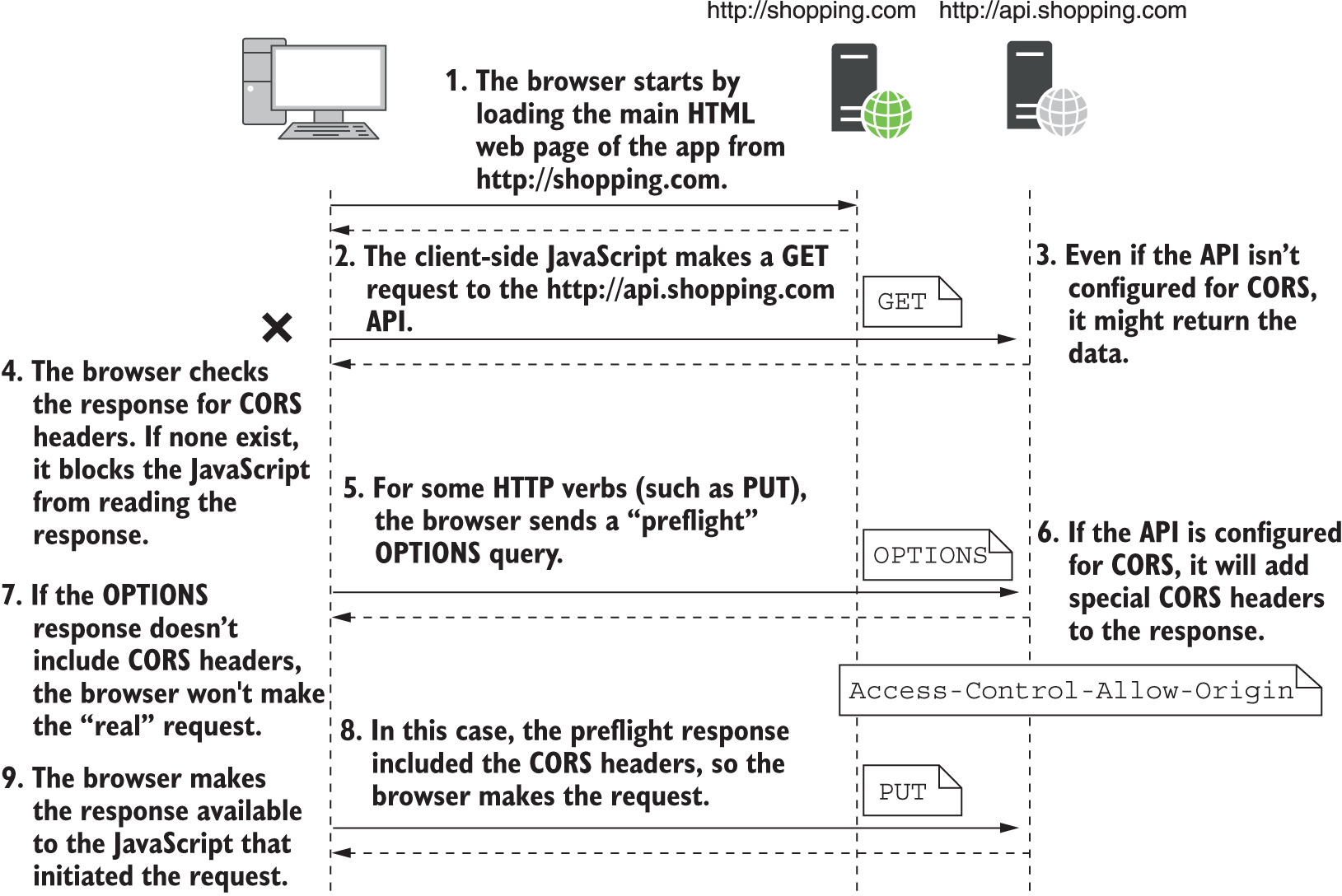
The Sec-Fetch-Mode header is probably the most confusing of the four headers, mostly because it requires you to understand the difference between a Cross Origin Resource Sharing (CORS) request, and a no-CORS request. We'll get into those differences shortly, but first let's look at the possible values, and what they mean.
navigate— the request was triggered by a top-level navigation, such as a user clicking on a link.websocket— the request is establishing a WebSocket connection.cors— the request is made in "cors" mode (more on that below).no-cors— the request is made in "no-cors" mode (more on that below).same-origin— the request is made from the same origin (so CORS/no-cors does not apply).
The main complexity with this header is understanding the difference between cors, no-cors, and same-origin. I've written about CORS previously, both in the context of ASP.NET Core and in the context of Cross Origin Resource Sharing (and associated headers), but it's one of those tricky-to understand subjects that people always end up fighting with!
As a brief summary:
same-originrequests are requests made to the same origin. These generally don't have any restrictions and are the easy, simple, happy path.corsrequests are cross-origin, where you make requests to a different origin than the current page. While you can initiate these requests, the browser may first make a preflight request using theOPTIONSverb, before sending the "real" request. And either way, the server has to explicitly allow requests to be sent, by returning the response withAccess-Control-Allow-Originheaders (the CORS headers). If the server doesn't add these headers, the browser will block the client-side JavaScript from reading the response.no-corsrequests are also cross-origin, but they explicitly don't need CORS headers to "allow" them to be sent. However, the response tono-corsrequests is explicitly blocked from JavaScript. JavaScript code sendingno-corsrequests can't read the headers or the body of the response!
When the browser sends a request to load the URL in an <img> tag, it loads it using no-cors mode; the results are opaque, they can't be read by JavaScript. This generally applies to all the links in an HTML page that the browser loads automatically; they're all loaded in no-cors mode, so that they can be loaded cross-origin, but can't be inspected by JavaScript code.
In contrast, any time you're sending requests using the fetch() API (for example), these will be cors mode by default. That means the request will fail (and the response will be blocked), unless the server explicitly adds CORS headers to allow the response to be read.
The Sec-Fetch-Mode header includes this information in the request, so the server knows how the request was made. The browser automatically loading a resource (in no-cors mode) might be totally fine, but if you know that it should never be requested by JavaScript directly (in cors mode), then that's a strong signal you should reject the request.
The Sec-Fetch-User headers
The final header is pretty simple; if the user initiated the action, it will have the value ?1. Otherwise the header will be omitted. So if you click a link, for example, the header Sec-Fetch-User: ?1 will be added, otherwise it will be missing.
Putting it all together
There's a lot to remember there, so let's put it all together with a few examples.
Your session starts by typing a request into the address bar, and the browser makes the initial request. The fetch Metadata headers will look something like this:
Sec-Fetch-Dest: document
Sec-Fetch-Mode: navigate
Sec-Fetch-Site: none
Sec-Fetch-User: ?1
Then the browser starts loading resources, it loads images, stylesheets, scripts. The stylesheet requests hosted on the same server would look something like this:
Sec-Fetch-Dest: style
Sec-Fetch-Mode: same-origin
Sec-Fetch-Site: same-origin
However the images are hosted on a CDN at a different origin, and look like this:
Sec-Fetch-Dest: image
Sec-Fetch-Mode: no-cors
Sec-Fetch-Site: cross-site
You then click a link, which navigates to a new page within the same orign:
Sec-Fetch-Dest: document
Sec-Fetch-Mode: navigate
Sec-Fetch-Site: same-origin
Sec-Fetch-User: ?1
On load, some background JavaScript makes a fetch() request to a third-party site, which looks like this:
Sec-Fetch-Dest: empty
Sec-Fetch-Mode: cors
Sec-Fetch-Site: cross-origin
Hopefully those all make sense as examples. In the next section, we look at some of the things you can do with these headers on the server side.
Putting it all together; protecting your site
The Fetch Metadata headers are primarily focused on providing the tools for servers to more easily mitigate cross-origin (commonly called cross-site) attacks. The classic cross-site scripting attack involves forging a request from a different page, and getting a user to inadvertently send it, in a process called Cross-Site Request Forgery.
I have a more detailed description of CSRF attacks in this post.
The canonical attack involves a malicious site forging a <form> and tricking you into POST-ing it to the victim server, which treats it as a "real" request from the user, and takes action (transfering money out of your bank account, for example):

The standard solution to these attacks have been anti-CSRF tokens, which have long been supported in ASP.NET Core. Same-Site Cookies are a newer layer of protection, preventing attackers from being able to send your authentication cookies.
The Fetch Metadata security headers allow another layer of defence, meaning you can block certain classes of requests entirely, without needing to think about anti-forgery tokens or same-site cookies. That's not to say you shouldn't use those defences, just that you can have another layer of protection.
For example, if you know that none of your site should be accessed cross-origin, then you might choose to block all cross-origin requests, except for those which are top-level navigations (so that users can still follow links to your site!). That might be too strict for your use case, but the important thing is that you have control. The policy you choose to implement is typically called a Resource Isolation Policy.
Ultimately, it's up to you to implement a Resource Isolation Policy, but there will likely be a "generally safe" implementation you could choose, but you would have to implement that in your web server of choice (e.g. ASP.NET Core for .NET). And that's what we'll look at next time; the new Fetch-Metadata based CSRF protection coming in .NET 11!
Summary
In this post I walked through the four headers that make up the Fetch Metadata headers. These headers provide information to a destination server about where a request is coming from, as well as how the response will be used. It lets the server know if the request is coming from the same or a different page, and it lets the server know if the response will be used as an image, a stylesheet, or provided to JavaScript code, for example. The information in the Fetch Metadata headers lets the server build additional cross-origin request forgery protections, without having to rely on the sometimes brittle "token-based" approaches which have been common up to now. In the next post, we'll look at how ASP.NET Core is putting these new headers to use in .NET 11.