
In this post, I take a look at the new Cross-Site Request Forgery (CSRF) protection added to ASP.NET Core in .NET 11 preview 6, which relies on the Fetch Metadata HTTP headers, instead of the "traditional" anti-CSRF tokens used in earlier versions of .NET Core.
If you haven't heard about the Fetch Metadata HTTP headers, I wrote a post about them last week that I'd recommend looking at first!
I first talk about CSRF attacks, the existing protections in ASP.NET Core, discuss why a new approach is possible, and provide a brief recap on Fetch Metadata headers. Next I show how this works in ASP.NET Core as of .NET 11 preview 6. Finally, I take a look at the implementation behind the feature, as well as dive into why the new feature doesn't really help you if you're using MVC or Razor Pages.
What is Cross-Site Request Forgery (CSRF)?
Cross-Site Request Forgery is a type of attack where a malicious website forges a request to your web app, and the application handles the request as though it was a legitimate request from a user.
The classic example of this attack involves an online banking application. Imagine you have an online banking application that stores authentication tokens in cookies. This is pretty standard in general, and is how ASP.NET Core Identity works by default, for example. After a user has logged in, these cookies are sent automatically by the browser with every request a user makes, when navigating around a website.
Now imagine that the banking application has a page that lets a user transfer funds from their account to another account using a POST request. Obviously you need to be logged in to access the form and send the request, but otherwise the form just contains the amount to transfer and where you want to transfer it. Clicking Submit on the form makes the POST request, and transfers the funds.
Some time later, after visiting the banking application, imagine that you accidentally visit a malicious web site. The attacker has embedded a form in their website that performs a POST to your bank’s application, identical to the genuine transfer-funds form on your banking website, but which requests sending $1,000 to the attacker. The browser automatically sends the cookies because you're already logged in, and the attacker makes off with your money! The site has just fallen victim to a Cross-Site Request Forgery (CSRF) attack.

Of course, there are various existing mitigations in both browsers and websites these days, to guard against this sort of attack. Same Site cookies provide a great defence, as they refuse to send the all important authentication cookies in the above scenario. Unfortunately, it's not always possible to enable same site cookies, depending on your application. The most common solution to preventing CSRF attacks is based on synchronizer tokens.
How does the existing CSRF protection work in ASP.NET Core?
ASP.NET Core has had built-in support for CSRF protection since at least ASP.NET Core 2.0. The support has evolved over the years, but it's fundamentally based on the synchronizer token pattern. This pattern works as follows:
- A user-specific, unique token is stored in a cookie, and is tied to the logged-in user.
- Another unique token, derived from the user, is added to any form rendered by the application.
- When the form is posted to the server, the server compares the tokens, and ensures they're valid. If they're not, the request is rejected and is not processed.
In recent versions of ASP.NET Core, the antiforgery tokens are added automatically to any POST form rendered using Razor . Additionally, antiforgery middleware is automatically added to the middleware pipeline, as long as you call AddAntiforgery(), AddMvc(), or similar methods on the DI container.
When the server receives a request, the middleware reads the IAntiforgeryMetadata associated with the selected endpoint, and executes IAntiforgery.ValidateRequestAsync(), which by default implements the synchronizer pattern discussed above.
In general, this works ok, and it's obviously been good enough for the last 10 years. So why are we talking about changing things?
Why do we need a new anti-CSRF feature in ASP.NET Core?
The existing synchronizer token protections work in general, but they're not without difficulties. For a start, the antiforgery protection depends on the Data Protection system in ASP.NET Core. This comes with some operational overhead, as it's a stateful system, which requires that you carefully protect and persist the data it's storing. Additionally, in a web-farm scenario (or more likely these days, kubernetes), you also need to securely share the data protection keys across all replicas. There are standard ways to do that, but it can be a bit of a challenge.
Additionally, only the most recently loaded page on a site using antiforgery tokens contains a valid token. That means that if users open a second tab, the original tab will no longer be valid. Unfortunately, there's not a good solution to this, and given that "multiple tabs" is such a basic browser feature, it's a pretty big drawback.
Finally, there's a performance aspect. As with everything in .NET-land these days, the data protection APIs have seen performance improvements over the years, but however you look at it, these APIs need to perform encryption/decryption/hashing of data on every request. While not that expensive in the grand scheme of things, it would be nice if it wasn't necessary.
Those limitations are annoying, but there wouldn't necessarily be a great alternative if it weren't for a relatively recent development in browsers: Fetch Metadata HTTP headers.
A recap on Fetch Metadata HTTP headers
The Fetch Metadata HTTP headers are a set of 4 security headers, that have been widely available in browsers since 2023, which are sent with all requests to the server. They provide additional context about an HTTP request, and can't be set by JavaScript. There are 4 headers that can be set:
Sec-Fetch-Dest—says what the response will be used for, e.g.image,style,document, orempty(if used in JavaScript).Sec-Fetch-Site—says where the request is coming fromcross-site/same-site/same-origin/none(if the user clicked a bookmark or entered the URL directly).Sec-Fetch-Mode—says whether the request is made with the modesame-origin/cors/no-cors/websocket/navigate(if it was a top-level navigation).Sec-Fetch-User—says whether the user initiated the action.
Put together, that means you get collections of headers like the following. An initial top-level navigation gives the following:
Sec-Fetch-Dest: document
Sec-Fetch-Mode: navigate
Sec-Fetch-Site: none
Sec-Fetch-User: ?1
Images loaded from a CDN might look like the following:
Sec-Fetch-Dest: image
Sec-Fetch-Mode: no-cors
Sec-Fetch-Site: cross-site
While JavaScript making a fetch() request to a third-part site would look like the following:
Sec-Fetch-Dest: empty
Sec-Fetch-Mode: cors
Sec-Fetch-Site: cross-origin
If you want to learn more about these headers, see my previous post, the MDN docs, or the spec.
With these headers available in all modern browsers, the way was open for ASP.NET Core to provide a simpler anti-CSRF algorithm.
Updating the anti-CSRF algorithm in ASP.NET Core
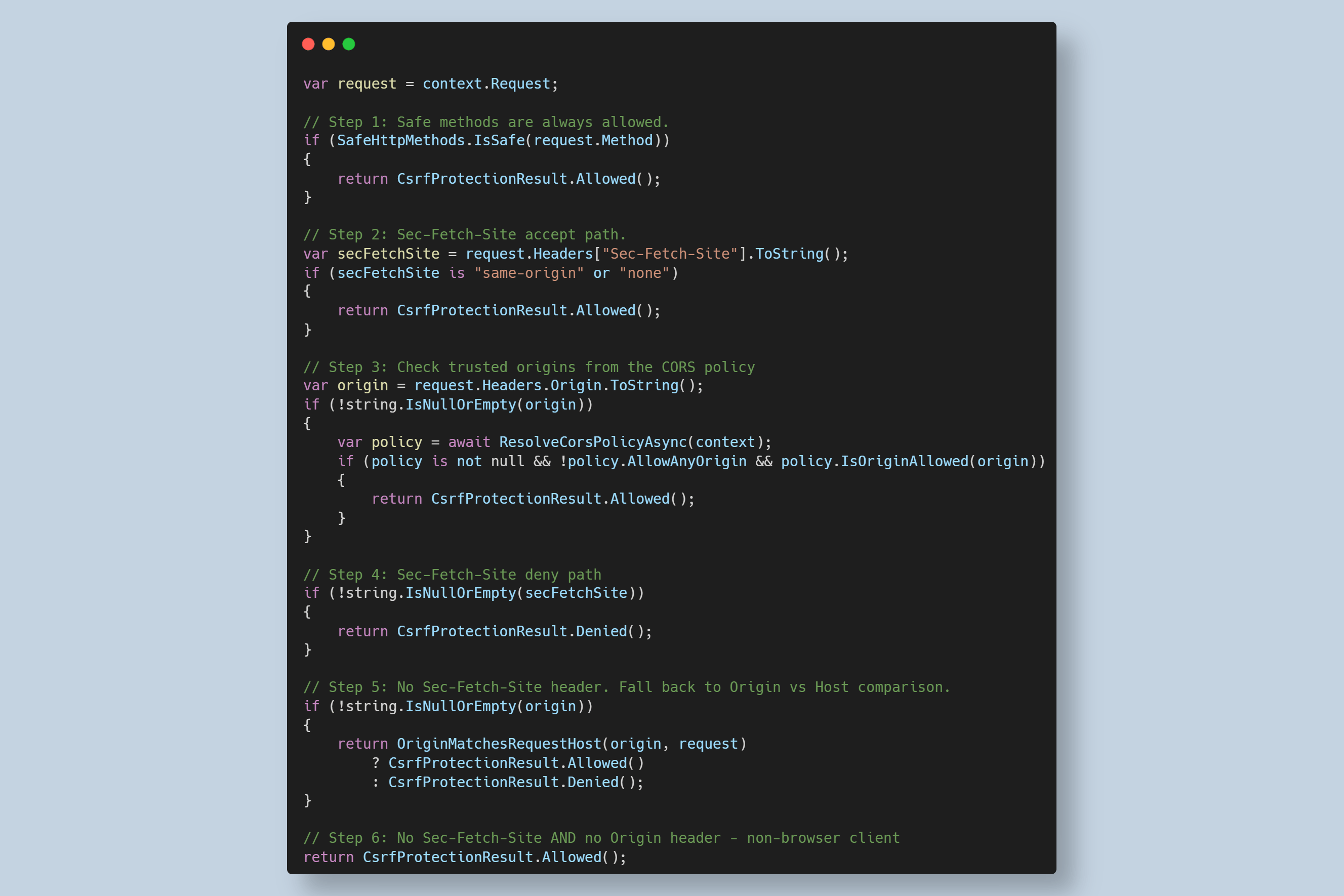
The instigation of a new ASP.NET Core algorithm for CSRF protection seems to have been prompted by an equivalent algorithm implemented in Go 1.25, and the Go algorithm is pretty much the same one implemented in ASP.NET Core. When enabled, the new algorithm works as follows:
- Is the request a safe HTTP verb:
GET,HEAD,OPTIONS,TRACE,QUERY?- If yes, the request is allowed.
- If no, continue.
- Is the
Sec-Fetch-Siteheader set tosame-originornone?- If yes, the request is allowed.
- If no, continue.
- Is the
Originheader present? If yes, is there a CORS policy for the endpoint?- If yes, and the
Originvalue is in the allow list, then the request is allowed. Note that "allow any origin" is ignored for this check. - If no, continue.
- If yes, and the
- Is the
Sec-Fetch-Siteheader present?- If yes (it should be either
cross-originorsame-site, as we already checked other values), and the request is denied. - If no, continue.
- If yes (it should be either
- Is the
Originheader present?- If yes, compare it to the
Hostheader. If they match, the request is allowed; if they don't match, the request is denied. - If the
Originheader is not present, continue
- If yes, compare it to the
- If none of the other checks apply, there was not a
Sec-Fetch-Siteor anOriginheader, which implies this is not a request from a browser. As CSRF is a browser-based attack, no protection is needed,- The request is allowed.
You can see this algorithm laid out very clearly in the new DefaultCsrfProtection service, which is the default implementation of ICsrfProtection, a new interface introduced in .NET 11. This abstraction is used by the CsrfProtectionMiddleware, which automatically invokes the CSRF protection algorithm (unless anti-CSRF has been explicitly disabled for an endpoint). This middleware is automatically added to the WebApplicationBuilder middleware pipeline, so you don't need to configure it directly.
Note that these types are different from the token-based CSRF protection:
IAntiforgery, theAntiforgeryMiddleware, and theUseAntiforgery()call are all related to the synchronizer token implementation, not the new Fetch Metadata implementation.
The CsrfProtectionMiddleware runs the above algorithm, but it doesn't immediately reject the request. Instead, it records the allowed/denied decision in the request, and then defers to later components to decide to act upon this decision. These components include:
- MVC actions
- Minimal APIs that read form data
- Blazor static server-side rendering (SSR) endpoints
- Any endpoint that reads the request body as a form
Note that not all endpoints will trigger an anti-CSRF failure, even if the CsrfProtectionMiddleware indicates a denied result. That's because requests are inherently only vulnerable to CSRF attacks if you're
- Using a browser
- Have Cookie authentication
- Are using
<form>data
So if you're reading the body as JSON; you're not vulnerable to CSRF attacks. If the request is sent by curl instead of using the browser; you're not vulnerable to CSRF attacks. So to avoid too many (irritating) false positives, the actual decision of whether the cross-origin request matters is made only when the framework takes a potentially risky action i.e. reading the request's body as a form.
That describes the new algorithm used by the CSRF protection middleware, but what do you, as an ASP.NET Core app author need to do to support this new approach?
Modifying your application to support the new middleware
The good news is that you probably don't need to change any of your applications to handle the CSRF changes in .NET 11. By design, the new system plugs seamlessly into the existing anti-CSRF protection that is already in place. Any DisableAntiforgery() calls or [IgnoreAntiforgeryToken] attributes are honoured by the new implementation the same way as the old one was.
The docs describe the general differences between the new CSRF protection and the existing token-based protection.
If your app is currently calling UseAntiforgery(), then you may want to remove it. Calling UseAntiforgery() adds the the old token-based validation middleware to the pipeline after the new CsrfProtectionMiddleware. The token-based middleware will then overwrite the token-based decision with its own decision, essentially keeping your app completely unchanged. If you want to opt-in to the new behaviour, remove any calls to UseAntiforgery().
Note that if you're using MVC or Razor Pages, there's basically no simple way today to opt into only using the new approach as far as I can tell. See the following section for details!
The main scenario where you may run into compatibility when upgrading to .NET 11 is when you have a cross-origin request that you want to allow, which is blocked by default in .NET 11. There are two main ways to tackle this scenario
- Disable CSRF protection for the endpoint entirely (by calling
DisableAntiforgery()for minimal APIs or adding[IgnoreAntiforgeryToken]for MVC/Razor Pages). - Add the specific allowed origin to the list of allowed CORS origins.
That latter point might be a bit confusing, given that CORS is essentially a different concern. However, it's clearly related, hence the configuration overlap. Let's say that you have an app running at https://example.com, and you need to accept a form post from https://shop.example.com:
var builder = WebApplication.CreateBuilder(args);
var app = builder.Build();

// The endpoint uses [FromForm] so it requests CSRF protection
app.MapPost("/success", ([FromForm] OrderId id, IOrderService order)
    => order.Handle(id);

app.Run();
As written above, requests to /success would fail with a 400 Bad Request response, when the anti-CSRF protection kicks in. To allow requests from shop.example.com you have to configure CORS to allow the origin.
var builder = WebApplication.CreateBuilder(args);

// Configure CORS to allow cross-origin requests
builder.Services.AddCors(options =>
{
    // We're adding a single default policy, but you could also create a
    // separate custom policy and apply it to the endpoint
    options.AddDefaultPolicy(policy =>
        policy.WithOrigins("https://shop.example.com") // Add the endpoint to trusted origins
              .AllowAnyHeader()
              .AllowAnyMethod());
});

var app = builder.Build();

app.UseCors();

// Now the endpoint can execute when the request is sent by https://shop.example.com
app.MapPost("/success", ([FromForm] OrderId id, IOrderService order)
    => order.Handle(id);

app.Run();
This shows how to update your minimal API applications, but if you have an MVC or Razor Pages application, you might be surprised to see that the older token generation and validation is still happening. But why?
Wait, why am I still seeing tokens, and getting 400 errors if they're not present?
Blazor static server-side rendering (SSR) was updated to no longer generate or validate anti-CSRF tokens in the cases where you are relying on the default CsrfProtectionMiddleware. But it looks like that's not the case for MVC and Razor Pages applications. These pages still generate and validate tokens, and so these endpoints will still fail if the tokens are modified or not present in the submitted forms.
I'm not entirely sure if this is a bug, or expected behaviour, but I believe it's the latter. I can't find anything in GitHub issues one way or the other.
Given the advantages that should come from using the new approach, I was a little disappointed. Sure, you can argue (as the docs do) that it's a "defence in depth" approach, but I think that's a bit disingenuous; if it's better to have both, why is this disabled for Blazor apps?
Anyway, I had a little play, and the long story short is that I couldn't find a neat way to disable the support, though I hacked around it. What follows is just an example of the moving pieces required, I'm not saying you should really do this 😅/
First of all, we need to stop MVC and Razor Pages automatically adding token generation to every <form> on the page. The easiest way I found is by using an ITagHelperInitializer which automatically disables the antiforgery generation for every instance:
public class DisableAntiForgeryTagHelperInitializer : ITagHelperInitializer<FormTagHelper>
{
    public void Initialize(FormTagHelper helper, ViewContext context)
    {
        helper.Antiforgery = false;
    }
}
Then we just need to register it in the DI container:
builder.Services.AddSingleton<ITagHelperInitializer<FormTagHelper>>(
    new DisableAntiForgeryTagHelperInitializer());
That avoids the generation of the token, but that means all requests that access form data would fail unless we disable the validation too. The difficulty with this one is that MVC/Razor Pages now adds the AutoValidateAntiforgeryTokenAttribute filter by default to all pages and action, and we need to remove that. The only way I could find to do that was to create a custom convention to remove the filter:
public class RemoveAntiforgeryConvention : IPageApplicationModelConvention, IControllerModelConvention
{
    public void Apply(PageApplicationModel model)
        => RemoveFilter(model.Filters);

    public void Apply(ControllerModel controller)
        => RemoveFilter(controller.Filters);

    private static void RemoveFilter(IList<IFilterMetadata> filters)
    {
        var antiforgeryFilter = filters.FirstOrDefault(f => f is AutoValidateAntiforgeryTokenAttribute);
        if (antiforgeryFilter != null)
        {
            filters.Remove(antiforgeryFilter);
        }
    }
}
We then need to add that to the Razor Pages and MVC conventions as part of app configuration:
builder.Services.AddRazorPages(options =>
{
    options.Conventions.Add(new RemoveAntiforgeryConvention());
});

builder.Services.AddControllersWithViews(options =>
{
    options.Conventions.Add(new RemoveAntiforgeryConvention());
    options.Filters.Add<CsrfProtectionAuthorizationFilter>();
});
However, this still isn't enough. The FormFeature has a method, HandleUncheckedAntiforgeryValidationFeature which runs before interacting with anything on Request.Form. This check looks to see if the AntiforgeryMiddleware or the CsrfProtectionMiddleware has added a blocking IAntiforgeryValidationFeature to the request. If it has, then the form throws an Exception (and ultimately generates a 500 Internal Server Error), because it expects that something should have handled the validation.
Put another way, it means we need to add our own version of AutoValidateAntiforgeryTokenAttribute that validates the IAntiforgeryValidationFeature created by the CsrfProtectionMiddleware. The following is a thrown-together version that's heavily based on the ValidateAntiforgeryTokenAttribute, but which checks the IAntiforgeryValidationFeature instead of using tokens:
internal sealed partial class CsrfProtectionAuthorizationFilter : IAuthorizationFilter, IAntiforgeryPolicy
{
    private readonly ILogger _logger;
    public CsrfProtectionAuthorizationFilter(ILoggerFactory loggerFactory)
    {
        _logger = loggerFactory.CreateLogger(GetType());
    }

    public void OnAuthorization(AuthorizationFilterContext context)
    {
        ArgumentNullException.ThrowIfNull(context);

        if (!context.IsEffectivePolicy<IAntiforgeryPolicy>(this))
        {
            Log.NotMostEffectiveFilter(_logger, typeof(IAntiforgeryPolicy));
            return;
        }

        // Retrieve the validation feature from the context, and if it's not valid
        // Fail the request
        if (context.HttpContext.Features.Get<IAntiforgeryValidationFeature>() is { IsValid: false })
        {
            Log.AntiforgeryTokenInvalid(_logger);
            context.Result = new AntiforgeryValidationFailedResult();
        }
    }

    private static partial class Log
    {
        [LoggerMessage(1, LogLevel.Information, "Antiforgery token validation failed.", EventName = "AntiforgeryTokenInvalid")]
        public static partial void AntiforgeryTokenInvalid(ILogger logger);

        [LoggerMessage(2, LogLevel.Trace, "Skipping the execution of current filter as its not the most effective filter implementing the policy {FilterPolicy}.", EventName = "NotMostEffectiveFilter")]
        public static partial void NotMostEffectiveFilter(ILogger logger, Type filterPolicy);
    }
}
I was really just trying to get a PoC together here, so haven't fully validated that this works exactly as expected, and doesn't leave any security holes, so take it as a fun experiment for inspiration, and validate anything you do to make sure you haven't opened any security gaps!
Summary
In this post I described the new CSRF protection algorithm added to ASP.NET Core in .NET 11 preview 6 that's based on the Fetch Metadata HTTP headers. These headers have been added to all requests from browsers since 2023, and they provide a lightweight mechanism for the framework to identify and block cross-site requests, instead of using the synchronizer token mechanism.
In this post I described CSRF attacks, how the existing protection in ASP.NET Core works with the synchronizer token mechanism, and some of the limitations to this approach, such as using the data protection APIs and not working with multiple tabs. I then provided a recap in the Fetch Metadata HTTP headers, and described the new algorithm introduced in .NET 11. I showed how you can switch to using the new middleware in Blazor SSR and minimal API applications, but how MVC and Razor Pages would continue to use the "old" protection style in addition.
As a final experiment, I showed the lengths you can go to to remove the token pattern entirely from MVC and Razor Pages, and instead rely on the new mechanism entirely. I can't really recommend taking that approach based on the hacking around that was required, but it provides a basis for exploration if it's something you want to pursue!