
In this post I look at the new experimental support for Device Bound Session Credentials (DBSC) released for .NET 11 in the Microsoft.AspNetCore.Authentication.DeviceBoundSessions package. In this post I show how to use the package, how to add it to an ASP.NET Core Identity application, the effect it has on the requests between the server and the browser, as well as some of the implementation details behind the package.
A brief introduction onto Device Bound Session Credentials (DBSC)
A well known risk with cookie authentication is "cookie theft" or "session hijacking", where long-lived authentication cookies are exfiltrated from a victim machine and can then be used from an attacker's machine. As the cookies are "bearer" tokens, there's no way for the server to know that the tokens have been stolen (outside of using vague heuristics like impossible travel etc.)
Device Bound Session Credentials (DBSC) aim to provide a defence against this weakness, by exchanging long-live credentials for short-lived credentials, and using a refresh token that requires a server to verify it is being used on the same machine it was issued to. This makes session hijacking harder, as you can no longer simply extract credentials and use them elsewhere; the short-lived cookies will shortly expire, and the refresh token would not be valid.
This verification works by having the browser sign requests using a private key that is stored in a Trusted Platform Module (TPM). The key is never exposed outside of the TPM, so you can be sure that if a request is signed with the same key, it's coming from the same machine.
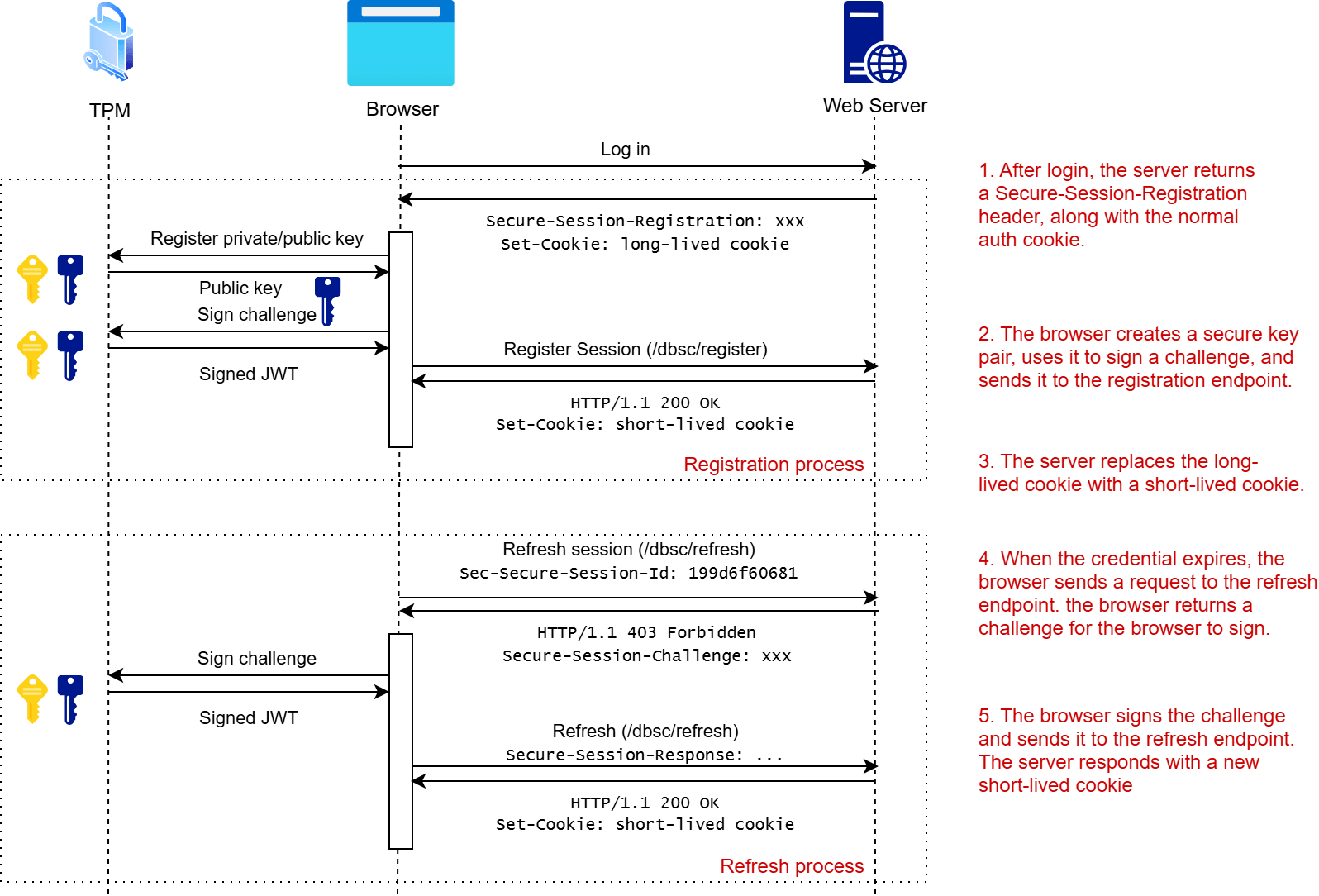
The overall flow of DBSC consists of a "registration" step and a "refresh" step, as shown in the following diagram. In summary:
- The server returns a
Secure-Session-Registrationheader that tells the browser that DBSC is supported. - The browser creates a private-public key pair and registers it with the server.
- The server replaces the long-lived authentication cookies with short-lived cookies instead.
- When required, the browser sends a request to the server's refresh endpoint to get updated credentials. The server sends a challenge, the browser signs and sends it back, and the server updates the short-lived cookies.
For a more detailed exploration of the protocol, see my previous post, in which I walk through all of the steps at the HTTP level. The final section in this post assumes you have a decent overview of how the protocol works, so I recommend reading that post first (or one of the other posts linked to)
ASP.NET Core's support for DBSC
In .NET 11, ASP.NET Core has added experimental support for Device Bound Session Credentials (DBSC). This is being shipped as a standalone package, Microsoft.AspNetCore.Authentication.DeviceBoundSessions, and as described in the original PR:
It is designed as a drop-in hardening layer over an existing cookie auth scheme: you point it at a "source" sign-in scheme and it manages the registration handshake, a path-scoped refresh cookie, and a short-lived session cookie.
There's a fair amount of public API surface, but for the simplest use cases, enabling DBSC for an application simply involves calling AddDeviceBoundSession() on the AuthenticationHandler:
// Normal authentication code
builder.Services.AddAuthentication()
    .AddCookie("Application", o => { /* normal sign-in cookie */ })
    // 👇 Add DBSC support for the `"Application"` cookie
    .AddDeviceBoundSession("Application");
The "Application" argument is key there, as it defines which of the cookies gets the DBSC "wrapping" and protection. You can apply it to more than one cookie authentication scheme if you wish by calling AddDeviceBoundSession() multiple times, and passing in a different scheme.
Of course, if you're looking into adding DBSC to your ASP.NET Core application, you might well be using ASP.NET Core Identity, and that's the example I'm going to explore in the rest of this post as an obvious case study.
Using DBSC with ASP.NET Core Identity
In this section we'll create a sample ASP.NET Core app with ASP.NET Core Identity. We'll then add the Microsoft.AspNetCore.Authentication.DeviceBoundSessions package to the app, and configure the default authentication cookie to use DBSC. Finally we'll explore how this looks when the browser is making the requests.
Creating the sample app
We start with a simple ASP.NET Core MVC app with ASP.NET Core Identity, created using dotnet new:
dotnet new mvc -au Individual
This creates an app that uses ASP.NET Core Identity for storing users in a SQLite database with EF Core. The service configuration in the Program.cs file looks something like this:
var builder = WebApplication.CreateBuilder(args);

// Add services to the container.
var connectionString = builder.Configuration.GetConnectionString("DefaultConnection") ?? throw new InvalidOperationException("Connection string 'DefaultConnection' not found.");
builder.Services.AddDbContext<ApplicationDbContext>(options =>
    options.UseSqlite(connectionString));
builder.Services.AddDatabaseDeveloperPageExceptionFilter();

builder.Services.AddDefaultIdentity<IdentityUser>(options => options.SignIn.RequireConfirmedAccount = true)
    .AddEntityFrameworkStores<ApplicationDbContext>();
builder.Services.AddControllersWithViews();

var app = builder.Build();

// ... middleware pipeline config elided for brevity

app.Run();
The interesting part for us here is the AddDefaultIdentity() method, as that sets up the authentication for the app as follows:
public static IdentityBuilder AddDefaultIdentity<TUser>(this IServiceCollection services, Action<IdentityOptions> configureOptions) where TUser : class
{
    services.AddAuthentication(o =>
    {
        o.DefaultScheme = IdentityConstants.ApplicationScheme;
        o.DefaultSignInScheme = IdentityConstants.ExternalScheme;
    })
    .AddIdentityCookies(o => { });

    return services.AddIdentityCore<TUser>(o =>
    {
        o.Stores.MaxLengthForKeys = 128;
        configureOptions?.Invoke(o);
    })
        .AddDefaultUI()
        .AddDefaultTokenProviders();
}
AddIdentityCookies() configures the authentication cookies, but the important thing here is seeing the default scheme used is IdentityConstants.ApplicationScheme. That's the scheme we're going to use with DBSC.
Adding the DBSC package
First we need to add the Microsoft.AspNetCore.Authentication.DeviceBoundSessions package to our project. This package is staying in preview even when .NET 11 goes GA, so we need to use the --prerelease flag with the .NET CLI:
dotnet add package Microsoft.AspNetCore.Authentication.DeviceBoundSessions --prerelease
This adds the package to the project file, something like the following:
<Project Sdk="Microsoft.NET.Sdk.Web">

  <PropertyGroup>
    <TargetFramework>net11.0</TargetFramework>
    <Nullable>enable</Nullable>
    <ImplicitUsings>enable</ImplicitUsings>
    <UserSecretsId>aspnet-temp103-b48f7b3d-0bde-4298-9a9c-205fd5fb92c3</UserSecretsId>
  </PropertyGroup>

  <ItemGroup>
    <None Update="app.db" CopyToOutputDirectory="PreserveNewest" ExcludeFromSingleFile="true" />
  </ItemGroup>

  <ItemGroup>
    <PackageReference Include="Microsoft.AspNetCore.Diagnostics.EntityFrameworkCore" Version="11.0.0-rc.1.26425.128" />
    <PackageReference Include="Microsoft.AspNetCore.Identity.EntityFrameworkCore" Version="11.0.0-rc.1.26425.128" />
    <PackageReference Include="Microsoft.AspNetCore.Identity.UI" Version="11.0.0-rc.1.26425.128" />
    <PackageReference Include="Microsoft.EntityFrameworkCore.Sqlite" Version="11.0.0-rc.1.26425.128" />
    <PackageReference Include="Microsoft.EntityFrameworkCore.Design" Version="11.0.0-rc.1.26425.128" PrivateAssets="all" />
    <PackageReference Include="Microsoft.EntityFrameworkCore.Tools" Version="11.0.0-rc.1.26425.128" />
    <PackageReference Include="Microsoft.IdentityModel.JsonWebTokens" Version="8.22.0" />

    <!-- 👇 Adds this package -->
    <PackageReference Include="Microsoft.AspNetCore.Authentication.DeviceBoundSessions" Version="0.11.0-rc.1.26425.128" />
  </ItemGroup>

</Project>
With the restore complete, we now need to hook up the package in the Program.cs.
Enabling the DBSC flow for Identity cookies
The main integration point of the Microsoft.AspNetCore.Authentication.DeviceBoundSessions package is an extension method on AuthenticationBuilder called AddDeviceBoundSession(), with the expectation that you call it something like this (as I showed previously):
builder.Services.AddAuthentication()
    .AddCookie("Application")
    .AddDeviceBoundSession("Application");
However, when you're using ASP.NET Core Identity, the AddAuthentication() and AddCookie() calls are hidden inside the AddDefaultIdentity() and AddIdentityCookies() helper methods respectively. That means the "expected" chaining approach above isn't possible.
Luckily, the AuthenticationBuilder needed for the AddDeviceBoundSession() method is just a thin wrapper around an IServiceCollection, which means we can do something like this:
new AuthenticationBuilder(builder.Services)
    .AddDeviceBoundSession(sourceScheme: IdentityConstants.ApplicationScheme);
The important thing here is that we specify the sourceScheme to be the same as the Identity authentication cookie, to ensure the standard Identity authentication cookie is wrapped by DBSC.
I wouldn't be surprised if they add another extension method directly on
IServiceCollectionto avoid needing to create anAuthenticationBuilder.
With that single addition, DBSC is now in place, so let's take a look at the results!
Exploring the DBSC behaviour in ASP.NET Core
Now that we have our sample app, we'll inspect the DBSC interactions between the browser and the server. Unfortunately, this is somewhat harder than you might think. First, it's important to know that the browser will only consider opting-in to DBSC if the app is server over https, so we have to make sure that we run the app with the https project.
I also found that I couldn't get DBSC to work on a site unless I disabled my ad blocker. I tried it on multiple different sites, and neither of them worked, so that's something to bear in mind when exploring DBSC.
Making things even trickier to validate, Chrome also doesn't show the registration/refresh requests in the "normal" network tab, so if your DBSC requests aren't working, you won't necessarily know it from looking at the Chrome side. To counteract that, I updated the appsettings.json file to make sure ASP.NET Core infrastructure logs of Information and above were logged, so that I could easily see the server-side of any DBSC requests made by the browser.
As already mentioned, it's important that you run the application with an HTTPS endpoint. There are several ways you can do that; I took the easy option of swapping the order of profiles in the launchSettings.json. dotnet run chooses the first profiler by default, so putting https first means it will be chosen (and then trusting the dev certificate with dotnet dev-certs https --trust).
1. Behind the scenes: registering multiple authentication handlers
Before we get to the actual exchanges, we'll take a little look at the infrastructure ASP.NET Core uses to implement DBSC. This involves registering a number of services, handlers and options as part of the implementation.
At the heart of the implementation, we have two cookies, and their associated schemes:
var refreshScheme = $"{sourceScheme}.Dbsc.Refresh";
var sessionScheme = $"{sourceScheme}.Dbsc.Session";

// This cookie is the "main" short-lived credential cookie
builder.AddCookie(sessionScheme, o =>
{
    o.Cookie.Name = $".AspNetCore.{sourceScheme}.Dbsc.Session";
});

// This cookie is only applied to the /.well-known/dbsc path
// and is used as a way to manage the refreshing of the credentials
builder.AddCookie(refreshScheme, o =>
{
    o.Cookie.Name = $".AspNetCore.{sourceScheme}.Dbsc.Refresh";
    o.Cookie.Path = "/.well-known/dbsc";
});
In my standard ASP.NET Core Identity setup, I used the IdentityConstants.ApplicationScheme source scheme, which gives:
- The refresh scheme is
"Identity.Application.Dbsc.Refresh" - The session scheme is
"Identity.Application.Dbsc.Session"
Another important component is registering a PolicySchemeHandler. This is how the short-lived cookie can easily "replace" the default authentication after the DBSC session has been established, and the long-lived cookie has been removed.
// Add a policy scheme that tries the session cookie first, then falls back to the source scheme
var policyScheme = $"{sourceScheme}.Dbsc";
builder.AddPolicyScheme(policyScheme, policyScheme, o =>
{
    o.ForwardDefaultSelector = context =>
    {
        // Resolve the session scheme's configured cookie name at request time so an app that
        // customizes CookieAuthenticationOptions.Cookie.Name is still matched. Otherwise the
        // selector would miss the cookie and fall back to a source scheme that DBSC registration
        // may have deleted, effectively logging the user out.
        var sessionCookieName = context.RequestServices
            .GetRequiredService<IOptionsMonitor<CookieAuthenticationOptions>>()
            .Get(sessionScheme).Cookie.Name ?? $".AspNetCore.{sessionScheme}";
        if (context.Request.Cookies.ContainsKey(sessionCookieName))
        {
            return sessionScheme;
        }
        return sourceScheme;
    };
});
Next up, a number of IPostConfigureOptions implementations are registered. in summary:
PostConfigureDeviceBoundSessionCookieOptionschains anCookieAuthenticationOptions.Events.OnSigningInevent to ensure theSecure-Session-Registrationheader is added on sign in, and the DBSC cookies are all removed on sign out.PostConfigureDeviceBoundSessionDerivedCookieOptionscopies settings from the "main" authentication cookie to the DBSC cookies, likeHttpOnly,Secure,SameSite,Domain, and lifetime settings.PostConfigureDeviceBoundSessionAuthenticationOptionsupgrades the default authentication scheme to point to the DBSC policy scheme.
Finally, a DeviceBoundSessionChallengeProtector services is added (more on that shortly) and the DeviceBoundSessionHandler authentication handler, which handles the registration and refresh endpoints and the overall protocol. We'll be looking at that one a lot!
With all that said, let's look at the app behaviour when we run it with dotnet run, and explore how DBSC works in ASP.NET Core!
2. Returning the Secure-Session-Registration header
The DBSC protocol really starts when the server first returns the Secure-Session-Registration header, which ASP.NET Core does after you sign in to a DBSC-wrapped scheme. The OnSigningIn cookie event fires, and calls DeviceBoundSessionRegistrationHeader.Emit(), which is responsible for adding the Secure-Session-Registration header to the response.
The bulk of this implementation is about generating the challenge. ASP.NET Core bases the challenge on the current ClaimsPrincipal (the just-logged in user), by choosing a key claim (such as the sub, or other name claim if possible) and then using the Data Protection System to create an encrypted value. This is then base64 encoded and included into the header.
By using the data protection system, and encrypting values available in the
ClaimsPrincipal, ASP.NET Core can easily verify that the signed challenge the browser sends matches, without needing to store any additional data anywhere.
The net result is that if you check the response headers login request's response, you can see the Secure-Session-Registration is returned:
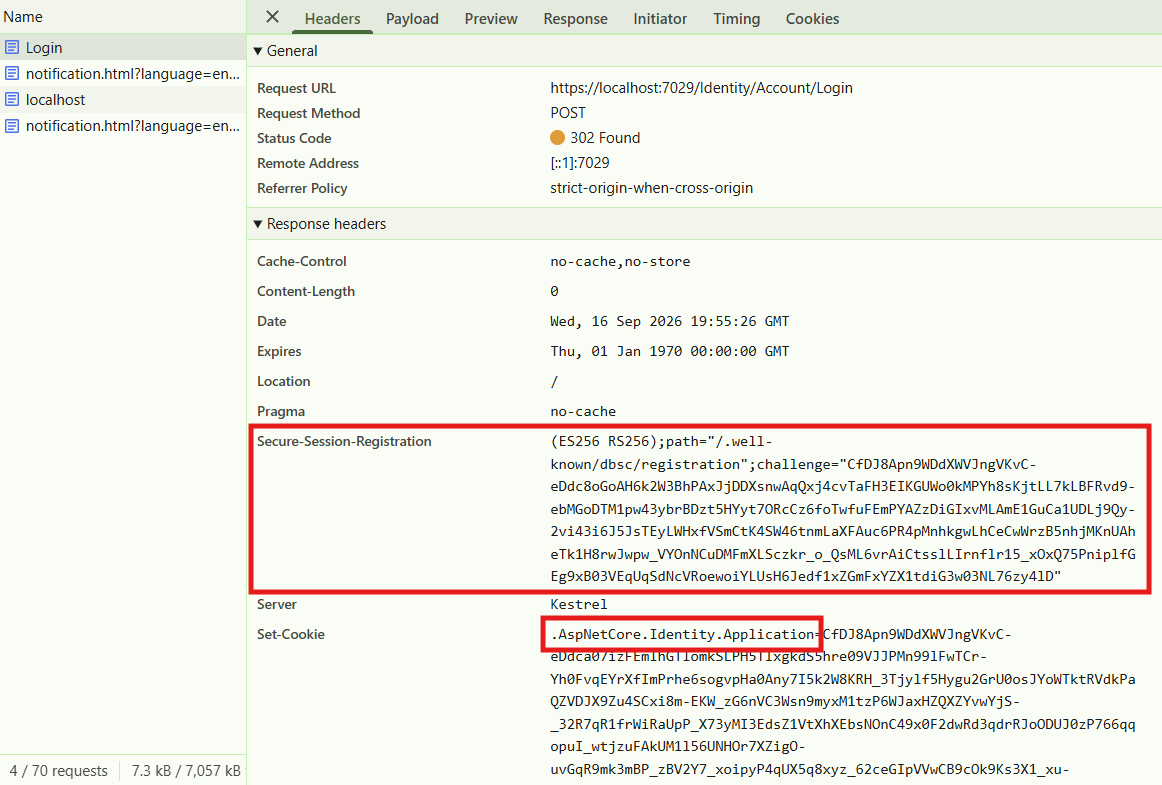
As you can see, the Secure-Session-Registration cookie is in the response, along with the ASP.NET Core Identity cookie. The browser will spot this header, and initiate the DBSC call to the registration path listed in the header: /.well-known/dbsc/registration.
3. Registration of a DBSC session
The next step is where it gets harder to track things from the browser side, as the DBSC registration request isn't visible in the browser tools, but we can see it if we check our ASP.NET Core server logs:
info: Microsoft.AspNetCore.Hosting.Diagnostics[1]
      Request starting HTTP/2 POST https://localhost:7029/.well-known/dbsc/registration - - 0
info: Microsoft.AspNetCore.Authentication.Cookies.CookieAuthenticationHandler[10]
      AuthenticationScheme: Identity.Application.Dbsc.Refresh signed in.
info: Microsoft.AspNetCore.Authentication.Cookies.CookieAuthenticationHandler[10]
      AuthenticationScheme: Identity.Application.Dbsc.Session signed in.
info: Microsoft.AspNetCore.Authentication.Cookies.CookieAuthenticationHandler[11]
      AuthenticationScheme: Identity.Application signed out.
info: Microsoft.AspNetCore.Hosting.Diagnostics[2]
      Request finished HTTP/2 POST https://localhost:7029/.well-known/dbsc/registration - 200 - application/json 7.1578ms
The logs here give an idea about what's happening, but we'll work through it in more detail now. First of all, the DeviceBoundSessionHandler handles the incoming request to /.well-known/dbsc/registration, and calls HandleRegistrationAsync which does the following:
- Read the
Secure-Session-Responseheader (which contains a JWT). - Verify the JWT signature and extract the public key and the challenge.
- Authenticate against the long-lived ASP.NET Core Identity cookie.
- Decode the provided challenge, and verify that it matches the original (based on the claims).
- If everything is valid, create a random session ID property and use it (along with the the public key details) to sign-in to the refresh cookie.
- Sign-in to the short-lived session cookie.
- Sign-out of the long-lived authentication cookie.
- Finally, build the JSON response body instructions that describes how the credentials should be used, and return with a
200 OK
Once the browser receives that response, it's now registered in a DBSC session, and will use the short-lived credentials for subsequent requests. If we make a standard navigation in the browser, we can see the short-lived session cookie in the request headers, and there's no sign of the long-lived cookie any more:
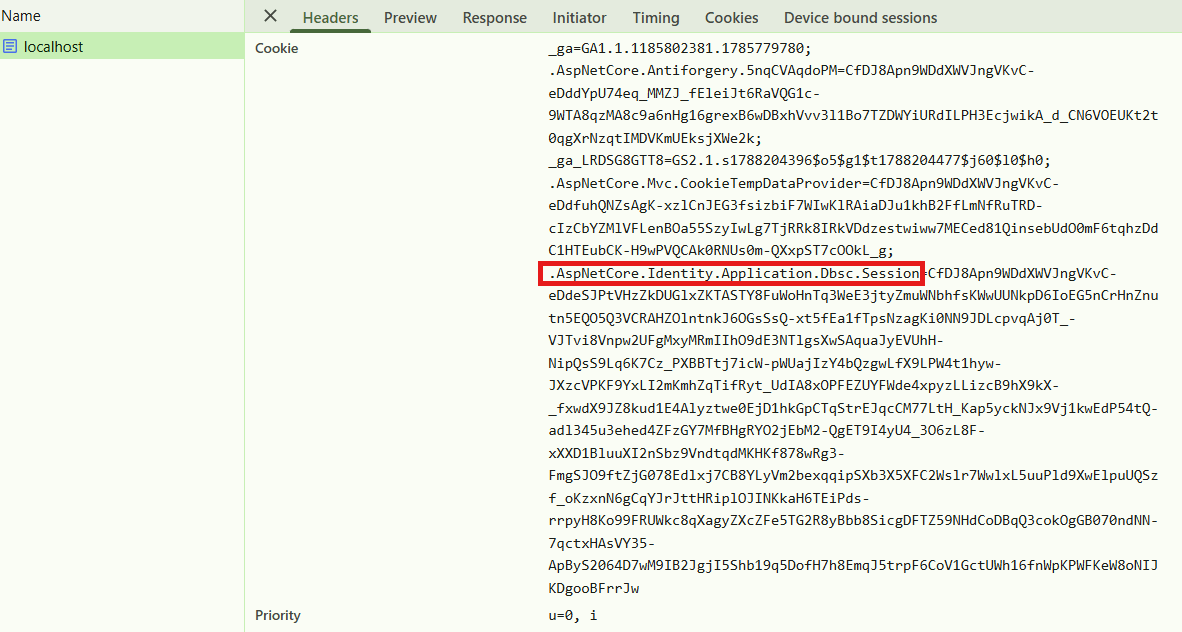
You'll note that the Refresh cookie is not sent in this request, because that cookie is scoped only to the refresh path, /.well-known/dbsc/refresh. However, you can see in the above screenshot there's a Device bound sessions tab, which shows that a session is active:
 .
.
The deferral decision refers to whether the browser needed to pause the request to refresh the short-lived session, which in this case it didn't. However, eventually, the browser will need to call the refresh endpoint.
4. Refreshing the credentials
Eventually, the browser will need to refresh the credentials, and again, we need to check the ASP.NET Core server logs to see this happening:
info: Microsoft.AspNetCore.Hosting.Diagnostics[1]
      Request starting HTTP/2 POST https://localhost:7029/.well-known/dbsc/refresh - - 0
info: Microsoft.EntityFrameworkCore.Database.Command[20101]
      Executed DbCommand (7ms) [Parameters=[@p='?' (Size = 36)], CommandType='Text', CommandTimeout='30']
      SELECT "a"."Id", "a"."AccessFailedCount", "a"."ConcurrencyStamp", "a"."Email", "a"."EmailConfirmed", "a"."LockoutEnabled", "a"."LockoutEnd", "a"."NormalizedEmail", "a"."NormalizedUserName", "a"."PasswordHash", "a"."PhoneNumber", "a"."PhoneNumberConfirmed", "a"."SecurityStamp", "a"."TwoFactorEnabled", "a"."UserName"
      FROM "AspNetUsers" AS "a"
      WHERE "a"."Id" = @p
      LIMIT 1
info: Microsoft.EntityFrameworkCore.Database.Command[20101]
      Executed DbCommand (0ms) [Parameters=[@user_Id='?' (Size = 36)], CommandType='Text', CommandTimeout='30']
      SELECT "a"."Id", "a"."ClaimType", "a"."ClaimValue", "a"."UserId"
      FROM "AspNetUserClaims" AS "a"
      WHERE "a"."UserId" = @user_Id
info: Microsoft.AspNetCore.Hosting.Diagnostics[2]
      Request finished HTTP/2 POST https://localhost:7029/.well-known/dbsc/refresh - 403 0 - 16.5363ms
info: Microsoft.AspNetCore.Hosting.Diagnostics[1]
      Request starting HTTP/2 POST https://localhost:7029/.well-known/dbsc/refresh - - 0
info: Microsoft.AspNetCore.Authentication.Cookies.CookieAuthenticationHandler[10]
      AuthenticationScheme: Identity.Application.Dbsc.Session signed in.
info: Microsoft.AspNetCore.Hosting.Diagnostics[2]
      Request finished HTTP/2 POST https://localhost:7029/.well-known/dbsc/refresh - 200 - application/json 8.6243ms
There's a lot more happening here; we have two separate requests and some EF Core requests, so let's dig in.
It again starts with the authentication handler DeviceBoundSessionHandler and the call to HandleRefreshAsync(). This does the following:
- Read the DBSC session ID from the
Sec-Secure-Session-Idheader. - Authenticate the refresh scheme (using the refresh cookie).
- Grab the session ID from the cookie, and confirm it matches the header.
- Generate a new challenge value based on the claims principal.
- Return a
403response, with the challenge value in theSecure-Session-Challengeheader.
The browser then signs the challenge, and sends a JWT in the Secure-Session-Response header to the same endpoint. The DeviceBoundSessionHandler again calls HandleRefreshAsync() to handle the response, with the first 3 steps being the same:
- Read the DBSC session ID from the
Sec-Secure-Session-Idheader. - Authenticate the refresh scheme (using the refresh cookie).
- Grab the session ID from the cookie, and confirm it matches the header.
- Grab the expected public key from the cookie.
- Validate the JWT, and ensure the public key matches.
- Decode the provided challenge, and verify that it matches the original (based on the claims).
- Do a fresh sign-in to the short-lived session cookie.
- Build the session instructions again, and send them in the response body along with a
200 OKresponse
And with that, the refresh is complete! As already stated, the browser will make this exchange before sending a main request if necessary, which will show that the request was deferred in that case:

I've obviously skipped over a lot of the details here, but if you want to learn more, you can find it all in the ASP.NET Core repo. As described in the docs, the implementation is only experimental, and will remain as such throughout .NET 11 apparently. That said, given it's very low-effort to give it a try, I recommend taking a look!
Summary
In this post I gave a brief introduction to Device Bound Session Credentials (DBSC), and why it's a useful extra defence against cookie theft and session hijacking. I then introduced the new experimental Microsoft.AspNetCore.Authentication.DeviceBoundSessions package and show how you can use it in your applications. I then show the feature working, and provide an overview of how the various components work behind the scenes. Ultimately, there's very little you need to understand to use the feature, it just requires a single API call, so I recommend checking it out if you're interested.