
In this post I look at the implementation of closed class hierarchies that is available in .NET 11 preview 5. I'll describe what a close closed hierarchy is, how to create one, and discuss why you might want to.
What is a "closed class hierarchy"?
A closed class hierarchy is a class hierarchy that can only be defined within a single assembly. Attempting to derived from a closed class from a different assembly is a compilation error. This is easiest to see in action.
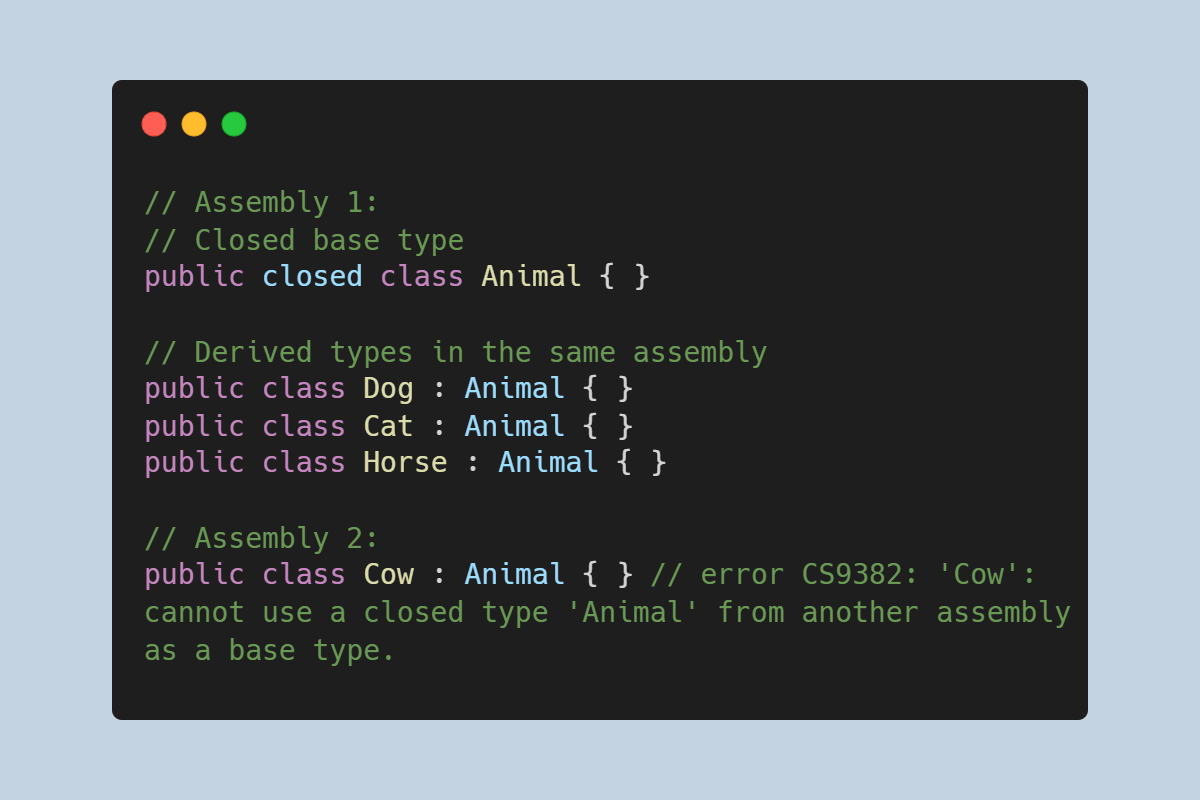
Imagine you have the following classes, all in the same assembly:
// Create a closed base class
public closed class Animal { }

// Each class derives from the closed Animal class
public class Dog : Animal { }
public class Cat : Animal { }
public class Horse : Animal { }
The Dog, Cat, and Horse classes all derive from Animal. This is all C# 101; the closed keyword isn't really changing anything about that.
The difference is if we create a new assembly, and try to derive from Animal in a different assembly:
// Assembly 2
public class Cow : Animal { }
then this won't compile! Instead you'll get an error like the following:
error CS9382: 'Cow': cannot use a closed type 'Animal' from another assembly as a base type.
So from this example, you can see that this approach allows you to have a public base type, but ensure that no one other than you can define types derived from it. This can be very useful for modelling certain domains, and can simplify the logic in your own code significantly. However, that's not all they're for.
Couldn't we do this already with private constructors?
Being able to prevent derived types using closed is useful, but there have been other ways to achieve this in the past. By providing a private protected or internal default constructor on the base class, it's practically impossible to create a derived type.
For example, if we update the Animal definition to:
// Assembly 1
// remove 'closed', make abstract, and add constructor
public abstract class Animal
{
    private protected Animal()
    {
    }
}
then you still can't define Cow in another assembly:
// Assembly 2
public class Cow : Animal { } // Won't compile
because you get one of two different errors:
error CS0122: 'Animal.Animal()' is inaccessible due to its protection level
error CS1729: 'Animal' does not contain a constructor that takes 0 arguments
Using closed is clearly semantically nicer than the private constructor approach, but it doesn't seem like it's actually providing new functionality.
However, there is a difference. With the private constructor approach, the compiler didn't really "know" that you couldn't create any derived types, because theoretically you could, even if you couldn't practically.
With the closed keyword, when the compiler builds an assembly, it knows exactly what all the derived types of a closed class are. The main benefit of that is that the compiler can apply exhaustiveness checking to switch expressions.
Exhaustiveness checking in switch expressions
Let's say we have a "normal" class hierarchy, similar to the one shown above, but this time just using abstract instead of closed:
// Abstract base type
public abstract class Animal { }

// The same derived types as before
public class Dog : Animal { }
public class Cat : Animal { }
public class Horse : Animal { }
We then also define the following method, which takes an Animal instance, and performs a switch:
static string Speak(Animal animal) => animal switch
{
    Dog => "Woof",
    Cat => "Meow",
    Horse => "Neigh",
};
If you compile this code, you'll get a warning:
warning CS8509: The switch expression does not handle all possible
    values of its input type (it is not exhaustive). For example,
    the pattern '_' is not covered.
Even though you're handling all the types that could be passed to Speak(), the compiler doesn't know that. As far as it's concerned, you could have created a type derived from Animal in a different assembly, and passed it to the method.
Note that even if we add the
private protectedconstructor here, so that practically a different assembly can't derive from the type, that doesn't change the warning. The compiler can't infer the fact that there will only ever be these three implementations.
Using closed means that the compiler does know that these are all of the implementations, and there can't be any more. That means the compiler can correctly apply exhaustiveness checking to switch expressions which used closed types.
This might seem like a small thing, but it's actually quite a big deal for writing correct code.
For example, imagine you have code similar to the previous that you were using with .NET 10. In order to quiet the warnings, you add a catch-all handler to your switch expressions
static string Speak(Animal animal) => animal switch
{
    Dog => "Woof",
    Cat => "Meow",
    Horse => "Neigh",
    _ => throw new InvalidOperationException(); // Can't be hit
};
This keeps the compiler satisfied, but it's a little bit ugly. But the important thing is what happens when you introduce a new type to the project:
public class Hamster : Animal {}
The big problem here is that all your existing code continues to compile. Which means Speak is going to throw an InvalidOperationException() when it's called 😬 In this way, the lack of correct exhaustiveness checking for our type hierarchy has made our switch expression fragile to changes.
Note that this is a very "functional programming" approach, in which the data (the
Animalclasses) are separate from the methods (Speak()). This is in contrast to an object oriented approach, in whichSpeakwould likely be defined on theAnimaltypes themselves. These are two different approaches, and both are valid and useful in different situations.
With the closed keyword, you no longer need the catch-all parameter:
// Animal is closed
public closed class Animal { }

static string Speak(Animal animal) => animal switch
{
    Dog => "Woof",
    Cat => "Meow",
    Horse => "Neigh",
    // We no longer need a fallback clause
};
That means that when we add our new implementation, Hamster, the compiler will emit a warning, telling us everywhere that needs to be updated!
warning CS8509: The switch expression does not handle all possible values of its input type (it is not exhaustive). For example, the pattern 'Hamster' is not covered.
All in all, this change means modifying a closed hierarchy is generally safer than a standard class hierarchy, because the compiler is able to catch unhandled cases much more easily.
How do closed class hierarchies relate to unions?
In a previous post, I described the union support that is also coming to C# with .NET 11. One of the advantages of the union support is that you get similar exhaustiveness checking in switch expressions, for example:
// Three different cases
public record Windows(string Version);
public record Linux(string Distro, string Version);
public record MacOS(string Name, int Version);

// Combined in a union, which can represent one of them
public union SupportedOS(Windows, Linux, MacOS);

// Use the union in a switch expressions
string GetDescription(SupportedOS os) => os switch
{
    Windows windows => $"Windows {windows.Version}",
    Linux linux => $"{linux.Distro} {linux.Version}",
    MacOS macOS => $"MacOS {macOS.Name} ({macOS.Version})",
}; // note: no catch-all _ required
Just as for the closed class hierarchy, the union supports exhaustiveness checking so you don't need the catch-all parameters. However, the union support is conceptually different. There's no hierarchy involved with the union; rather it defines the specific possible values, and the compiler makes sure you handle all of those cases in the switch expression.
Using closed class hierarchies in .NET 11
I've talked a lot about what closed class hierarchies are for, and why they're useful, but we haven't looked at how to actually enable them in your project.
First, closed class hierarchies were introduced in .NET 11 preview 5, so you must install the .NET 11 preview 5 SDK or higher.
Note that depending on your setup, you may need to add a global.json file and set
allowPrerelease: true.
Once you've installed the SDK, if you try to use the closed keyword in a .NET 11 project, you'll get the following warnings:
error CS8652: The feature 'closed classes' is currently in Preview and *unsupported*. To use Preview features, use the 'preview' language version.
error CS0656: Missing compiler required member 'System.Runtime.CompilerServices.ClosedAttribute..ctor'
To fix these errors, you need to do two things:
- Add
<LangVersion>preview</LangVersion>to your csproj - Manually define the
[Closed]attribute
The first of these requires opening your .csproj file, and adding the <LangVersion> property to a <PropertyGroup>:
<Project Sdk="Microsoft.NET.Sdk">

  <PropertyGroup>
    <OutputType>Exe</OutputType>
    <TargetFramework>net11.0</TargetFramework>
    <ImplicitUsings>enable</ImplicitUsings>
    <Nullable>enable</Nullable>

    <!-- Add this 👇 -->
    <LangVersion>preview</LangVersion>
  </PropertyGroup>

</Project>
The second requirement, adding the [Closed] attribute, is a temporary issue; it likely won't be necessary in preview 6 or later, as the runtime will provide the attribute directly. For now, you should add the following to your project:
namespace System.Runtime.CompilerServices;

[AttributeUsage(AttributeTargets.Class, AllowMultiple = false, Inherited = false)]
internal sealed class ClosedAttribute : Attribute { }
Once you've done all these steps, you should be able to use closed hierarchies in your project.
What are the limitations and features of closed class hierarchies?
When you apply the closed keyword to a class or a record, it implicitly makes the class abstract, so you can't use the sealed or static modifiers on the type. Additionally, you can't explicitly use abstract on the type either, even though it is abstract 😅
// Valid definitions
public closed class Animal { }
public closed record Animal { }

// Invalid definitions
public closed abstract class Animal { } // error CS9384: a closed type cannot be marked abstract because it is always implicitly abstract.
public closed sealed record Animal { } // error CS9381: a closed type cannot be sealed or static
public closed static record Animal { } // error CS9381: a closed type cannot be sealed or static
When you derive from a closed type, the derived classes themselves aren't automatically closed, but it's valid to mark them as such:
public closed record Animal { }

// Dog is not automatically closed, but _can_ be made closed
public closed record Dog : Animal{ }
public record Labrador : Dog { }
public record Collie : Dog { }
You can have generic closed types, but if a derived class is also generic, then all of its type parameters must be used in the base class specification:
public closed class Animal<T> { }
class Dog<U> : Animal<U> { }   // Ok, because 'U' is used in base class
class Cat<V> : Animal<V[]> { } // Ok, because 'V' is used in base class
class Horse<W> : Animal<int> { } // error CS9383: 'Horse<W>': The type parameter 'W' must be referenced in the base type 'Animal3<int>' because the base type is closed.
Obviously the main restriction on closed hierarchies, is that the whole hierarchy must be defined in a single assembly. There is one additional subtle restriction that comes up if you apply the sealed keyword to your derived types.
Making a closed hierarchy a sealed hierarchy
If you mark all the derived types of a closed class as sealed, then it is said to have a sealed hierarchy. In these cases, the compiler is able to make even stronger assumptions about your code, and so can add errors for scenarios that indicate something is probably wrong in your code.
For example, let's stick with the same familiar hierarchy, but this time we've marked all of our derived Animal types as sealed:
public closed class Animal { }

// All derived types are sealed
public sealed class Dog : Animal { }
public sealed class Cat : Animal { }
public sealed class Horse : Animal { }
Let's also imagine we have the simple IPet interface:
public interface IPet { }
Now, if we have some code that tries to explicitly cast from an Animal instance to IPet, the compiler can "see" all of the derived types, can see that none of them implement IPet, and therefore can reason at compile-time that this conversion will fail:
Animal animal = GetSomeAnimal();
var pet = (IPet)animal; // error CS0030: Cannot convert type 'Animal' to 'IPet'
This turns a guaranteed runtime error into a compile-time error. Lovely!
How are closed hierarchies implemented?
If, like me, you're wondering how closed hierarchies are implemented under the hood, it's actually pretty simple. Taking our Animal example again:
public closed class Animal { }
The compiler generates a type that looks like this:
[Closed] // Marks the type as a closed type
public class Animal
{
    [CompilerFeatureRequired("ClosedClasses")] // Tells the compiler that it needs this feature
    public Animal() { }
}
The [Closed] attribute added to the type tells downstream consumers of the assembly that the type is closed, and is not allowed to be derived from. That's why we had to add that attribute to use the feature in preview 5; because the compiler was emitting code that referenced it.
The [CompilerFeatureRequired] attribute is an interesting way of making sure that you can't bypass the closed restriction by using a version of the .NET SDK that doesn't understand the closed hierarchies feature.
For example, imagine you've built a library using the .NET 11 SDK. You target net8.0, so that your library can be used across all supported versions of .NET Core, but then you hand this assembly off to another team. The other team is using the .NET 8 SDK - if they try to derive from the Animal type, their compiler blocks it even though it doesn't know about or understand the [Closed] attribute. The .NET 8 SDK sees that the "ClosedClasses" feature is required (as per the [CompilerFeatureRequired] attribute), and blocks you from deriving from them.
Just to be clear, this only blocks using the closed feature with old SDKs. You're perfectly able to build for earlier runtimes, as long as you're using the .NET 11 SDK, and have set the <LangVersion> as required.
Note that if you are targeting earlier runtimes, you may need to add additional attributes to your project, which are only defined in later versions of the runtime. Alternatively, you can use a pollyfill library like Simon Cropp's Polyfill to handle all that for you automatically!
That brings us to the end of this look at closed hierarchies. In some ways this is a very simple feature, but I'm personally looking forward to using it to accurately and safely model the expectations of libraries I'm writing, as well as to benefit from more exhaustiveness checking!
Summary
In this post I described the closed class hierarchy feature. A closed hierarchy is one in which all of the derived types are contained in a single assembly. Marking a class or record as closed implicitly makes it abstract, and means no external assemblies can derive from it. Closed hierarchies also benefit from additional exhaustiveness checking in switch expressions.
